• Daz 3D
  • Shop
  • 3D Software
    • Daz Studio Premier
    • Daz Studio
    • Install Manager
    • Partnerships
    • AI Training data
    • Exporters
    • Daz to Roblox
    • Daz to Maya
    • Daz to Blender
    • Daz to Unreal
    • Daz to Unity
    • Daz to 3ds Max
    • Daz to Cinema 4D
  • 3D Models
    • Genesis 9
    • Genesis 8.1
    • Free 3D Models
  • Community
    • Gallery
    • Forums
    • Blog
    • Press
    • Help
  • Memberships
    • Daz Premier
    • Daz Plus
    • Daz Base
    • Compare
  • Download Studio
ADVANCED SEARCH
  • Menu
  • Daz 3D
ADVANCED SEARCH
Add image
  • Shop
  • 3d Software
    • Daz Studio Premier
    • Daz Studio
    • Install Manager
    • Partnerships
    • AI Training data
    • Exporters
    • Daz to Roblox
    • Daz to Maya
    • Daz to Blender
    • Daz to Unreal
    • Daz to Unity
    • Daz to 3ds Max
    • Daz to Cinema 4D
  • 3D Models
    • Genesis 9
    • Genesis 8.1
    • Free 3D Models
  • Community
    • Our Community
    • Gallery
    • Forums
    • Blog
    • Press
    • Help
  • Memberships
    • Daz Premier
    • Daz Plus
    • Daz Base
    • Compare

Notifications

You currently have no notifications.

Loading...
    • Categories
    • Recent Discussions
Daz 3D Forums > 3rd Party Software > Blender Discussion

Diffeomorphic: Python Error Saving G8 Pose Preset *SOLVED*

csaacsaa Posts: 931
January 2023 edited February 2023 in Blender Discussion

Padone,

Hope you can help me with this one.

I get Python errors in the Diffeomorphic scripts folder whenever I try to save a G8 figure's pose (Rigify) to a preset file. I see this happen for both G8M and G8F, and also with G8.1F. I started seeing this after moving to the Differomorphic 1.7 version.

To recreate the problem:

  1. Export G8F to Diffeomrophic (as DBZ) with Daz 4.21.0.5 64-bit version.
  2. In Blender, load via Easy Import. Select Rigirify system.
  3. Save to a new Blend file.
  4. Diffeomrophic -> Save Pose Preset (use default settings).
  5. Blender displays a log error window.

Relevant file attachments:

  • G8F Daz DUF
  • G8F_EasyImport.jpg (import settings)
  • G8F_SavePose (default settings)
  • SavePosePreset_Error.txt
  • SavePosePreset_SystemInfo.txt

Cheers!

duf

duf
G8F.duf
140K
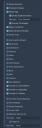
G8F_EasyImport.jpg
405 x 1244 - 70K
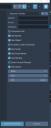
G8F_SavePose.jpg
426 x 1067 - 53K
txt
txt
SavePosePreset_Error.txt
1K
txt
txt
SavePosePreset_SystemInfo.txt
3K
Post edited by csaa on February 2023

Comments

  • PadonePadone Posts: 4,001
    January 2023

    Reported to Thomas.

    https://bitbucket.org/Diffeomorphic/import_daz/issues/1383/

  • PadonePadone Posts: 4,001
    February 2023

    @csaa Thomas fixed it, let us know it works for you so we can mark as resolved.

  • csaacsaa Posts: 931
    February 2023

     Padone,

    I installed version 1.7.0.1418 in Daz Studio and in Blender. Saving the pose through Diffeomorphic doesn't lead to any Python errors anymore. The problem is resolved.

    Thanks for the help.

    Cheers!

    Padone said:

    @csaa Thomas fixed it, let us know it works for you so we can mark as resolved.

Sign In or Register to comment.
Adding to Cart…

Daz 3D is part of Tafi

Connect

DAZ Productions, Inc.
7533 S Center View Ct #4664
West Jordan, UT 84084

HELP

Contact Us

Tutorials

Help Center

Sell Your 3D Content

Affiliate Program

Documentation Center

Open Source

Consent Preferences

JOIN DAZ

Memberships

Blog

About Us

Press

Careers

Bridges

Community

In the Studio

Gallery

Forum

DAZ STORE

Shop

Freebies

Published Artists

Licensing Agreement | Terms of Service | Privacy Policy | EULA

© 2025 Daz Productions Inc. All Rights Reserved.
