• Daz 3D
  • Shop
  • 3D Software
    • Daz Studio Premier
    • Daz Studio
    • Install Manager
    • Partnerships
    • AI Training data
    • Exporters
    • Daz to Roblox
    • Daz to Maya
    • Daz to Blender
    • Daz to Unreal
    • Daz to Unity
    • Daz to 3ds Max
    • Daz to Cinema 4D
  • 3D Models
    • Genesis 9
    • Genesis 8.1
    • Free 3D Models
  • Community
    • Gallery
    • Forums
    • Blog
    • Press
    • Help
  • Memberships
    • Daz Premier
    • Daz Plus
    • Daz Base
    • Compare
  • Download Studio
ADVANCED SEARCH
  • Menu
  • Daz 3D
ADVANCED SEARCH
Add image
  • Shop
  • 3d Software
    • Daz Studio Premier
    • Daz Studio
    • Install Manager
    • Partnerships
    • AI Training data
    • Exporters
    • Daz to Roblox
    • Daz to Maya
    • Daz to Blender
    • Daz to Unreal
    • Daz to Unity
    • Daz to 3ds Max
    • Daz to Cinema 4D
  • 3D Models
    • Genesis 9
    • Genesis 8.1
    • Free 3D Models
  • Community
    • Our Community
    • Gallery
    • Forums
    • Blog
    • Press
    • Help
  • Memberships
    • Daz Premier
    • Daz Plus
    • Daz Base
    • Compare

Notifications

You currently have no notifications.

Loading...
    • Categories
    • Recent Discussions
Daz 3D Forums > 3rd Party Software > Blender Discussion

Problems with shading (Fine in Blender, but not in Daz)

omen.krisomen.kris Posts: 13
January 2023 edited January 2023 in Blender Discussion

I have a problem with normal shading in Daz. In Blender everything looks smooth and fine, but imported to DAZ it does not anymore. See screenshots. It's the very same mesh. I tried wried fbx and dae import.
Content creators out there... Any ideas on this? Thank you in advice
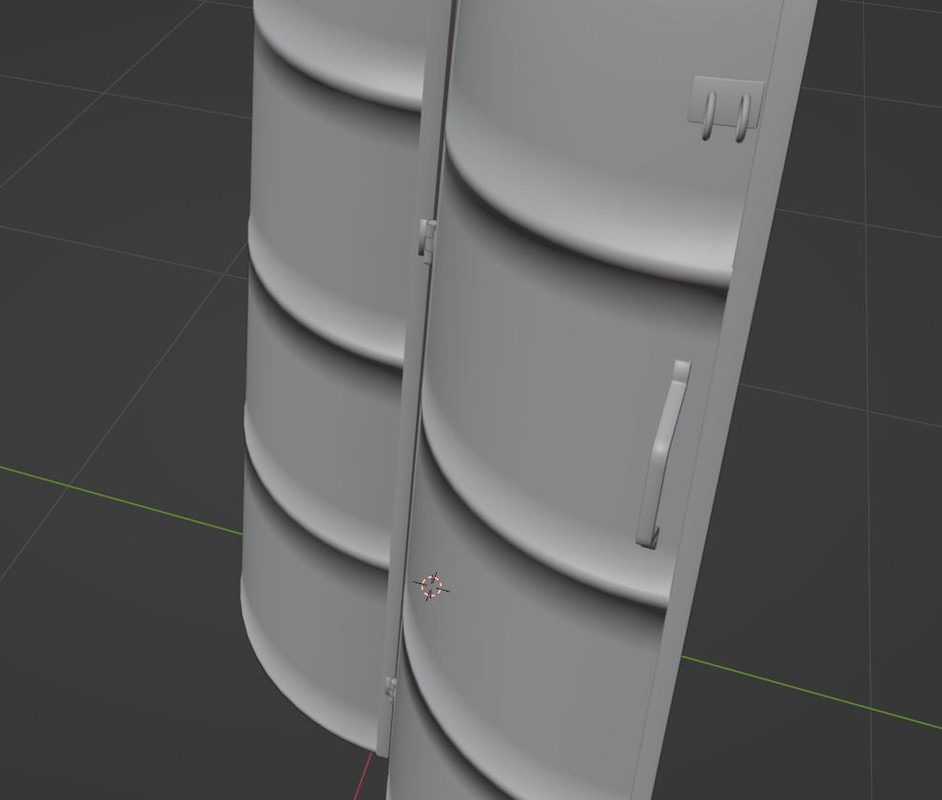
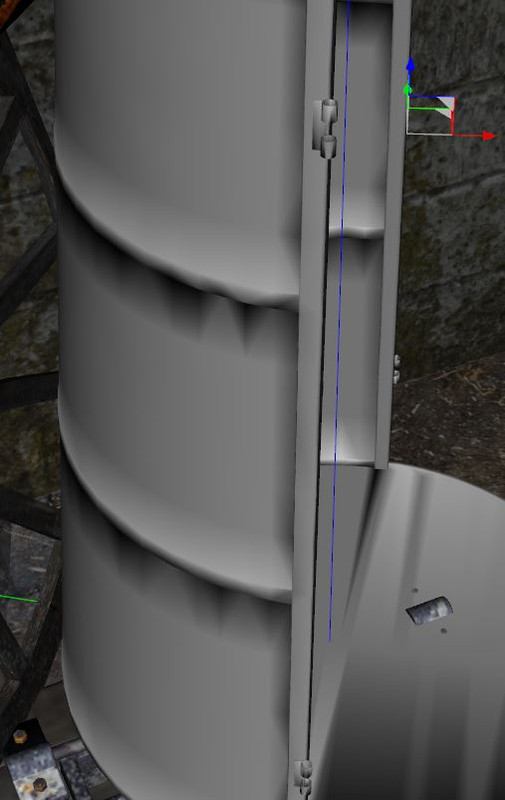
Post edited by omen.kris on January 2023

Comments

  • Richard HaseltineRichard Haseltine Posts: 107,953
    January 2023

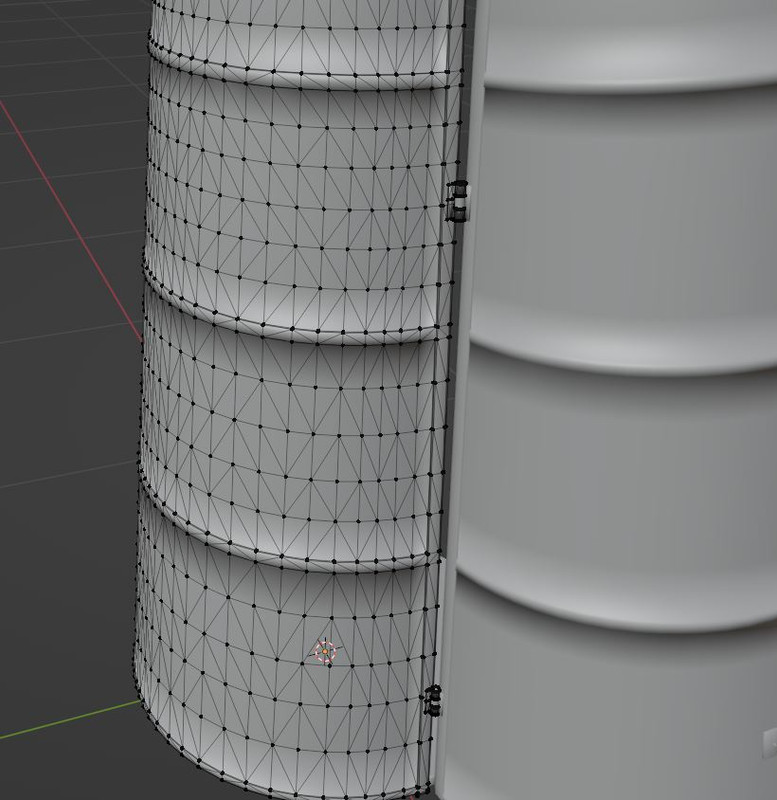
    What does the topology look like (post a wireframe or hidden wire version)?

  • omen.krisomen.kris Posts: 13
    January 2023

    Here's image of wireframe. Mesh is cleaned. No dublicated verts

  • felisfelis Posts: 5,749
    January 2023

    I would keep it as quads, and avoid tris going in different directions.

    And for the bumps I would have a more loops to define them.

  • Richard HaseltineRichard Haseltine Posts: 107,953
    January 2023

    Yes, I think it's the triangles that are the main cause of the shading if you compare the wireframe with the smoothed version, and adding an extra loop above and below each ridge might also help to define the shape.

  • omen.krisomen.kris Posts: 13
    January 2023

    Thanks, I will try with the suggested topology and report back. :)

  • PadonePadone Posts: 4,001
    January 2023 edited January 2023

    You may also try not to export/import normals if you have the option, so to force daz studio to rebuild them. Unless you use custom normals for your model that would be bad anyway for export purposes.

    Post edited by Padone on January 2023
  • omen.krisomen.kris Posts: 13
    February 2023

    Well, I tried all kind of things and there is no solution to this issue. I have other meshes that also shade like s**t. There is nothing I can do about it. DAZ is messing those up. I can not even see broken normals in any other software. I don't know how others make assets for DAZ. There must be a secret noone is telling :( Otherwise there would not be good looking objects. When DAZ is calculating them on iit's own uncontrolable, how must the file be in blender to not get messed by DAZ?
     

    Padone said:

    You may also try not to export/import normals if you have the option, so to force daz studio to rebuild them. Unless you use custom normals for your model that would be bad anyway for export purposes.

    well, there is no option in Blender to do that. Besides how should this help, when the problem clearly is DAZ messing up objects that are shwon correct everywhere else

  • PadonePadone Posts: 4,001
    February 2023

    @omen.kris If you can share the file I can try to import it in daz studio and see if can be fixed.

  • RL_MediaRL_Media Posts: 339
    February 2023 edited February 2023

    One thing to note. Dont look at meshes in DS until you add a iray material, then play around with the angle slider. I find the sweet spots are usually somewhere around 30 or 60 for some reason

    Post edited by RL_Media on February 2023
  • novoluz1novoluz1 Posts: 0
    June 2024

    RL_Media said:

    One thing to note. Dont look at meshes in DS until you add a iray material, then play around with the angle slider. I find the sweet spots are usually somewhere around 30 or 60 for some reason

    thank u SOOO much for this tip on the angle slider!!! i was also struggling with some stupid shading problem from a blender mesh i imported into daz. i thought it was something i did wrong, but nope, it was just good ol' daz throwing me a Very unnecessary curveball! *smh* thx again, u rock!!! yes

Sign In or Register to comment.
Adding to Cart…

Daz 3D is part of Tafi

Connect

DAZ Productions, Inc.
7533 S Center View Ct #4664
West Jordan, UT 84084

HELP

Contact Us

Tutorials

Help Center

Sell Your 3D Content

Affiliate Program

Documentation Center

Open Source

Consent Preferences

JOIN DAZ

Memberships

Blog

About Us

Press

Careers

Bridges

Community

In the Studio

Gallery

Forum

DAZ STORE

Shop

Freebies

Published Artists

Licensing Agreement | Terms of Service | Privacy Policy | EULA

© 2025 Daz Productions Inc. All Rights Reserved.