Eyelid Subsurface Scattering and Eyelid Shadow
 hello_4493841
Posts: 7
hello_4493841
Posts: 7
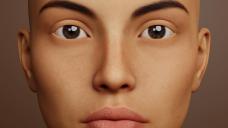
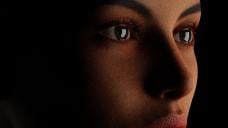
I notice with my daz characters I get a shadow under the top eyelid. It's most noticeable with subsurface scattering turned on. Where the eyelids seem to glow from the SSS. You can see in my low light example the eyelids glow even where the eyeball and surrounding skin fall into the shadows. I have the SSS set as low as I can at 0.001.
Has anyone else had this issue?
Is there anyway to control the SSS on just the eyelids, with a map or something?
eyes1.jpg
1830 x 1029 - 248K
eyes2.jpg
1830 x 1029 - 273K

Daz 3D is part of 
Connect
DAZ Productions, Inc.
7533 S Center View Ct #4664
West Jordan, UT 84084
Licensing Agreement | Terms of Service | Privacy Policy | EULA
© 2026 Daz Productions Inc. All Rights Reserved.
Comments
With diffeomorphic you can use the bsdf material option to mimic iray. Or the principled option to get easy materials to customize/fix as needed.
p.s. Also using burley instead of random walk usually gets away the artifacts. Reason is random walk doesn't work fine with open meshes at the borders.
https://docs.blender.org/manual/en/4.5/render/shader_nodes/shader/sss.html
A quick workaround would be to duplicate the face material, then go edit mode with the duplicated material still selected unassign all verts. And reassing all faces for that area. Then either turn off SSS for those faces or go even lower for that area to not completely lose SSS.
If you need more detailed way, I can probably do tomorrow. With pictures or an animated gif. But only if you don't get what I mean.
I am having this exact same issue, were you able to actuall fix it?
Create a control map and plug it into the SSS weight input.
If you haven't noticed yet by all the different replies SSS in Blender can be a PIA. For a while my preferred setup was to run the diffuse texture through a Color to BW node, then a brightness/contrast node, then finally through a color ramp. The color ramp allowing you to to control things pretty well. It's no replacement for having an actual SSS map, but I did okay with it. I like to fine tune the SSS by doing an extremely bright back light on the head and looking at the ear form the front. Once I get that looking right it typically works everywhere else just fine.
As gregsgraphics_cafd0962a0 said, you can create a black and white map to control which parts get SSS and how much. Simplebake can generate a thickness map, and then you can modify that with texture painting and/or a map range/color ramp.