
Daz 3D is part of 
Connect
DAZ Productions, Inc.
7533 S Center View Ct #4664
West Jordan, UT 84084
Licensing Agreement | Terms of Service | Privacy Policy | EULA
© 2026 Daz Productions Inc. All Rights Reserved.
Comments
Had to wishlist this for now (funds) but it had me at RHD and LHD options, not to mention the licence plate generator with different countries. Great to see the detail and thought applied to the last products were not a one off.
Thanks for letting me know about the dirt issue @barbult. I'll check it out and if I can confirm the issue will work on a fix for it (hopefully I'll get some time this weekend).
Hi. They are seperate objects so you probably could. But....obviously the position of the endpoints of the belt is intended to work with the Flyte, so they won't magically line up or be in the right place for any other vehicle. You would have to the select the anchor bones in the scene tab to adjust them after you're positioned the belt as there's no facegroup to allow selection in the viewport for those bones.
Thank you! Please check the store version. Sometimes Daz breaks things that worked in the PAs submitted version.
Not this time. This is 100% my fault. :) I've confirmed the issue. This was a result of fixing the open window morphs that required a change in the car rigging, and I forgot to re-rerig the dirt to match. I'm sorry about that. I've alr4eady fixed it on my end. But I still need to look at the texturing seam issue you noticed to see if there's anything I can tweak to visually improve that.
Thank you for quickly confirming the problem and creating a fix.
I'm also having intermittent problems with setting the right side temperature. Sometimes it works; Sometimes it doesn't. I'm going to check the PDF again to see if I am selecting the correct thing when I run the script. Have you noticed anything like that?
This is the best vehicle I ever got for Daz Studio - by far! How about an add-on product on for different interior colors? I live in Florida. A black interior is to be avoided at all cost - too hot with the sun beating in. I played around with changing some of the surfaces to make a tan interior and got this. (I rendered this before playing with the electronics settings, so it is off.)
Hmm. I have not been able to replicate the intermittent issue with the right side temperature. Are you referring to the outside temperature reading, or the right-side of the climate control reading? You should have the root object of the Zirael Flyte selected in the scene tab (ie, not the wheels, dirt, or license plates etc)
I tried a few more times being sure that the top level car was selected. It might be that it only fails when Iray Preview is running, but that is the only way I can see if the change occurred. It did fail one more time today under those conditions. When that happens, the DS log shows:
2022-11-18 01:54:19.971 Iray [INFO] - IRAY:RENDER :: 1.0 IRAY rend progr: Received update to 00003 iterations after 2.070s.
2022-11-18 01:54:20.170 Iray [INFO] - IRAY:RENDER :: 1.0 IRAY rend progr: Received update to 00004 iterations after 2.269s.
2022-11-18 01:54:20.411 Iray [INFO] - IRAY:RENDER :: 1.0 IRAY rend progr: Received update to 00005 iterations after 2.510s.
2022-11-18 01:54:20.713 Iray [INFO] - IRAY:RENDER :: 1.0 IRAY rend progr: Received update to 00006 iterations after 2.812s.
2022-11-18 01:54:20.984 Iray [INFO] - IRAY:RENDER :: 1.0 IRAY rend progr: Received update to 00007 iterations after 3.083s.
2022-11-18 01:54:21.259 Iray [INFO] - IRAY:RENDER :: 1.0 IRAY rend progr: Received update to 00008 iterations after 3.359s.
2022-11-18 01:54:21.534 Iray [INFO] - IRAY:RENDER :: 1.0 IRAY rend progr: Received update to 00009 iterations after 3.633s.
2022-11-18 01:54:21.771 Iray [INFO] - IRAY:RENDER :: 1.0 IRAY rend progr: Received update to 00010 iterations after 3.871s.
2022-11-18 01:54:22.013 Iray [INFO] - IRAY:RENDER :: 1.0 IRAY rend progr: Received update to 00011 iterations after 4.112s.
2022-11-18 01:54:22.254 Iray [INFO] - IRAY:RENDER :: 1.0 IRAY rend progr: Received update to 00012 iterations after 4.353s.
2022-11-18 01:54:22.500 Iray [INFO] - IRAY:RENDER :: 1.0 IRAY rend progr: Received update to 00013 iterations after 4.599s.
2022-11-18 01:54:22.740 Iray [INFO] - IRAY:RENDER :: 1.0 IRAY rend progr: Received update to 00014 iterations after 4.839s.
2022-11-18 01:54:22.816 [INFO] :: Loading script: N:/DAZ 3D/Studio/My DIM Library/vehicles/gcjellyfish/gcj zirael flyte/materials/interior lights/gcj zirael flyte set climate control temperature.dsa
2022-11-18 01:54:22.992 Iray [INFO] - IRAY:RENDER :: 1.0 IRAY rend progr: Received update to 00015 iterations after 5.091s.
2022-11-18 01:54:23.274 Iray [INFO] - IRAY:RENDER :: 1.0 IRAY rend progr: Received update to 00016 iterations after 5.373s.
2022-11-18 01:54:23.475 Iray [INFO] - IRAY:RENDER :: 1.0 IRAY rend progr: Received update to 00017 iterations after 5.574s.
2022-11-18 01:54:23.711 Iray [INFO] - IRAY:RENDER :: 1.0 IRAY rend progr: Received update to 00018 iterations after 5.810s.
2022-11-18 01:54:23.991 Iray [INFO] - IRAY:RENDER :: 1.0 IRAY rend progr: Received update to 00019 iterations after 6.091s.
2022-11-18 01:54:24.190 Iray [INFO] - IRAY:RENDER :: 1.0 IRAY rend progr: Received update to 00020 iterations after 6.290s.
2022-11-18 01:54:24.434 Iray [INFO] - IRAY:RENDER :: 1.0 IRAY rend progr: Received update to 00021 iterations after 6.533s.
2022-11-18 01:54:24.668 Iray [INFO] - IRAY:RENDER :: 1.0 IRAY rend progr: Received update to 00022 iterations after 6.767s.
2022-11-18 01:54:24.910 Iray [INFO] - IRAY:RENDER :: 1.0 IRAY rend progr: Received update to 00023 iterations after 7.009s.
2022-11-18 01:54:25.188 Iray [INFO] - IRAY:RENDER :: 1.0 IRAY rend progr: Received update to 00024 iterations after 7.288s.
2022-11-18 01:54:25.433 Iray [INFO] - IRAY:RENDER :: 1.0 IRAY rend progr: Received update to 00025 iterations after 7.533s.
2022-11-18 01:54:25.624 Iray [INFO] - IRAY:RENDER :: 1.0 IRAY rend progr: Received update to 00026 iterations after 7.723s.
2022-11-18 01:54:25.867 Iray [INFO] - IRAY:RENDER :: 1.0 IRAY rend progr: Received update to 00027 iterations after 7.966s.
2022-11-18 01:54:26.104 Iray [INFO] - IRAY:RENDER :: 1.0 IRAY rend progr: Received update to 00028 iterations after 8.204s.
2022-11-18 01:54:26.346 Iray [INFO] - IRAY:RENDER :: 1.0 IRAY rend progr: Received update to 00029 iterations after 8.445s.
2022-11-18 01:54:26.581 Iray [INFO] - IRAY:RENDER :: 1.0 IRAY rend progr: Received update to 00030 iterations after 8.680s.
2022-11-18 01:54:26.817 Iray [INFO] - IRAY:RENDER :: 1.0 IRAY rend progr: Received update to 00031 iterations after 8.916s.
2022-11-18 01:54:27.059 Iray [INFO] - IRAY:RENDER :: 1.0 IRAY rend progr: Received update to 00032 iterations after 9.158s.
2022-11-18 01:54:27.302 Iray [INFO] - IRAY:RENDER :: 1.0 IRAY rend progr: Received update to 00033 iterations after 9.402s.
2022-11-18 01:54:27.557 Iray [INFO] - IRAY:RENDER :: 1.0 IRAY rend progr: Received update to 00034 iterations after 9.656s.
2022-11-18 01:54:27.787 Iray [INFO] - IRAY:RENDER :: 1.0 IRAY rend progr: Received update to 00035 iterations after 9.887s.
2022-11-18 01:54:28.029 Iray [INFO] - IRAY:RENDER :: 1.0 IRAY rend progr: Received update to 00036 iterations after 10.128s.
2022-11-18 01:54:28.484 Iray [INFO] - IRAY:RENDER :: 1.0 IRAY rend progr: Received update to 00038 iterations after 10.583s.
2022-11-18 01:54:29.200 Iray [INFO] - IRAY:RENDER :: 1.0 IRAY rend progr: Received update to 00042 iterations after 11.299s.
2022-11-18 01:54:30.353 Iray [INFO] - IRAY:RENDER :: 1.0 IRAY rend progr: Received update to 00048 iterations after 12.452s.
2022-11-18 01:54:31.022 [INFO] :: Script executed successfully: N:/DAZ 3D/Studio/My DIM Library/vehicles/gcjellyfish/gcj zirael flyte/materials/interior lights/gcj zirael flyte set climate control temperature.dsa
2022-11-18 01:54:31.497 Iray [INFO] - IRAY:RENDER :: 1.0 IRAY rend progr: Received update to 00054 iterations after 13.597s.
2022-11-18 01:54:32.647 Iray [INFO] - IRAY:RENDER :: 1.0 IRAY rend progr: Received update to 00060 iterations after 14.747s.
2022-11-18 01:54:34.102 Iray [INFO] - IRAY:RENDER :: 1.0 IRAY rend progr: Received update to 00068 iterations after 16.201s.
2022-11-18 01:54:35.619 Iray [INFO] - IRAY:RENDER :: 1.0 IRAY rend progr: Received update to 00076 iterations after 17.718s.
2022-11-18 01:54:37.246 Iray [INFO] - IRAY:RENDER :: 1.0 IRAY rend progr: Received update to 00085 iterations after 19.344s.
It shows that the script was loaded, and then the next thing is the script executed successfully, but none of the processing steps were shown, and the change was not made.
is there a specific temperature setting you input that does this? (FYI, I submitted a fix for the other issues last night...so now it goes through the qa process)
I haven't noticed that it was temperature specific. I have never seen it change to the wrong value, though. It either changes correctly or not at all. Is there a good way to tell whether the temperature has really changed, other than to look at it in Iray Preview? If I look at the surface setting, I can try to watch whether the offset values change, but that is kind of hard to catch sometimes.
they should also be visible if you use filament in the viewport
I didn't even think of that! I'll give it a try. Thanks.
Filament works great for this! I tried multiple times to set the Rignt temp to 73. It failed every time, so maybe it is temperature specific. In fact, I can't set Left or Both to 73 either.
I looked in the data folder. There is no data file for 73 in my installation. I think the mystery is solved.
So I made my own data files for 73 and now 73 works fine, left, right, and both.
But now I experimented with Celsius temperature ranges, and I can't get 18 to work. So, I look at the data folder again and I see there is no data file for 18, even though the script says the range is 18-31.
The texture map has no 18 in it either.
Is the license plate number script working for anyone? When I use it, the script seems to run, but nothing changes on the plate.
Relevant section of log:
I found the dirt update in DIM already! I installed it and it did fix the front window dirt problem.
Unfortunately, while I was working on a new scene with the rear hatch open, I discovered some errant dirt polygons in that configuration. It appears in both LHD and RHD. I colored the dirt car surface turquoise here to make the dirt surface more visible. I circled the bad polygons in red.
Well, dang. I thought I had cleared all those errant polygons for the hatch. Solve one problem, create another. Guess I know what I'm doing tonight. I'll check to see if there are missing files for 18 and 73.
@murgatroyd314, are you sure you have the licence plate selected in the scene tab? It should be parented to the hatch bone (rear) or the body bone (front)
Yes it works. There are two license plates - one in the front and one in the back. Did you make the mistake I made once - selecting one and looking at the other? Here I changed both.
Ok. Confirmed that the surface material for 18 and 73 were indeed missing. And the texture didn't have 18 on it. So why I specified 18 as an option is beyond me. Brain fart. However, I've added it to the texture so it will be an option after the next update. I've fixed the weight map glitch with the hatch rear trim. Which will be in the next update. I'm going to wait to submit it until after the weekend in case anyone finds anyuthing else that needs fixed. Apologies for the hassle.
FYI @barbult if you check the parameters tab while the plate is selected, there's a morph that will let you center the text on the plate.
Tiny glitches. Good PA support. The car is amazing.
Look, the back seats fold down flat to stow a lot of luggage.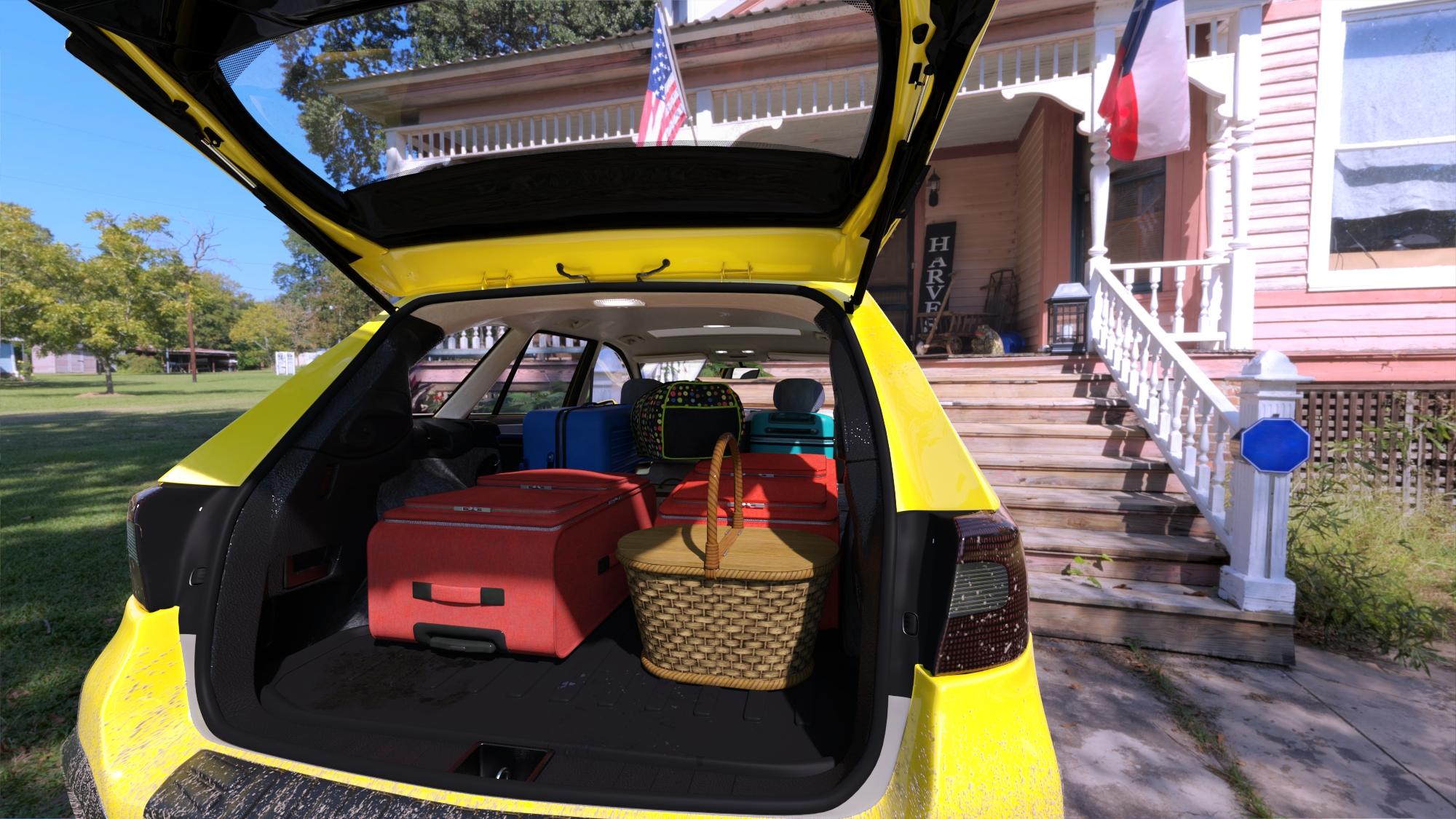
I heard a lot of complaints about cars where the seats don't adjust. Was one of the things I was determined to do. :)
Somebody's going on a picnic! Yay!
This car just looks awesome, and seeing all these other options within throughout this thread makes me excited to pick this up in the very near future!
You will not be disappointed!
We have needed something like this for so long - an everyday driver, suitable for a trip to the grocery store, fast food joint, or off to the golf course.
I hate to be that guy, but an add-on set of roof racks for a canoe, one or two kayaks, or up to three bicycles would really put the icing on the cake.
Thank you for the PA for making a wonderful model of Subar...ehh.. Zirael Flyte. With RHD or LHD option too. Hopefully the PA can make its more agile sibling from the same marquee, you know, the one that won several WRC title
Yes, I have the license plate selected. If I try without the plate selected, it gives the "You must select the GCJ Zirael Flyte License Plate to perform this action" error.
If I try running the script from within the Script IDE pane, it provides the following error information:
The fact that I'm on a Mac (Intel) may be relevant.