• Daz 3D
  • Shop
  • 3D Software
    • Daz Studio Premier
    • Daz Studio
    • Install Manager
    • Partnerships
    • AI Training data
    • Exporters
    • Daz to Roblox
    • Daz to Maya
    • Daz to Blender
    • Daz to Unreal
    • Daz to Unity
    • Daz to 3ds Max
    • Daz to Cinema 4D
  • 3D Models
    • Genesis 9
    • Genesis 8.1
    • Free 3D Models
  • Community
    • Gallery
    • Forums
    • Blog
    • Press
    • Help
  • Memberships
    • Daz Premier
    • Daz Plus
    • Daz Base
    • Compare
  • Download Studio
ADVANCED SEARCH
  • Menu
  • Daz 3D
ADVANCED SEARCH
Add image
  • Shop
  • 3d Software
    • Daz Studio Premier
    • Daz Studio
    • Install Manager
    • Partnerships
    • AI Training data
    • Exporters
    • Daz to Roblox
    • Daz to Maya
    • Daz to Blender
    • Daz to Unreal
    • Daz to Unity
    • Daz to 3ds Max
    • Daz to Cinema 4D
  • 3D Models
    • Genesis 9
    • Genesis 8.1
    • Free 3D Models
  • Community
    • Our Community
    • Gallery
    • Forums
    • Blog
    • Press
    • Help
  • Memberships
    • Daz Premier
    • Daz Plus
    • Daz Base
    • Compare

Notifications

You currently have no notifications.

Loading...
    • Categories
    • Recent Discussions
Daz 3D Forums > 3rd Party Software > Blender Discussion

Need Help: Diffeomorphic + Rigify *SOLVED*

csaacsaa Posts: 931
September 2022 edited September 2022 in Blender Discussion

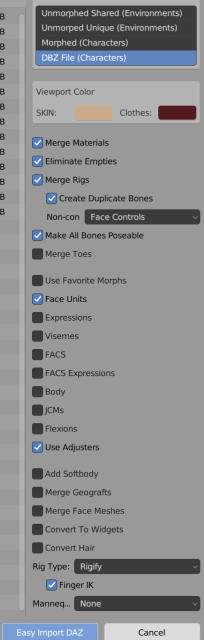
I ran into problems while using Diffeomorphic to import a G8.1F figure, in the process replacing the Daz rig with Rigify one. (I'm using Diffeo 1.6.2 with Blender 3.1.0.) At this point I'm stumped, and I hope someone can offer a quick solution.

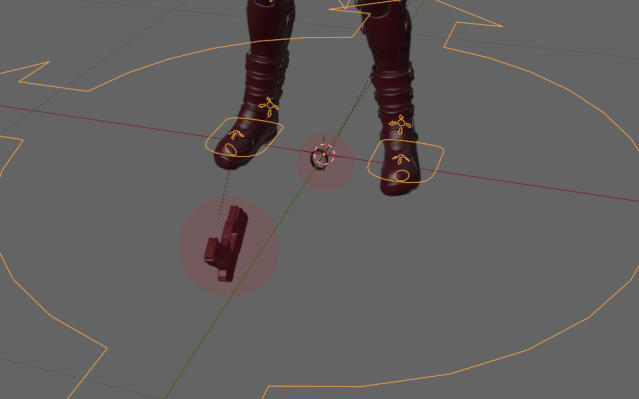
I have two assets that are parented to the Daz limbs. When using Diffeo to import with the default Daz rig set, these assets are parented properly in Blender; however, when imported with the rig changed to Rigify, the assets end up detached. Worse, they stay where they are as I proceed to apply Daz poses to the figure in Blender.

Below are screenshots ...
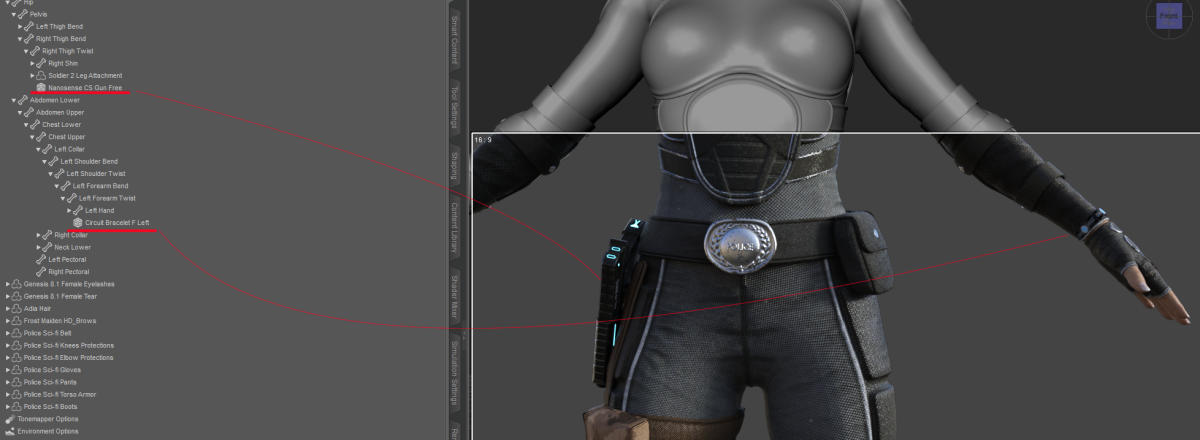
I've heard a lot of great things about Rigify and I'm eager to begin using it. This problem, however, is a showstopper. I'm not sure how I can proceed without fixing it. Any help is much appreciated.

Cheers!

Post edited by csaa on September 2022

Comments

  • wolf359wolf359 Posts: 3,931
    September 2022

    You will have to parent them manually to the rigify controls.

  • Krys KryngleKrys Kryngle Posts: 311
    September 2022

    For the bracelet -

    Select the bracelet and hit alt + p to clear all parents.

    Move the bracelet back to the location you want it on the character's wrist.

    After it is positioned, in object mode, select the bracelet so that it's highlighted, switch to pose mode, hold shift, select the bone you want to parent the bracelet to (left lower arm bone or hand), then hit ctrl + p and parent to bone.  Basically you are parenting the object to a bone so it moves with the character as you pose. 

    Rinse and repeat for the other object.

  • csaacsaa Posts: 931
    September 2022

    wolf359, Krys Kryngle:

    Thanks so much! Everything looks good now. The transform controls available through Rigify make posing a lot easier.

    Cheers!

    Krys Kryngle said:

    For the bracelet -

    Select the bracelet and hit alt + p to clear all parents.

    Move the bracelet back to the location you want it on the character's wrist.

    After it is positioned, in object mode, select the bracelet so that it's highlighted, switch to pose mode, hold shift, select the bone you want to parent the bracelet to (left lower arm bone or hand), then hit ctrl + p and parent to bone.  Basically you are parenting the object to a bone so it moves with the character as you pose. 

    Rinse and repeat for the other object.

  • PadonePadone Posts: 4,003
    September 2022 edited September 2022

    Just tested with a basic figure and everything seems to work fine here. If I easy import with rigify the cone is paranted to the hand same as daz studio. Test scene attached.

    If you didn't, please get the dev version with the latest fixes.

    Let us know if this works or please provide a test scene yourself, as simple as possible, so Thomas can fix this.


    g8f-weapon.jpg
    253 x 235 - 18K
    duf
    duf
    g8f-weapon.duf
    124K
    Post edited by Padone on September 2022
  • csaacsaa Posts: 931
    September 2022

    Padone,

    Yes, I confirm that on my end, the cone comes out well after the Rigify deployment using my usual Easy Import settings. Importing a DUF pose has the cone repositioned accordingly; so the parenting works. (As an aside, is there a way in Blender -- even via Python -- to show what an object is parented to? There are tons of tutorials about the process of rig parenting, but none I've found about revealing the parenting info after the fact. frown)

    I'll see if I can provide a simple use case DUF that recreates the problem I ran into.

    Cheers!

    Padone said:

    Just tested with a basic figure and everything seems to work fine here. If I easy import with rigify the cone is paranted to the hand same as daz studio. Test scene attached.

    If you didn't, please get the dev version with the latest fixes.

    Let us know if this works or please provide a test scene yourself, as simple as possible, so Thomas can fix this.


  • PadonePadone Posts: 4,003
    September 2022

    You can check parenting on the relations tab.

    relations.jpg
    324 x 196 - 15K
Sign In or Register to comment.
Adding to Cart…

Daz 3D is part of Tafi

Connect

DAZ Productions, Inc.
7533 S Center View Ct #4664
West Jordan, UT 84084

HELP

Contact Us

Tutorials

Help Center

Sell Your 3D Content

Affiliate Program

Documentation Center

Open Source

Consent Preferences

JOIN DAZ

Memberships

Blog

About Us

Press

Careers

Bridges

Community

In the Studio

Gallery

Forum

DAZ STORE

Shop

Freebies

Published Artists

Licensing Agreement | Terms of Service | Privacy Policy | EULA

© 2025 Daz Productions Inc. All Rights Reserved.