• Daz 3D
  • Shop
  • 3D Software
    • Daz Studio Premier
    • Daz Studio
    • Install Manager
    • Exporters
    • Daz to Roblox
    • Daz to Maya
    • Daz to Blender
    • Daz to Unreal
    • Daz to Unity
    • Daz to 3ds Max
    • Daz to Cinema 4D
  • 3D Models
    • Genesis 9
    • Genesis 8.1
    • Free 3D Models
  • Community
    • Gallery
    • Forums
    • Blog
    • Press
    • Help
  • Memberships
    • Daz Premier
    • Daz Plus
    • Daz Base
    • Compare
  • AI
  • Download Studio
  • Menu
  • Daz 3D
  • Shop
  • 3d Software
    • Daz Studio Premier
    • Daz Studio
    • Install Manager
    • Exporters
    • Daz to Roblox
    • Daz to Maya
    • Daz to Blender
    • Daz to Unreal
    • Daz to Unity
    • Daz to 3ds Max
    • Daz to Cinema 4D
  • 3D Models
    • Genesis 9
    • Genesis 8.1
    • Free 3D Models
  • Community
    • Our Community
    • Gallery
    • Forums
    • Blog
    • Press
    • Help
  • Memberships
    • Daz Premier
    • Daz Plus
    • Daz Base
    • Compare
  • AI

Notifications

You currently have no notifications.

Loading...
    • Categories
    • Recent Discussions
Daz 3D Forums > 3rd Party Software > Blender Discussion

diffeomorphic rigify IK foot posing: leg shorten instead of bending

rocthered_1819485rocthered_1819485 Posts: 32
August 2022 edited August 2022 in Blender Discussion

Hi everyone,

I have a strange problem. I transferred a character to blender with diffeomorphic and "convert to rigify" immediately. The strange thing is when I posed the foot with IK, instead of bending the knee it made the leg short and stout (see the image).

It does not happen to base figures, but only to this figure that I heavily modified from genesis 8 male. However, I put a lot of time and effort into it, so if possible, I do not want to do it all over again, especially when I do not know what caused this. 

Anyone can help? Thanks a lot!
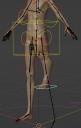


Snipaste_2022-08-18_10-04-13.jpg
366 x 580 - 40K
Post edited by rocthered_1819485 on August 2022

Comments

  • wolf359wolf359 Posts: 3,952
    August 2022 edited August 2022

    @rocthered

    Hi , heavily modified  Genesis figures figures who’s limbs have been altered from the base default length ,in daz studio, will have some issues when both posing and retargeting animations to the rigify rig.


    Most are easily correctable by turning on the tweak bones that are essentially the  pole targets of the knees & elbows.

    from there you can correct the “squashing”manually as I had to do when placing this riders feet&hands.


    THE GRID TRONtweak.jpg
    1586 x 930 - 860K
    Post edited by wolf359 on August 2022
  • rocthered_1819485rocthered_1819485 Posts: 32
    August 2022

    wolf359 said:

    @rocthered

    Hi , heavily modified  Genesis figures figures who’s limbs have been altered from the base default length ,in daz studio, will have some issues when both posing and retargeting animations to the rigify rig.


    Most are easily correctable by turning on the tweak bones that are essentially the  pole targets of the knees & elbows.

    from there you can correct the “squashing”manually as I had to do when placing this riders feet&hands.


    Uh yes. Thanks for the suggestion! It's much better than doing it all over again..

  • PadonePadone Posts: 4,095
    August 2022

    Rigify needs prebended limbs for ik to work. So some figures may need "optimize pose for ik" before converting to rigify.

  • rocthered_1819485rocthered_1819485 Posts: 32
    August 2022

    Padone said:

    Rigify needs prebended limbs for ik to work. So some figures may need "optimize pose for ik" before converting to rigify.

    It worked! Thank you so much! 

  • rocthered_1819485rocthered_1819485 Posts: 32
    August 2022

    Padone said:

    Rigify needs prebended limbs for ik to work. So some figures may need "optimize pose for ik" before converting to rigify.

    Hi @Padone,

    Looks like after I do "optimize pose for ik" , the character has some mismatch between object mode and edit mode (one with legs more spread than the other). Do you know how to match them again? Thanks!

  • PadonePadone Posts: 4,095
    August 2022

    You have to "apply rest pose" to make the prebend effective for ik. I'm not sure why "apply rest pose" is an option, it makes little sense to me to prebend without the rest pose.

  • rocthered_1819485rocthered_1819485 Posts: 32
    August 2022

    Padone said:

    You have to "apply rest pose" to make the prebend effective for ik. I'm not sure why "apply rest pose" is an option, it makes little sense to me to prebend without the rest pose.

    Yes I did that. In fact only "apply rest pose" fix the problem of legs not bending. But then the pose in edit mode is a bit different from object mode, making it a bit annoying to modify the mesh further. Is it possible to fix that? 

  • PadonePadone Posts: 4,095
    August 2022

    That's not possible by definition, since "apply rest pose" bakes to edit mode. Please verify. Then if you're sure of the issue we need more details, as your blender/plugin versions and the exact steps to reproduce the issue, possibly with a test scene in duf format.

Sign In or Register to comment.
Adding to Cart…

Daz 3D is part of Tafi

Connect

DAZ Productions, Inc.
7533 S Center View Ct #4664
West Jordan, UT 84084

HELP

Contact Us

Tutorials

Help Center

Sell Your 3D Content

Affiliate Program

Documentation Center

Open Source

Consent Preferences

JOIN DAZ

Memberships

Blog

About Us

Press

Careers

Bridges

Community

In the Studio

Gallery

Forum

DAZ STORE

Shop

Freebies

Published Artists

Licensing Agreement | Terms of Service | Privacy Policy | EULA

© 2026 Daz Productions Inc. All Rights Reserved.

