Question Regarding Blender "Manifold?" lines [Solved]
 Ryuu@AMcCF
Posts: 812
Ryuu@AMcCF
Posts: 812
I'm not sure what the proper term for this is in Blender, but in the old Ray Dream Studio & Carrara apps, I've heard them referred to as "Manifold Lines"--
But in whatever app is used to make/edit a model, they're edges that frequently show up in a different color/highlight than the ordinary face edges will, often found on the openings into the interior, or where something wierd is going on in the mesh, like really, really sharp bends in the mesh. Please see attached picture at the bottom of the post for a better view:
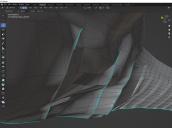
I've never figured out the significance as to why they exist or what their purpose is for. The only thing I know, is I have little control as to where they'll show up, and they will often cause morphs to not work exactly as planned when used in Poser or DAZ. Since Carrara is kaput for me, I'm permanantly forced to use Blender as the app for making/modifying meshes--now please don't get me wrong, I DO greatly appreciate how versitle and powerful Blender is--it's just that the learning curve is still quite steep for me in comparison to what Carrara, & RDS before that, were. And, sorry to say, but all documentation for using Blender leave much to be desired--searching for specific phrases in the DAZ forums is easier. (And yes, I did search for "maniforld lines/edges", "highlighted lines/edges", and other terms in multiple combinations to think of--nothing found here, either.
So, like the apps I was using before, I learned how to convert these highlighted edges back to normal edges, but the task is an extremely tedious one.
My questions are:
- Is there an easier way to convert them to normal edges without having to go to each one, delete it, relink the verticies, refill all the faces that get blown away when I delete the highlighted edge, and THEN sometimes have to flip normals--ALL DAY LONG??
- Is there some valid purpose to keep them or to purposefully put them into the mesh (such as for the seams of mesh segments)? If so, how can that be done?
Thanks in advance for any info and advice.

Daz 3D is part of 
Connect
DAZ Productions, Inc.
7533 S Center View Ct #4664
West Jordan, UT 84084
Licensing Agreement | Terms of Service | Privacy Policy | EULA
© 2026 Daz Productions Inc. All Rights Reserved.
Comments
Blue edges means a 'sharp' edge, found in the edge menu.
Easiest way to remove all, is click A (all) and then in the Edge menu Clear sharp.
Before posting, I had tried that, but it made no change on the blue highlighted lines. I also tried setting one of the normal edges to "sharp" and got a green highlighted edge instead--that's what prompted me to ask about this.
My bad! That was "Freestyle edges" I tried before! What you told me worked! Thanks Felis!! :D