• Daz 3D
  • Shop
  • 3D Software
    • Daz Studio Premier
    • Daz Studio
    • Install Manager
    • Partnerships
    • AI Training data
    • Exporters
    • Daz to Roblox
    • Daz to Maya
    • Daz to Blender
    • Daz to Unreal
    • Daz to Unity
    • Daz to 3ds Max
    • Daz to Cinema 4D
  • 3D Models
    • Genesis 9
    • Genesis 8.1
    • Free 3D Models
  • Community
    • Gallery
    • Forums
    • Blog
    • Press
    • Help
  • Memberships
    • Daz Premier
    • Daz Plus
    • Daz Base
    • Compare
  • Download Studio
ADVANCED SEARCH
  • Menu
  • Daz 3D
ADVANCED SEARCH
Add image
  • Shop
  • 3d Software
    • Daz Studio Premier
    • Daz Studio
    • Install Manager
    • Partnerships
    • AI Training data
    • Exporters
    • Daz to Roblox
    • Daz to Maya
    • Daz to Blender
    • Daz to Unreal
    • Daz to Unity
    • Daz to 3ds Max
    • Daz to Cinema 4D
  • 3D Models
    • Genesis 9
    • Genesis 8.1
    • Free 3D Models
  • Community
    • Our Community
    • Gallery
    • Forums
    • Blog
    • Press
    • Help
  • Memberships
    • Daz Premier
    • Daz Plus
    • Daz Base
    • Compare

Notifications

You currently have no notifications.

Loading...
    • Categories
    • Recent Discussions
Daz 3D Forums > 3rd Party Software > Blender Discussion

Export from DAZ3D to Blender

jaxtonejaxtone Posts: 73
June 2022 in Blender Discussion

Hi, 

I must start with saying that I also started a ticket to the formal support at Blender with the same problem.

I just bought the Li´l Scrap Boy model. Here´s a link: https://www.daz3d.com/lil-scrap-boy-hd-for-genesis-8-male

I just needed to render it out with a image as background but gave up because the DAZ3D engine didn´t even succeed to render a single pixel after more than ten minutes. So I decided to export the object into my version of Blender instead. Strange enough when I export the object as an OBJ file it pops up in Blender without the same finish and look of the surfaces as it had in DAZ3D. I then tried to export it as an FBX file with and it did show up with the correct surfaces but also with a totally messed up object with a body that looks like it has been involved in a train crash.

Please see my three attached images that hopefully makes it easy for someone more skilled than myself to explain what I´ve done wrong here.

Thank´s.
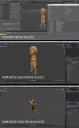
LilScrapBoy.jpg
1915 x 3120 - 1M

Comments

  • danielbui78danielbui78 Posts: 333
    June 2022 edited June 2022

    jaxtone said:

    Hi, 

    I must start with saying that I also started a ticket to the formal support at Blender with the same problem.

    I just bought the Li´l Scrap Boy model. Here´s a link: https://www.daz3d.com/lil-scrap-boy-hd-for-genesis-8-male

    I just needed to render it out with a image as background but gave up because the DAZ3D engine didn´t even succeed to render a single pixel after more than ten minutes. So I decided to export the object into my version of Blender instead. Strange enough when I export the object as an OBJ file it pops up in Blender without the same finish and look of the surfaces as it had in DAZ3D. I then tried to export it as an FBX file with and it did show up with the correct surfaces but also with a totally messed up object with a body that looks like it has been involved in a train crash.

    Please see my three attached images that hopefully makes it easy for someone more skilled than myself to explain what I´ve done wrong here.

    Thank´s.

     

    You need to uncheck the option for "Use Pre/Post Rotation".  See screenshot. 

    Alternative solutions are to use DazToBlender Bridge or Diffeo.  Good luck, have fun!


    Screenshot (30).png
    1036 x 717 - 177K
    Post edited by danielbui78 on June 2022
  • PaintboxPaintbox Posts: 1,633
    June 2022

    Look up diffeomorphic for daz, there is a forum also, it was made to export to Blender. There is also an official bridge, but is not as good (yet)

Sign In or Register to comment.
Adding to Cart…

Daz 3D is part of Tafi

Connect

DAZ Productions, Inc.
7533 S Center View Ct #4664
West Jordan, UT 84084

HELP

Contact Us

Tutorials

Help Center

Sell Your 3D Content

Affiliate Program

Documentation Center

Open Source

Consent Preferences

JOIN DAZ

Memberships

Blog

About Us

Press

Careers

Bridges

Community

In the Studio

Gallery

Forum

DAZ STORE

Shop

Freebies

Published Artists

Licensing Agreement | Terms of Service | Privacy Policy | EULA

© 2025 Daz Productions Inc. All Rights Reserved.
