• Daz 3D
  • Shop
  • 3D Software
    • Daz Studio Premier
    • Daz Studio
    • Install Manager
    • Partnerships
    • AI Training data
    • Exporters
    • Daz to Roblox
    • Daz to Maya
    • Daz to Blender
    • Daz to Unreal
    • Daz to Unity
    • Daz to 3ds Max
    • Daz to Cinema 4D
  • 3D Models
    • Genesis 9
    • Genesis 8.1
    • Free 3D Models
  • Community
    • Gallery
    • Forums
    • Blog
    • Press
    • Help
  • Memberships
    • Daz Premier
    • Daz Plus
    • Daz Base
    • Compare
  • Download Studio
ADVANCED SEARCH
  • Menu
  • Daz 3D
ADVANCED SEARCH
Add image
  • Shop
  • 3d Software
    • Daz Studio Premier
    • Daz Studio
    • Install Manager
    • Partnerships
    • AI Training data
    • Exporters
    • Daz to Roblox
    • Daz to Maya
    • Daz to Blender
    • Daz to Unreal
    • Daz to Unity
    • Daz to 3ds Max
    • Daz to Cinema 4D
  • 3D Models
    • Genesis 9
    • Genesis 8.1
    • Free 3D Models
  • Community
    • Our Community
    • Gallery
    • Forums
    • Blog
    • Press
    • Help
  • Memberships
    • Daz Premier
    • Daz Plus
    • Daz Base
    • Compare

Notifications

You currently have no notifications.

Loading...
    • Categories
    • Recent Discussions
Daz 3D Forums > 3rd Party Software > Blender Discussion

Skin properties missing when exported to Blender

yangq001yangq001 Posts: 3
June 2022 in Blender Discussion

I tried DaztoBlender and Diffeomorphic but neither was able to transfer the right skin properties. I wanted the character's skin to be kind of shiny.

(I tried using this product: https://www.daz3d.com/wet-and-tanned-skins-for-genesis-8-males)

It seems that the skin effect is created through a shell, which cannot be exported to Blender?

Does anyone have any exprience?


Another issue: I can change some parameters in the skin shader I got from DaztoBlender to make the skin shiny. However, the shader generated from Diffeomorphic (screenshot) does not seem to have any options to control the reflectibility or other skin properties. I tried moving those sliders but it didn't work. The skin is just looking too dry and dull (not realistic).


Any advice is appreciated. Thanks!
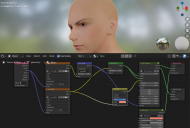
Screenshot 2022-06-21 17.48.50.png
1274 x 857 - 726K

Comments

  • PadonePadone Posts: 4,001
    June 2022 edited June 2022

    As for the wet skins be sure to get the latest version of diffeomorphic that's actually 1.6.2. It does import refractive shells be sure to use the bsdf option for materials and the material option for shells, since the new geonode shells are experimental and may not work fine yet.

    As for your skin example you probably imported a daz skin with zero specularity in all channels. The plugin actually imports glossy, dual lobe and top coat. Again use the bsd option for the best result.

    Or you can import with the principled option for materials then adjust specular and clearcoat as you wish.

    Post edited by Padone on June 2022
  • yangq001yangq001 Posts: 3
    June 2022

    Padone said:

    As for the wet skins be sure to get the latest version of diffeomorphic that's actually 1.6.2. It does import refractive shells be sure to use the bsdf option for materials and the material option for shells, since the new geonode shells are experimental and may not work fine yet.

    As for your skin example you probably imported a daz skin with zero specularity in all channels. The plugin actually imports glossy, dual lobe and top coat. Again use the bsd option for the best result.

    Or you can import with the principled option for materials then adjust specular and clearcoat as you wish.

    Thank you so much! Now it works.

Sign In or Register to comment.
Adding to Cart…

Daz 3D is part of Tafi

Connect

DAZ Productions, Inc.
7533 S Center View Ct #4664
West Jordan, UT 84084

HELP

Contact Us

Tutorials

Help Center

Sell Your 3D Content

Affiliate Program

Documentation Center

Open Source

Consent Preferences

JOIN DAZ

Memberships

Blog

About Us

Press

Careers

Bridges

Community

In the Studio

Gallery

Forum

DAZ STORE

Shop

Freebies

Published Artists

Licensing Agreement | Terms of Service | Privacy Policy | EULA

© 2025 Daz Productions Inc. All Rights Reserved.

