• Daz 3D
  • Shop
  • 3D Software
    • Daz Studio Premier
    • Daz Studio
    • Install Manager
    • Exporters
    • Daz to Roblox
    • Daz to Maya
    • Daz to Blender
    • Daz to Unreal
    • Daz to Unity
    • Daz to 3ds Max
    • Daz to Cinema 4D
  • 3D Models
    • Genesis 9
    • Genesis 8.1
    • Free 3D Models
  • Community
    • Gallery
    • Forums
    • Blog
    • Press
    • Help
  • Memberships
    • Daz Premier
    • Daz Plus
    • Daz Base
    • Compare
  • AI Solutions
  • Download Studio
  • Menu
  • Daz 3D
  • Shop
  • 3d Software
    • Daz Studio Premier
    • Daz Studio
    • Install Manager
    • Exporters
    • Daz to Roblox
    • Daz to Maya
    • Daz to Blender
    • Daz to Unreal
    • Daz to Unity
    • Daz to 3ds Max
    • Daz to Cinema 4D
  • 3D Models
    • Genesis 9
    • Genesis 8.1
    • Free 3D Models
  • Community
    • Our Community
    • Gallery
    • Forums
    • Blog
    • Press
    • Help
  • Memberships
    • Daz Premier
    • Daz Plus
    • Daz Base
    • Compare
  • AI Solutions

Notifications

You currently have no notifications.

Loading...
    • Categories
    • Recent Discussions
Daz 3D Forums > 3rd Party Software > Blender Discussion

Tight shirt made in blender inflates when transferred to figure

kim.devylderkim.devylder Posts: 11
February 2022 in Blender Discussion

Hi there, 

I am trying to fit a shirt (mesh) that I made in Blender to my figure using the Transfer Utility.

Which ever setting I try the shirt will allways blow up a little. I've seen numerous tutorials where this does not happen but I can't figure out what's wrong.

I've been at this a long time. Hope someone can help.

Thanks!
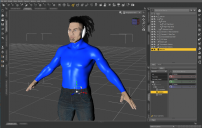
Not-transferred.png
1601 x 1012 - 609K
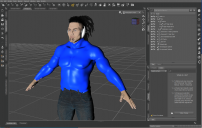
Transferred.png
1602 x 1016 - 614K

Comments

  • LeanaLeana Posts: 13,034
    February 2022

    Was is modeled for the default figure or for a morphed figure?

  • kim.devylderkim.devylder Posts: 11
    February 2022 edited February 2022

    I made it from an exported Genesis 8.1 mesh but it's not the default one. It's a figure from a package I bought so I guess it's morphed. 

    The figure in the screenshots is what I exported to Blender to make the shirt from

    If that is what you mean. Bit of a Noob here ;-)


    Post edited by kim.devylder on February 2022
  • wolf359wolf359 Posts: 3,952
    February 2022
    If you scaled the mesh in Blender at any point, you need to apply scale before exporting to Daz studio.
  • felisfelis Posts: 6,192
    February 2022

    General advice is always model towards the base mesh.

    When using transfer utility, you can try change the donor from 'default' to 'current'. I have never actually used it, but my understanding is it should work.

  • Richard HaseltineRichard Haseltine Posts: 109,719
    February 2022

    felis said:

    General advice is always model towards the base mesh.

    When using transfer utility, you can try change the donor from 'default' to 'current'. I have never actually used it, but my understanding is it should work.

    You also need to expand the dialogue and select the Reverse Source Shape from Target option.

  • kim.devylderkim.devylder Posts: 11
    February 2022 edited February 2022

    Richard Haseltine said:

    felis said:

    General advice is always model towards the base mesh.

    When using transfer utility, you can try change the donor from 'default' to 'current'. I have never actually used it, but my understanding is it should work.

    You also need to expand the dialogue and select the Reverse Source Shape from Target option.

    Wow, thanks a lot for your great help guys!

    I had allready applied all transforms in Blender but thanks for the tip wolf659.

    A combination of selecting "Item Shape" under "Source" and checking "Reverse Source Shape From Target" in the Transfer Utility seems to do the trick nicely.

    Adding a screenshot of my settings for anyone facing a problem like this.

    Thransfer-Utility-settings.PNG
    469 x 673 - 30K
    Post edited by kim.devylder on February 2022
Sign In or Register to comment.
Adding to Cart…

Daz 3D is part of Tafi

Connect

DAZ Productions, Inc.
7533 S Center View Ct #4664
West Jordan, UT 84084

HELP

Contact Us

Tutorials

Help Center

Sell Your 3D Content

Affiliate Program

Documentation Center

Open Source

Consent Preferences

JOIN DAZ

Memberships

Blog

About Us

Press

Careers

Bridges

Community

In the Studio

Gallery

Forum

DAZ STORE

Shop

Freebies

Published Artists

Licensing Agreement | Terms of Service | Privacy Policy | EULA

© 2026 Daz Productions Inc. All Rights Reserved.
