DTU Bridge - materials not working, animations not working
 psychoclast
Posts: 9
psychoclast
Posts: 9
I'm using the latest DTU bridge and have found that it still fails to export materials properly - transparency is lost as are normal maps, bump maps and emission maps.
Additionally, animations do not export at all - regardless of whether you select export as animation or not, it gets exported as a skeletal mesh. What can I do to fix this? I'm using Victoria 8.1. Some texture images have been modified, but most have not. All are losing bump, normal, transparency and roughness, and again, no animation. Hair looks a mess too. I can fix most of the material issues in Unity, but the animation I'm lost on.
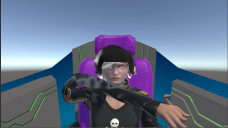
And unfortunately, I can't use FBX export for animations either - while it will export the animation, I lose all facial expression data unless I select "Bake to studio keyframes." However, if I do that, then the pivot points on all the bones get screwed up and the figure distorts wildly. See image below. I've tried using both a humanoid and generic rig.

Daz 3D is part of 
Connect
DAZ Productions, Inc.
7533 S Center View Ct #4664
West Jordan, UT 84084
Licensing Agreement | Terms of Service | Privacy Policy | EULA
© 2026 Daz Productions Inc. All Rights Reserved.
Comments
Have you tried to use unofficial DTU bridge?
https://www.daz3d.com/forums/discussion/494626/unofficial-updates-for-daztounity-bridge-urp-built-in-pbrskin-anims-dforce#latest
I know it transfers animations.
Use only humanoid rig in Unity, unless you wish to put additional time to get it to work with Daz characters.
I have - and found it broke my unity project.
Ok, I only use the official Daz to Unity bridge and for my needs it is working well.
Actually, the latest Daz to Unity bridge is still the same version from Oct/Nov 2020. I can't speak officially for Daz, but hopefully a new version will be out soon.
Animations are not yet supported with the current version of the Daz to Unity bridge. Victoria 8.1 uses the more recent "PBRSkin" shaders instead of the "Iray Uber" shaders that's used in older products. "PBRSkin" shaders are also not yet supported in the official Daz to Unity bridge. This is why all extra material data like bump, normal, transparency and roughness are missing. Many hair assts require extra tweaks to BumpMap Strength, NormalMap Strength and Alpha Threshold. Animations and PBRSkin support have been in the unofficial bridge since v0.3-alpha. Improved hair support was added to v1.3 alpha 3.
Only studio keyframes (aka Timeline) animations are exported in FBX files. Aniblocks and other "aniMate"-based animations must be baked to studio keyframes before they can be exported. Distorted figures usually results when animations which were made for a specific model and rigging are applied to a same or different model with entirely different rigging. The best way to minimize this is to always use the same exact settings and export procedures that you use for your base model and all of your animations. From what you've written so far, it sounds like you've been experimenting with several different Daz Studio settings, FBX Exporter settings and Unity settings for your exported models and animations, and then trying to use all of these different export results together. Your best path forward may be to start with a completely fresh project and do new exports with the same settings for all assets/models/animations.
There are a couple things that might cause a "broken" project. The first is you tried to use a mismatched combination of Officila/Unofficial Daz Studio plugin with Unity plugin. Both versions can be installed into Daz Studio at the same time, but you have to use a matched version of the Daz Studio and Unity plugins when doing an export operation, aka only use the Official Daz Studio plugin with the Official Unity plugin or the unofficial Daz Studio plugin with the unofficial Unity plugin. A second cause is if you are using Unity version 2020 or higher and did not select the option to Update Scripts when you first installed the uDTU files into your Unity Project. If this happened, then you can try selecting your "Assets/Daz3D" folder in Unity, right-clicking and selecting "reimport".
I know all this is easier said than done. If you still run into distorted animations, then you are probably unintentionally changing something between model export and animation export without realizing it. Post back here if you need more detailed instructions. Good luck.