Optimize my educational path for Blender
 BlueFingers
Posts: 924
BlueFingers
Posts: 924
Hi there Blender users!
I want to learn Blender to make stills and make my own assetts when needed (clothing, hair, vignettes for stills, small props) when there are no appropiate Daz assets available. I want to optimize my educational path, and I thought it would be best to start with free tutorials on YouTube on the follwing channels:
Official Blender Channel
- Blender Guru
- Grant Abbit
- CG Fast Track
and then move to more technique focused training with:
- CG Boost
And on Blender market:
- CG Cookie
- Creative Shrimp
- p2design
- Xane Graphics
- Blender Bros
I haven't listed anything that requires a subscription as I dislike the business model.
So here are my questions:
- Is it still usefull to learn from 2.9 or even 2.8 content now that 3.0 is out, or is it better to wait a bit for 3.0 content?
- Is there an optimal path for learning the different aspects of Blender for what I want?
- Are there particular teachers you would recommend over others?
- What are the pitfall I might encounter in learning Blender, and what would be the best way to avoid them?
- Should I focus on a particular render engine or is it still to early to worry about such things?
- Is it possible to import Daz assetts directly in to Blender (so I can ditch Windows)?
My end goal would be to have the ability to create something similar like this in Blender, but 3D:
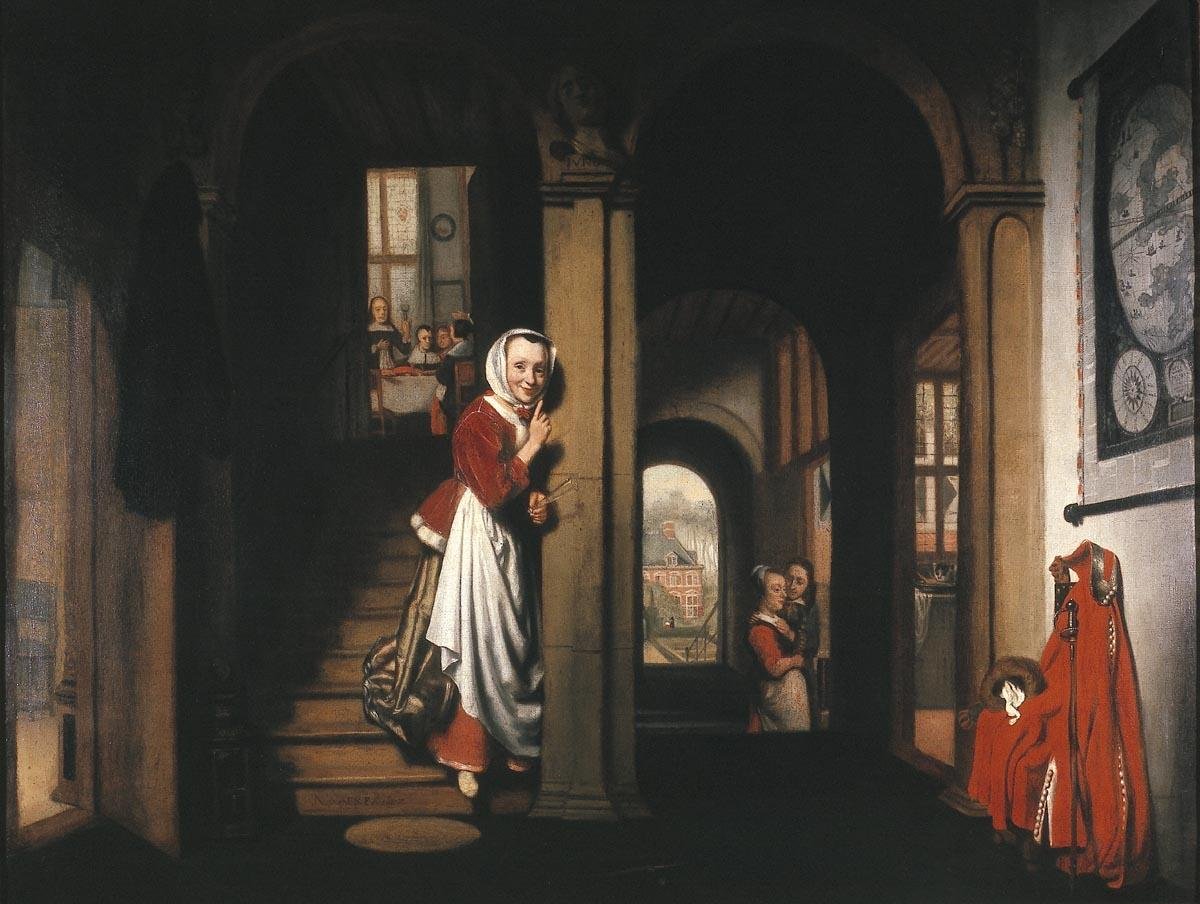
Though I think it might be too ambitious, and I might not really know what I'm asking, it at least gives you an idea of my goal.

Daz 3D is part of 
Connect
DAZ Productions, Inc.
7533 S Center View Ct #4664
West Jordan, UT 84084
Licensing Agreement | Terms of Service | Privacy Policy | EULA
© 2026 Daz Productions Inc. All Rights Reserved.
Comments
Other will properly come with different views - I think it depends on the person.
But this is my view.
1) Any tutorial from 2.8 and upwords should do. There has been some adjustments to the interface but not anything significant.
2) Start with selectede areas. Trying to learn everthing will likely kill you. Probably modelling, including UV and shaders as a start.
3) I started with Blender Guru, but that was becuase I found him. He does it fairly thorougly so you don't get lost, but it takes it's time.
4) See pt 2
5) You can use both. The shader setup usually work for both. Eevee takes a lot of shortcuts in order to be fast, and there might be areas you need special settings to get it to work. I usually starts with Eevee and then later switch to Cykles
6) Diffeo seems like the best option. Thomas Larsson, the developer, is fast to correct faults.
This is helpful, yes it did seem learning Blender has the potential too take someones life . I did not know about the DAZ Importer, that is great to learn. Thank you so much!
Respectfully, I think you may be being penny wise but pound foolish. Blender is as good as anything else for modelling, but two of your areas are incidentally areas where Blender lags behind other software.
Clothing - You cannot beat Marvelous Designer. You will waste days if not weeks trying to coerce Blender into draping the way you want it to when in MD you could literally have just grabbed the garment while it was simulating and tugged it to where you wanted it. I'm looking at those nice folds in the woman's apron. There may be a pluginthat approaches this kind of functionality, but it isn't GPU accelerated.
Hair - You cannot beat Maya's options, like XGen, Ornatrix, Yeti, etc... Blender's hair system feels ancient and primitive.
If these other programs are viable options for you, they should be part of your educational efforts because Blender is simply not "there" yet in all areas.
Poof, there goes the dream,...well better to know it now then to become disillusioned. Yeah, Maya isn't going to happen, too pricey for my liking, and I do have to say I am pretty happy with the hair I can get for Daz. Marvelouse Designer will probably happen after I have become frustrated enough with making clothes in Blender. Thanks for letting me know though, appreciated!
Sorry, I didn't mean to rain on your parade, nor to imply that these types of thins are not possible in Blender. They are, but you really seemed focused on being efficient, in which case you just might not appreciate the amount of fiddling you'd have to do. So it's not whether you can do these things in Blender, yes you can, there's the brush tool for cloth and you can model each and every individual strand of hair with quite precise control, but both of these is a slower process than with the best tool available for each.
Are you aware that Maya has Indie pricing?
No worries, it's good to know! And I wasn't aware of the indie pricing for Maya, that is good to know too and affordable , thanks! But I have to say hair is probably at the bottom of my priorities, as I am pretty happy with the hair I can get from Daz. Making a vignette that could pass for something you'd find in a painting is my first priority, so I think I should first concentrate on learning to model in Blender before I drive myself insane with all the possibilities out there.
And with some luck there will be a new hair system in 1-2 years.
At least it is on the roadmap.
Yes, that's disppointing. That task was even recently unassigned from the developer it was assigned to. It's an orphan, now. I'm curious to know why they don't feel this is important, what with everything else moving to geometry nodes.
Could be because a better hair system does not seem to be a
priority of the Blender user base.
I am a member of two Blender user groups on Facebook
and IMHO ,the majority of the online Blender community
Are hard surface modeling enthusiasts.
Even in my group called "Blender for filmaking"
I seem to be the only one who posts animated Characters
while everyone else makes Shiny cars or architecture
or some abstract animation with geo nodes and cubes etc.
Even the apparent minority who creates Characters
tend to do Pixar /Disney inspired "cute" stuff where the hair
doe not have to simulate or look realistc.
Not a criticism , just an observation
I have hardops and boxcutter add-ons and love them.
But lately I have gotten a more positve response from non
Blender users for my recent efforts at Japanese anime style rendering
@wolf359 That is terrific, I mean amazing. Of course there are "cuts" in quality but I understand it's to maximize productivity and the overall "flow" feels just right.
If I may add a couple notes, what's more visible in the video as a "quality cut". Just to give feedback.
1. The camera movements are "robotic", real cameras start, then settles, then stop. There's acceleration and deceleration when you start and stop the camera. Same for some animations for example when the gate opens, the gate starts then settles then stop, there's acceleration and deceleration.
2. In the bike ride it is most noticeable that the hair doesn't move, there should be some wind moving the hair, or provide the figure with a helmet or something if you don't want to animate the hair.
3. As for the figure at the console her hand is just a "delirium tremis", has nothing to do with hitting keys. Though I understand the idea was to show a super fast operator it feels just not right. To slow the animation a bit may improve things.
4. The voices sound synthetic, but if you used a voice generator that is very good quality. I'd like to know what you used please.
5. You may try with two levels of shading instead of three for the toon shader. At least for the human skin. The less the shading changes during animation the more "natural" the skin will seem. Then mechanical surfaces are good with three levels.
edit. Wolf, if you'd like to add some credits in your amazing videos that you used daz, blender and diffeomorphic that would be much appreciated. Not that this is mandatory of course.
@wolf359 You are right, of course. I get the same feeling with the lack of proper support for mocap data until quite recently.
Your work is always inspiring.
@TheMysteryisThePoint
Thanks Donald!
Here is a 55 second long peek at episode 2 coming soon
Now that's what I'm talking about :) I loved the headshot at 0:15, the hand to hand combat, and of course the jump to the helo.
Blender evolves so fast that I decided to switch from Cinema 4D and Vray to Blender. Diffeomorpic is a great way to get figures and their assets to Blender. For static content, like buildings or other assets, I prefer to import them via OBJ and adjust & enhance the materials myself, as well as the objects. I did that in C4D before as well.
I still have to learn a lot for working with Blender, but I am slowly progressing. There are some great tutorials on Udemy and CGBoost that help to get forward. I also like the tutorials from Krys Kryngle regarding Diffeo on YouTube. Anyway there is a lot of information around, you just have to try it.