Texture Painting Problem
 Gemini Queen
Posts: 263
Gemini Queen
Posts: 263
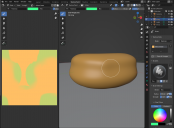
I'm following the tutorial by Blender Guru and everything is going great so far. However, I've hit a snag on step/video 8. He's painting in texture mode and he's able to pain directly onto the donut. However, when I attemp to click on the donut on the right hand side to pain on it like he does, it's for some reason posting to the underside of the donut like it's upside down or something? I'll see it come up on the map and it's really weird. I did back track to try and figure out what I did wrong, but I can't find it and I'd like to be able to follow the tutorial as closely as possible. Could someone explain what I did wrong?
Picture 1 - What he's doing in the video
Picture 2 - What I'm getting


Daz 3D is part of 
Connect
DAZ Productions, Inc.
7533 S Center View Ct #4664
West Jordan, UT 84084
Licensing Agreement | Terms of Service | Privacy Policy | EULA
© 2026 Daz Productions Inc. All Rights Reserved.
Comments
It's been so long since I've done this tutorial, I was thinking of redoing it now that he has a 3.0 version. But just looking at the two photos I'm seeing the photo on the left has icing selected, and the one on the right has the view for icing turned off and the donut is selected. Not sure if that will solve your problem, but it's the only thing I can see on here that looks like it could be the case.
If that didn't help, when I did the tutorial series, I ran into a number of problems as well and every single time I found the answer in the comment section of the video. It seems the sticky spots are pretty universal and there's always someone that points out what the issue is.
Hi,
Sounds like the model has inverted normals (polygons/faces pointing in the wrong direction, which will make painting on the mesh project to the back faces).
In the 3d viewport, press "Tab" key (edit mode). Then "Alt+N" (which brings up the "normals" menu). Select "Recalculate Outside"
benniewoodell - You were absolutely right. The first like 3 comments had the answer that I was looking for, so it worked out well. As for the ones I had selected, I incorrectly labled them. I hadn't even noticed that till you mentioned something.
stem_athome - It was inverted as all get out, thank you for pointing that out for me! I couldn't figure out what inverted was or how it got that way, but I was able to fix it eventually and moved along with the other stuff that I needed to do.