• Daz 3D
  • Shop
  • 3D Software
    • Daz Studio Premier
    • Daz Studio
    • Install Manager
    • Partnerships
    • AI Training data
    • Exporters
    • Daz to Roblox
    • Daz to Maya
    • Daz to Blender
    • Daz to Unreal
    • Daz to Unity
    • Daz to 3ds Max
    • Daz to Cinema 4D
  • 3D Models
    • Genesis 9
    • Genesis 8.1
    • Free 3D Models
  • Community
    • Gallery
    • Forums
    • Blog
    • Press
    • Help
  • Memberships
    • Daz Premier
    • Daz Plus
    • Daz Base
    • Compare
  • Download Studio
ADVANCED SEARCH
  • Menu
  • Daz 3D
ADVANCED SEARCH
Add image
  • Shop
  • 3d Software
    • Daz Studio Premier
    • Daz Studio
    • Install Manager
    • Partnerships
    • AI Training data
    • Exporters
    • Daz to Roblox
    • Daz to Maya
    • Daz to Blender
    • Daz to Unreal
    • Daz to Unity
    • Daz to 3ds Max
    • Daz to Cinema 4D
  • 3D Models
    • Genesis 9
    • Genesis 8.1
    • Free 3D Models
  • Community
    • Our Community
    • Gallery
    • Forums
    • Blog
    • Press
    • Help
  • Memberships
    • Daz Premier
    • Daz Plus
    • Daz Base
    • Compare

Notifications

You currently have no notifications.

Loading...
    • Categories
    • Recent Discussions
Daz 3D Forums > 3rd Party Software > Blender Discussion

Daz to Blender too big shoulders.

TizzaliciousTizzalicious Posts: 7
December 2021 edited December 2021 in Blender Discussion

Hello

When i import my daz figures into blender they all get this huge shoulders. How can i fix this?

I imported a animation, but even if i just import a figure and rotate the arms up its doing so. I tried to repaint weight layers, but it gets worse. 

Pls anybody with a solution here? or maybe same issue?

EDIT!!

So if i manually pose the character in daz and put her arms up and then export it also behaves the same, if i use a pose its all fine. The aniblock i bought is giving me the same result, no way to fix it?

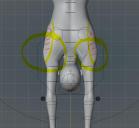
Daz_01.JPG
661 x 620 - 33K
DtB_01.JPG
768 x 707 - 65K
Post edited by Tizzalicious on December 2021

Comments

  • Richard HaseltineRichard Haseltine Posts: 107,945
    December 2021

    Does it not happen with a manual pose doing the same thing? I would expct that it would, as that looks like the consequence of not having a morph (or morphs) linked to the bends as it would be in DS.

  • TizzaliciousTizzalicious Posts: 7
    December 2021

    Its random, im just testing and while exporting manual posed and preset poses it sometimes imports with huge shoulders, sometimes not. I try to export it again and take a closer look at the morphs.

    My main goal is to export the swim ani block to blender. But breast (shoulder) and feets are completely destorted or bad looking. 

  • TizzaliciousTizzalicious Posts: 7
    December 2021 edited December 2021

    Richard Haseltine said:

    Does it not happen with a manual pose doing the same thing? I would expct that it would, as that looks like the consequence of not having a morph (or morphs) linked to the bends as it would be in DS.

    Oh my gooosh thank you it worked!! i just did not pay much attention to the morphs, i thought its a bone deform or bend issue. ;* thank youuuuuu!!!!

    Post edited by Richard Haseltine on December 2021
  • Richard HaseltineRichard Haseltine Posts: 107,945
    December 2021

    The Genesis 3 and 8 figures use a lot of JCMs (Joint Controlled Morphs) to fix the effect of the bends on the mesh. I don't believe FBX supports this kind of linking, though I'm pretty sure the destination application will have a similar ability.

Sign In or Register to comment.
Adding to Cart…

Daz 3D is part of Tafi

Connect

DAZ Productions, Inc.
7533 S Center View Ct #4664
West Jordan, UT 84084

HELP

Contact Us

Tutorials

Help Center

Sell Your 3D Content

Affiliate Program

Documentation Center

Open Source

Consent Preferences

JOIN DAZ

Memberships

Blog

About Us

Press

Careers

Bridges

Community

In the Studio

Gallery

Forum

DAZ STORE

Shop

Freebies

Published Artists

Licensing Agreement | Terms of Service | Privacy Policy | EULA

© 2025 Daz Productions Inc. All Rights Reserved.

