• Daz 3D
  • Shop
  • 3D Software
    • Daz Studio Premier
    • Daz Studio
    • Install Manager
    • Partnerships
    • AI Training data
    • Exporters
    • Daz to Roblox
    • Daz to Maya
    • Daz to Blender
    • Daz to Unreal
    • Daz to Unity
    • Daz to 3ds Max
    • Daz to Cinema 4D
  • 3D Models
    • Genesis 9
    • Genesis 8.1
    • Free 3D Models
  • Community
    • Gallery
    • Forums
    • Blog
    • Press
    • Help
  • Memberships
    • Daz Premier
    • Daz Plus
    • Daz Base
    • Compare
  • Download Studio
ADVANCED SEARCH
  • Menu
  • Daz 3D
ADVANCED SEARCH
Add image
  • Shop
  • 3d Software
    • Daz Studio Premier
    • Daz Studio
    • Install Manager
    • Partnerships
    • AI Training data
    • Exporters
    • Daz to Roblox
    • Daz to Maya
    • Daz to Blender
    • Daz to Unreal
    • Daz to Unity
    • Daz to 3ds Max
    • Daz to Cinema 4D
  • 3D Models
    • Genesis 9
    • Genesis 8.1
    • Free 3D Models
  • Community
    • Our Community
    • Gallery
    • Forums
    • Blog
    • Press
    • Help
  • Memberships
    • Daz Premier
    • Daz Plus
    • Daz Base
    • Compare

Notifications

You currently have no notifications.

Loading...
    • Categories
    • Recent Discussions
Daz 3D Forums > 3rd Party Software > Blender Discussion

Some Daz decals don't transfer to blender

outerdrake7outerdrake7 Posts: 9
December 2021 in Blender Discussion

These two work fine. they show in blender

HD Body Burns 2 for Genesis 8 and 8.1 Females | Daz 3D

HD Face Burns Texture Add-On for Genesis 8 Males | Daz 3D


Missing- Dega Extreme Wound Decals | Daz 3D

The face rips on the mouth and blood shot eyes are missing in blender pictures below.


I notice to that the extreme wounds is missing in the preview in daz and all together in blender.

I think its's because its a shader in daz and not an actual texture? as it does now show in the daz preview as well. anyway around this to get it to blender?
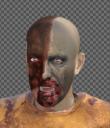
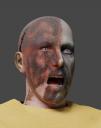


blood rip decals .JPG
396 x 462 - 36K
blood rip decals missing blender .JPG
483 x 614 - 36K

Comments

  • PadonePadone Posts: 4,001
    December 2021 edited December 2021

    If you mean diffeomorphic then decals are not supported. Only geoshells and layered images are supported. This may be a feature request for @ThomasLarsson. But from what I understand he seems to prefer to add decals directly in blender.

    http://diffeomorphic.blogspot.com/2020/12/decals.html


    edit. As a side note decals in daz studio are not good for animation because when you pose the figure the decal can't follow. For this you need uv mapping that's different from uv projection. I guess this is why Thomas prefers to make decals in blender.

    Post edited by Padone on December 2021
  • outerdrake7outerdrake7 Posts: 9
    December 2021

    Padone said:

    If you mean diffeomorphic then decals are not supported. Only geoshells and layered images are supported. This may be a feature request for @ThomasLarsson. But from what I understand he seems to prefer to add decals directly in blender.

    http://diffeomorphic.blogspot.com/2020/12/decals.html


    edit. As a side note decals in daz studio are not good for animation because when you pose the figure the decal can't follow. For this you need uv mapping that's different from uv projection. I guess this is why Thomas prefers to make decals in blender.

    I found a solution, i chenge the surface base color to the decal map on the face, it has all the normal and bump maps that i can save to blender and appy them in the exact spot. Im going to use a mix shader with the default skin. Seems like they could add this feature very easily, i basically found a loop hole to extract the maps.

    Saves me time from uv unwrapping or decal editing.


    decal sol ved.JPG
    1240 x 675 - 88K
  • PadonePadone Posts: 4,001
    December 2021 edited December 2021

    What do you mean "they could add this feature very easily" ? If I understand correctly that's exactly what the decal tool by Thomas does in blender. As for daz studio you can use the LIE for that and it will be imported fine.

    Post edited by Padone on December 2021
  • outerdrake7outerdrake7 Posts: 9
    December 2021

    Padone said:

    What do you mean "they could add this feature very easily" ? If I understand correctly that's exactly what the decal tool by Thomas does in blender. As for daz studio you can use the LIE for that and it will be imported fine.

    Daz already does the placement for me. I just need the texture maps, i place them on top of my regular map in photoshop.I'm not denying your method works, but i feel comofrtable just using this easy method. 

Sign In or Register to comment.
Adding to Cart…

Daz 3D is part of Tafi

Connect

DAZ Productions, Inc.
7533 S Center View Ct #4664
West Jordan, UT 84084

HELP

Contact Us

Tutorials

Help Center

Sell Your 3D Content

Affiliate Program

Documentation Center

Open Source

Consent Preferences

JOIN DAZ

Memberships

Blog

About Us

Press

Careers

Bridges

Community

In the Studio

Gallery

Forum

DAZ STORE

Shop

Freebies

Published Artists

Licensing Agreement | Terms of Service | Privacy Policy | EULA

© 2025 Daz Productions Inc. All Rights Reserved.

