• Daz 3D
  • Shop
  • 3D Software
    • Daz Studio Premier
    • Daz Studio
    • Install Manager
    • Partnerships
    • AI Training data
    • Exporters
    • Daz to Roblox
    • Daz to Maya
    • Daz to Blender
    • Daz to Unreal
    • Daz to Unity
    • Daz to 3ds Max
    • Daz to Cinema 4D
  • 3D Models
    • Genesis 9
    • Genesis 8.1
    • Free 3D Models
  • Community
    • Gallery
    • Forums
    • Blog
    • Press
    • Help
  • Memberships
    • Daz Premier
    • Daz Plus
    • Daz Base
    • Compare
  • Download Studio
ADVANCED SEARCH
  • Menu
  • Daz 3D
ADVANCED SEARCH
Add image
  • Shop
  • 3d Software
    • Daz Studio Premier
    • Daz Studio
    • Install Manager
    • Partnerships
    • AI Training data
    • Exporters
    • Daz to Roblox
    • Daz to Maya
    • Daz to Blender
    • Daz to Unreal
    • Daz to Unity
    • Daz to 3ds Max
    • Daz to Cinema 4D
  • 3D Models
    • Genesis 9
    • Genesis 8.1
    • Free 3D Models
  • Community
    • Our Community
    • Gallery
    • Forums
    • Blog
    • Press
    • Help
  • Memberships
    • Daz Premier
    • Daz Plus
    • Daz Base
    • Compare

Notifications

You currently have no notifications.

Loading...
    • Categories
    • Recent Discussions
Daz 3D Forums > 3rd Party Software > Blender Discussion

How to Fix Eyes after Using Daz to Blender Bridge

ironlionironlion Posts: 0
November 2021 in Blender Discussion

I'm having a problem where the irises don't look right after importing to Blender. Anyone know how to fix this in Blender?

It looks like the irises are floating above the white part of the eye or something. There's a white line around the irises and it looks like a shadow underneath. The eyes look great in a Daz render however.
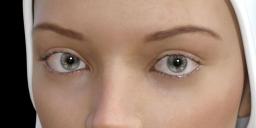
Eyes-Daz.JPG
660 x 322 - 27K
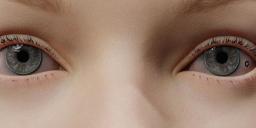
Eyes-Blender.JPG
869 x 317 - 45K

Comments

  • Krys KryngleKrys Kryngle Posts: 311
    November 2021

    I'm not sure exactly, but it helps to use the exact same node set up for the iris, sclera, and pupil.  If those materials are different in any way, you will notice.  If you can post a picture of your node setups that might help.

  • nonesuch00nonesuch00 Posts: 18,722
    November 2021

    Maybe you have selected the wrong UV Sets for the eyes. There is now Genesis 8.1 & Genesis 8 and they both use different UVs. If you use a Genesis 8 materials set on Genesis 8.1 or vice versa, change the UV set chosen to be correct if you picked the wrong one.

Sign In or Register to comment.
Adding to Cart…

Daz 3D is part of Tafi

Connect

DAZ Productions, Inc.
7533 S Center View Ct #4664
West Jordan, UT 84084

HELP

Contact Us

Tutorials

Help Center

Sell Your 3D Content

Affiliate Program

Documentation Center

Open Source

Consent Preferences

JOIN DAZ

Memberships

Blog

About Us

Press

Careers

Bridges

Community

In the Studio

Gallery

Forum

DAZ STORE

Shop

Freebies

Published Artists

Licensing Agreement | Terms of Service | Privacy Policy | EULA

© 2025 Daz Productions Inc. All Rights Reserved.
