Parts of objects fall off in Marvelous Designer simulating
 acdum1857
Posts: 105
acdum1857
Posts: 105
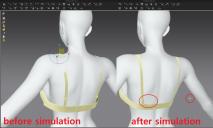
I exported the clothes as obj in blender, and simulated them in MD, then the clips fall off.
(This bra is not made in MD, it is a Daz outfit.)
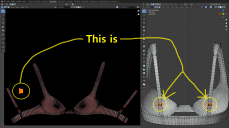
Among the UV islands, those that do not have a vertex connection to the main island fall off. (in this case clips)
This 'fall off' problem occurs with all obj clothes, and also occurs with Blender simulations.
(But I use MD because blender simulation gives bad results.)
So, what I've tried to solve the fall off is :
1) Before exporting, separate only the clips, then join it after MD simulation.
However, since this changes the UV, the existing texture does not match.
2) After MD simulation, only the clips that have fallen off move to their original positions.
But this is too hard as it has to be done every time it is simulated.
Any other suitable solutions?
Please advise.

Daz 3D is part of 
Connect
DAZ Productions, Inc.
7533 S Center View Ct #4664
West Jordan, UT 84084
Licensing Agreement | Terms of Service | Privacy Policy | EULA
© 2026 Daz Productions Inc. All Rights Reserved.
Comments
You could pin the clips where you want them, that is, position the clips part of the bra and exclude them from the simulation. Then simulate the rest of the bra. But personally, if fitting the bra is all you need, I'd rather try to shrinkwrap in blender first.
Thank you for answer.
I also posted this on the BA forums and had similar discussions.
https://blenderartists.org/t/parts-of-objects-fall-off-in-marvelous-designer-simulating/1334280/7
In conclusion, I prefer to use MD simulation rather than Blender simulation.
This is because Blender Simulation is fine for normal clothes, but not suitable for close-fitting clothes such as underwear.
In your case what I'm proposing is shrinkwrap that's not a simulation.
https://bitbucket.org/Diffeomorphic/import_daz/issues/226/importing-the-daz-smoothing-modifier
I thought I'd explain why I use MD simulation first.
Daz's auto-fitting is definitely a convenient and great feature, but it's not satisfactory for those who want something more realistic.
The images below are just some examples.
This problem occurs with most clothes, and the more the character's body is deformed, the larger the pose, the greater the distortion.
This is because, as you know, clothes are autofitted along the geometry of the figure.
In the case of low distortion, I only need to edit or sculpt a little in Blender, but in cases where the distortion is large and occurs in many places, a simulation-like method is more efficient and effective.
This may sound too finicky, but I'm trying to implement it even if it takes time, as I'm considering a very effective-efficient and at the same time high quality modeling and animation.
In the long run, it will greatly shorten my work time.
So, after testing shrink wrap, soft wrap, simulation, soft body, fit control, etc., in many cases, especially for underwear, the MD simulation had the least destruction and the most realistic fit.
Of course, I used the original clothes from Daz that are not worn on the figures.
For this reason, the shrink wrap you mentioned seems a bit far from my purpose.
(If you said something else, I may have misunderstood.)
It seems that the results of your discussion on the link page are organized into the 'Visibility Section'.
A while ago, I referenced it to effectively change and manage clothes in Blender.
(I am always grateful for the work of you and Thomas.)
Yes the daz autofit works following the figure morphs and tends to distort some areas. Unless the outfit provides a custom shape for the figure. I agree in this case some simulation may help to limit the distortions.