• Daz 3D
  • Shop
  • 3D Software
    • Daz Studio Premier
    • Daz Studio
    • Install Manager
    • Partnerships
    • AI Training data
    • Exporters
    • Daz to Roblox
    • Daz to Maya
    • Daz to Blender
    • Daz to Unreal
    • Daz to Unity
    • Daz to 3ds Max
    • Daz to Cinema 4D
  • 3D Models
    • Genesis 9
    • Genesis 8.1
    • Free 3D Models
  • Community
    • Gallery
    • Forums
    • Blog
    • Press
    • Help
  • Memberships
    • Daz Premier
    • Daz Plus
    • Daz Base
    • Compare
  • Download Studio
ADVANCED SEARCH
  • Menu
  • Daz 3D
ADVANCED SEARCH
Add image
  • Shop
  • 3d Software
    • Daz Studio Premier
    • Daz Studio
    • Install Manager
    • Partnerships
    • AI Training data
    • Exporters
    • Daz to Roblox
    • Daz to Maya
    • Daz to Blender
    • Daz to Unreal
    • Daz to Unity
    • Daz to 3ds Max
    • Daz to Cinema 4D
  • 3D Models
    • Genesis 9
    • Genesis 8.1
    • Free 3D Models
  • Community
    • Our Community
    • Gallery
    • Forums
    • Blog
    • Press
    • Help
  • Memberships
    • Daz Premier
    • Daz Plus
    • Daz Base
    • Compare

Notifications

You currently have no notifications.

Loading...
    • Categories
    • Recent Discussions
Daz 3D Forums > 3rd Party Software > Blender Discussion

DAZ to Blender Bridge 2.4.0: command in DTB window buggy / python error

tdint_9b0a5754f9tdint_9b0a5754f9 Posts: 1
October 2021 in Blender Discussion

Dear all,

first of all I would like to express my gratitude to all of you amazing people out there who create and help to

improve these awesome add-ons. Thank you

The ordinary figure importing of DAZ characters into Blender already works like a charm. You guys really rock.

Unfortunately I lately encounter an error when trying to execute the command (search) function located at the 

very bottom of the DTB window.

I followed along the manual and took every step as described. Despite successful import of my character

the command button in the DTB window vanishes however. 

After some time or actions (so far I have no clou what causes the command button to disappear) the command

buttons returns again however creating a python error message when hitting the button "command"

You can find an screenshot of the python error message attached.

In addition at mouse over the info undocumented operator appears in brackets as a small pop up window.

While doing some research about the bug, I found an unsolved issue of some user called SionSavior dating

back to April 20th of this year who apparently is having the same problems since.

So I really hope that you guys find some interest and time in investigating into this bug.

Thank you for your help and effort in advance.

P.S. I am using Blender version 2.93.4 with DTB 2.4 and DAZ Studio 4.15.0.2 pro edition (64-bit)
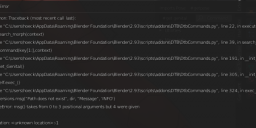


Screenshot 2021-10-03 222551.png
737 x 318 - 100K
Sign In or Register to comment.
Adding to Cart…

Daz 3D is part of Tafi

Connect

DAZ Productions, Inc.
7533 S Center View Ct #4664
West Jordan, UT 84084

HELP

Contact Us

Tutorials

Help Center

Sell Your 3D Content

Affiliate Program

Documentation Center

Open Source

Consent Preferences

JOIN DAZ

Memberships

Blog

About Us

Press

Careers

Bridges

Community

In the Studio

Gallery

Forum

DAZ STORE

Shop

Freebies

Published Artists

Licensing Agreement | Terms of Service | Privacy Policy | EULA

© 2025 Daz Productions Inc. All Rights Reserved.

