• Daz 3D
  • Shop
  • 3D Software
    • Daz Studio Premier
    • Daz Studio
    • Install Manager
    • Partnerships
    • AI Training data
    • Exporters
    • Daz to Roblox
    • Daz to Maya
    • Daz to Blender
    • Daz to Unreal
    • Daz to Unity
    • Daz to 3ds Max
    • Daz to Cinema 4D
  • 3D Models
    • Genesis 9
    • Genesis 8.1
    • Free 3D Models
  • Community
    • Gallery
    • Forums
    • Blog
    • Press
    • Help
  • Memberships
    • Daz Premier
    • Daz Plus
    • Daz Base
    • Compare
  • Download Studio
ADVANCED SEARCH
  • Menu
  • Daz 3D
ADVANCED SEARCH
Add image
  • Shop
  • 3d Software
    • Daz Studio Premier
    • Daz Studio
    • Install Manager
    • Partnerships
    • AI Training data
    • Exporters
    • Daz to Roblox
    • Daz to Maya
    • Daz to Blender
    • Daz to Unreal
    • Daz to Unity
    • Daz to 3ds Max
    • Daz to Cinema 4D
  • 3D Models
    • Genesis 9
    • Genesis 8.1
    • Free 3D Models
  • Community
    • Our Community
    • Gallery
    • Forums
    • Blog
    • Press
    • Help
  • Memberships
    • Daz Premier
    • Daz Plus
    • Daz Base
    • Compare

Notifications

You currently have no notifications.

Loading...
    • Categories
    • Recent Discussions
Daz 3D Forums > 3rd Party Software > Blender Discussion

DAE file not importing as expected

tam_c3df5332fctam_c3df5332fc Posts: 122
September 2021 in Blender Discussion

Hey guys,

I tried posting the following on the Blender exchange, but no one has replied yet, so I am hoping that since this involves Daz3d, that maybe you guys have a solution.

I am trying to import a guitar strap from Daz to Blender. When I try to use the Daz to Blender bridge, then the object does not look good at all. Kind of mangled/distorted and not even on the same axis.

As a workaround, I exported the guitar strap from Daz as a Collada .dae file, which brings me to my situation.

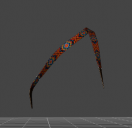
It imports the file, but not as expected. There are dots drawn exactly where I would like the guitar strap to be, but yet the actual guitar strap is found on the floor -- see attached screen shot

What can I do to make the strap line up with the dots?

Thanks in advance

Screen Shot 2021-09-14 at 9.40.03 AM.png
1212 x 898 - 323K
Screen Shot 2021-09-14 at 9.40.32 AM.png
299 x 290 - 20K

Comments

  • tam_c3df5332fctam_c3df5332fc Posts: 122
    September 2021

    In case someone else goes through this, then I have posted my workaround at the following, which includes step by step instructions with pics

    https://blender.stackexchange.com/questions/238101/dae-file-not-importing-as-expected

  • PadonePadone Posts: 3,998
    September 2021

    try diffeo

    http://diffeomorphic.blogspot.com/p/daz-importer-version-16.html

Sign In or Register to comment.
Adding to Cart…

Daz 3D is part of Tafi

Connect

DAZ Productions, Inc.
7533 S Center View Ct #4664
West Jordan, UT 84084

HELP

Contact Us

Tutorials

Help Center

Sell Your 3D Content

Affiliate Program

Documentation Center

Open Source

Consent Preferences

JOIN DAZ

Memberships

Blog

About Us

Press

Careers

Bridges

Community

In the Studio

Gallery

Forum

DAZ STORE

Shop

Freebies

Published Artists

Licensing Agreement | Terms of Service | Privacy Policy | EULA

© 2025 Daz Productions Inc. All Rights Reserved.