• Daz 3D
  • Shop
  • 3D Software
    • Daz Studio Premier
    • Daz Studio
    • Install Manager
    • Partnerships
    • AI Training data
    • Exporters
    • Daz to Roblox
    • Daz to Maya
    • Daz to Blender
    • Daz to Unreal
    • Daz to Unity
    • Daz to 3ds Max
    • Daz to Cinema 4D
  • 3D Models
    • Genesis 9
    • Genesis 8.1
    • Free 3D Models
  • Community
    • Gallery
    • Forums
    • Blog
    • Press
    • Help
  • Memberships
    • Daz Premier
    • Daz Plus
    • Daz Base
    • Compare
  • Download Studio
ADVANCED SEARCH
  • Menu
  • Daz 3D
ADVANCED SEARCH
Add image
  • Shop
  • 3d Software
    • Daz Studio Premier
    • Daz Studio
    • Install Manager
    • Partnerships
    • AI Training data
    • Exporters
    • Daz to Roblox
    • Daz to Maya
    • Daz to Blender
    • Daz to Unreal
    • Daz to Unity
    • Daz to 3ds Max
    • Daz to Cinema 4D
  • 3D Models
    • Genesis 9
    • Genesis 8.1
    • Free 3D Models
  • Community
    • Our Community
    • Gallery
    • Forums
    • Blog
    • Press
    • Help
  • Memberships
    • Daz Premier
    • Daz Plus
    • Daz Base
    • Compare

Notifications

You currently have no notifications.

Loading...
    • Categories
    • Recent Discussions
Daz 3D Forums > 3rd Party Software > Blender Discussion

How do I deform mesh according to bone scale in edit mode?

acdum1857acdum1857 Posts: 105
July 2021 edited July 2021 in Blender Discussion

I am using Diffeomorphic.

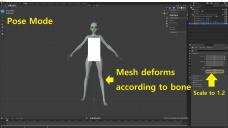
What I want to do is if I scale the bones, the mesh will also deform accordingly. (as in Daz)

Some transforms are reset when exporting a figure from daz, so this is to restore them manually in blender.


The problem is that when I scale the bones in pose mode the mesh is also deformed, but not in edit mode.

Changes made in the pose mode are not reflected in the edit mode.
(This seems to be because the original object can only be transformed in edit mode.)


So I tried to scale the bones in edit mode, but the mesh didn't deform.

How do I make the mesh deform according to the bone in edit mode?

Or is there a way to keep the transform values ​​when exported from Daz?

1.jpg
2560 x 1440 - 1M
2.jpg
2560 x 1440 - 1M
Post edited by acdum1857 on July 2021

Comments

  • PadonePadone Posts: 4,003
    July 2021

    you can't, blender doesn't support "morphing" armatures as genesis does

  • PerttiAPerttiA Posts: 10,024
    July 2021

    If you look at different height morphs, you see that while some of them are scaling the length of the bones there are also those that instead of scaling the length, specify new start and end points - These work better even in DAZ when fitting items (clothing/hair) on the figures.

  • acdum1857acdum1857 Posts: 105
    July 2021

    Padone said:

    you can't, blender doesn't support "morphing" armatures as genesis does

    Thanks for the reply Pedone.
    Yes, I'll just do it in pose mode or sculpt mode. 

  • acdum1857acdum1857 Posts: 105
    July 2021

    PerttiA said:

    If you look at different height morphs, you see that while some of them are scaling the length of the bones there are also those that instead of scaling the length, specify new start and end points - These work better even in DAZ when fitting items (clothing/hair) on the figures.

    Thanks for the reply :D 

Sign In or Register to comment.
Adding to Cart…

Daz 3D is part of Tafi

Connect

DAZ Productions, Inc.
7533 S Center View Ct #4664
West Jordan, UT 84084

HELP

Contact Us

Tutorials

Help Center

Sell Your 3D Content

Affiliate Program

Documentation Center

Open Source

Consent Preferences

JOIN DAZ

Memberships

Blog

About Us

Press

Careers

Bridges

Community

In the Studio

Gallery

Forum

DAZ STORE

Shop

Freebies

Published Artists

Licensing Agreement | Terms of Service | Privacy Policy | EULA

© 2025 Daz Productions Inc. All Rights Reserved.