A modified (bituka3d) Gas Station
 run4real
Posts: 94
run4real
Posts: 94
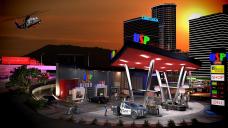
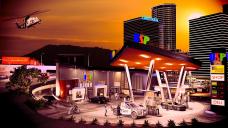
Normally I produce movies and no pictures, but since there was a discussion regarding the bituka3d gas station - https://www.daz3d.com/bituka3d-gas-station - because the creator unfortunately put his own name all over the product, I tried to modify the Gas Station (got it for $1.99) with the Geometry Editor and as a goal to completely remove the bituka3d name orgy as an example for other products as well and for those who are interested in this particular product and whether this is an efficient solution in Daz Studio to remove something unwanted without any external software. Well, it's a solution!
Example 1
rendered in DS with an old 4GB GPU GTX760 3840x2160px without pp but several layers
(no RTX 3090 necessary to do this!)
Example 2
3840x2160 with photoshop pp
The example is nothing special but was completely made with 3d models from Daz Store for those are interested in some of the models.
Gas Station from bituka3d
https://www.daz3d.com/bituka3d-gas-station
Police cars from Polish
https://www.daz3d.com/police-vehicles-bundle
Buildings Airport Island - City Center
from Perry Walinga
http://www.daz3d.com/airport-island-city-center
LoREZ Figures from Predatron
http://www.daz3d.com/lorez-police-us1
https://www.daz3d.com/lorez-casual-man-1
Other figures from Daz
Monique 6 and 7
Helicopter from DarkMatter
http://www.daz3d.com/rotor-heads-gdds76-helicopter
Bike from Billy-T
https://www.daz3d.com/custom-bike-type-1-2
Truck from petipet
http://www.daz3d.com/big-bill-truck

Daz 3D is part of 
Connect
DAZ Productions, Inc.
7533 S Center View Ct #4664
West Jordan, UT 84084
Licensing Agreement | Terms of Service | Privacy Policy | EULA
© 2026 Daz Productions Inc. All Rights Reserved.
Comments
looks pretty good
Hello, Nice renders! I have the same graphics card and I'm too cheap and lazy to upgrade. Would you please mind sharing a few screen grabs of your render settings tabs? I've never got my card to render, my DS renders from the CPU. I'm grateful for any help from anyone. I'm interested in seeing the Render Settings Advanced Tab, and or any other tab that will show me how to get DAZ to render using the card. I would like to be able to do some renders like that. It's also possible I need to change some settings in the Nvidia control panel. Thanks in advance!
That looks great, modeller! Much improved over the original.
Thanks for all the comments.
First of all you have to use Daz Studio 4.12.1.118 as the latest working edition of DS for this type of GPU because it's a Kepler architecture and it was depreciated by Daz, therefore DS 4.15 won't work. I still use Windows 7 64bit with this GPU and NVidia driver 466.77. (see attachments)
I use other GPU's and Windows 10 machines for my animations, but I wanted to show that it's possible to render a complex scene with an old machine and minimal hardware and software requirements as well, because not all people have new machines and the latest GPU, roughly speaking you are able to render every possible scene with an old GTX 760... if you have the time of course :-)
All depends on layers! If you would like to render a big scene like this (more than 4GB VRAM) you have to split the scene in multiple small layers and at the end you have to assemble and to put on top of each other all parts in a correct order. Hope this helps.
Daz has no input on what Nvidia does with Iray.
Thank you for your comment and that's correct Gordig, but my hint wasn't meant as an accusation to Daz and was meant more as an information for people who didn't realize the fact that you can't use a GTX 760 with DS 4.15 anymore, because Daz has choosen to use a newer SDK for DS 4.15, this is a normal development and has to do with NVidia of course, at least as far as I know.
"Thanks for all the comments. First of all you have to use Daz Studio 4.12.1.118 as the latest working edition of DS for this type of GPU because it's a Kepler architecture and it was depreciated by Daz, therefore DS 4.15 won't work."
Your render looks amazing and thank you so much for the information!
Yes I have version 4.15 so I just opend a support ticket and requested 4.12.1.118
Thanks again!!
I'm really blown away by the layout of all the things you put in the scene. That scene must have taken forever to put together.
May I ask? What was your render time?
Your renders do indeed look great! My question is in regard to your statement about animations.
"use other GPU's and Windows 10 machines for my animations," Could you please elaborate
more. I now pricing an addition system to build scenes in layers for sequential frame animations.
using Daz for animations does not seem to be time efficient.
You did a fantastic job on this! I bought this at 1.99 USD also with goal of doing something like this. Out of curiosity, how long did it take you once you got started to do just the edits? Is the lettering above the gas pump overhead roofing using 3D text letter models or did you set up billboards or something else?
Thank you for all the nice comments above, but I have to say, it was simply a test rendering to show how you could alter the product with a minimum effort and the scene is nothing special in my view and by far not perfect, the background is my own picture I took with my camera years ago at an airport.
But in answering your questions, it took about 10 minutes to do just the edits and all content in the scene is no fake, instead all models are real 3d models, therefore the lettering above the gas pump overhead roofing are real 3D text letters indeed too.
In answering your questions, I use several GTX 1070TI for animation purposes (old GPU's too) and some XEON CPU's (old 5520 CPU's) with Supermicro Mainboards and AMD Ryzen 7 Processors as well, I never use the newest and latest tech things,I try always to keep down costs in order that I'm able to afford my own server farm. If you use several techniques like layers etc. ("Dreamlight" has some good tutorials) Daz can be time efficient, but I use a lot of external software to complete my tasks too of course. I own dozens of tools and applications to fullfill my tasks, from Zbrush to Lightwave3d to Silo to Marvelous Designer to Hitfilm to Blackmagic Design etc. to name just a few, I guess many other artists do the same.
In answering your question, after I prepared all the layers, the rendering time took about 2 hours with my old machine W7 and 2x GTX760 + 2 Xeon CPU's, since I wanted to show that it is possible to render a complex scene with old hardware, because not all artists have access to the latest and greatest hardware available.
Thanks for answering my questions. I thought I'd share my interpretation just as a thanks for you inspiring me to actually do what I thought I wanted to do. (To be honest, it was probably not going to come to fruitation without some inspiration.)
I went a different route on the lettering since I didn't want to fiddle with individual letter objects so I used Photoshop CS 5 Extended to make my lettering, car wash figure, and pennants. I saved those as obj files. (I think 3d Repousse feature is included in CS 6 ...definitely CC. This feature was an extra purchase option for Photoshop CS5).
Thanks to this exercise I learned how to duplicate objects and save things as scene subsets. I also actually used the 3D extended feature I paid extra for with CS 5. So, win win. :)
Image is not really final...just sky and a pattern for ground just to show what YOU inspired me to do. Again, THANKS for inspiring me to actually do what I thought I wanted to do and learning some new stuff.
BTW, Sooooo much stuff had that branding! I got the main stuff but after a while I was like yeah that can stay that way. I figure who is really going to concentrate on the small stuff like what the coffee machine or chips say. I purposely left the water poster cause why not.
Attached is a view of the gas station using my choice of shaders and branding changes...and deletions because yeah can have too many logos in my book. BTW, anyone redoing this be aware there are copies of the advert sticker stuff in emission channels. I changed out mine and was like "What, what" because the changes did not render out. Then, I checked in the surface pane and was like, "Oh, I see you." hiding yourself in the emissions channel.
Edit: Oh yeah, I also got to use Rex HD. Hey, what is naming a Gas Station after a dinosaur ending astroid worth if you can't include one of the doomed.
Hey! Your interpretation of the GasStation looks good - fresh looking colors - and I like the flags too! Congratulations for your project!
edit (flags): I think it's called "Decorative Pennant Banner" and not "flags" anyway, with all the details in that it is successful. What about multi-colored Pennant Banners?
I just did them fast and nasty. I used an eps that I downloaded then converted that into custom shapes. I exported those as objects then just applied some shaders. I used these shaders: https://www.daz3d.com/ultrueviolet-light-and-glowing-shaders-for-daz-studio used the same shaders for the other gas station parts. I think I will probably do the pennants colors in post....easy fix. For the overall image, I'm kind of thinking of doing and "inronry" image with comet coming down...not set on this idea but it's swirling in the brain.
Edit: To remove that semi collin that gives an opps.
Edit" GEEZZZ I don't even know what I mean on that semi collin statement. LOL
t
OMG....shouldn't drink too much before posting. LOL The spelling and grammar...LOL
https://www.daz3d.com/ultrueviolet-light-and-glowing-shaders-for-daz-studio
Edit" I don't know why but stupid paste wants to add an ; that makes the http page turn into an OOPs. GGGGRRRRR
Well, as I understand it, you have an apocalyptic vision in mind as the bottom line for your project (Comet and Dinosaur and GasStation). This isn't an easy task to combine in order that it makes sense for a viewer!

Will you post the result as soon as it is finished?