I can't figure out the coloring on Time Honored Entrance
 jhogenboom_da69c035a9
Posts: 127
jhogenboom_da69c035a9
Posts: 127
Hi,
I'm not sure if I'm in the right place. I just picked up Time Honored Entrance and I can't figure out how to change colors. I want the blue stone to be stone-colored, but I can't figure out how it got to be blue in the first place. It doesn't appear to be in the jpeg in the diffuse color or in any of the channels. How did Andrey Pestryakov do it?
Thanks for your help.
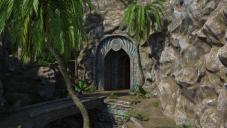
Time honored entrance.jpg
1087 x 614 - 629K

Daz 3D is part of 
Connect
DAZ Productions, Inc.
7533 S Center View Ct #4664
West Jordan, UT 84084
Licensing Agreement | Terms of Service | Privacy Policy | EULA
© 2026 Daz Productions Inc. All Rights Reserved.
Comments
Is it glossy and picking up a sky colour?
Maybe there is a blue map in the diffuse overlay color. Or maybe there is a geometry shell with the blue overlay. Or maybe LIE was used.
I've been poking around on this, and I tried removing every single base color map from everything that isn't a plant, but I still get this:
I'm showing hidden objects in the scene view, and hidden nodes in the surface pane, but I still don't see what's responsible. This suggests to me that the custom shader he used for a lot of the objects has map slots that are somehow completely invisible to the user.
Here's the same scene with the Uber base applied to those same surfaces, so yeah, it's definitely some dark magic going on with the custom shader.
Messing around in the Shader Mixer for the first time, I figured out how to edit those colors, giving me the following:
If you're feeling adventurous, the L5 blocks at the top of the window are responsible for those color changes, at least on the arch. I haven't touched the rocks yet, but I imagine the layout would be pretty similar. As I said, I've never done anything in Shader Mixer before, so I don't know how to make those parameters editable in the Surface pane.
Oh, wow, you've really been working hard. I know next to nothing about Shader Mixer. Looks like this is my chance to learn all about it. Thank you so much.
It took a while to find the color control I wanted on the rocks, but here it is with stone-colored stone. Thanks for the help.
Nice, work on the color change. It looks good.
Maybe you want to share how you have achieved it.
Sure. I followed Gordig's suggestion. I clicked on the surface I wanted to change with the surface selection tool. Then I went to the shader mixer tab and clicked on File>Import from scene>Material. Then I slid the zoom slider to 100% so I could see what I was doing and went looking for L5 (Thanks to Gordig who found that for me). Under L5-1 and L5-2 (at the top and toward the right of the Shader Mixer) there are image ID dropdowns under Inputs that have the colors. I changed those from blues to browns and now I have stone-colored stone.