G8Figures UV Baking Question...
 Write Idea
Posts: 493
Write Idea
Posts: 493
Really not sure if this is a DAZ3D or Blender question...
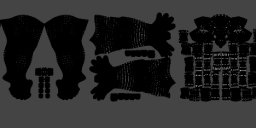
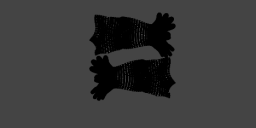
In a nutshell, I'm trying to create a normal map with a G8 figure, however, most of the UV maps are outside of the UV box (not really a technical term).
1) Do I need to do a different way of exporting the figure from DAZ-to-Blender?
2) Or Is there a way to center the needed UV map to the image box?
Below are attached images of what I'm referring to. Thank you in advance!
Blender01.png
1161 x 234 - 44K
Blender02.png
1161 x 234 - 9K

Daz 3D is part of 
Connect
DAZ Productions, Inc.
7533 S Center View Ct #4664
West Jordan, UT 84084
Licensing Agreement | Terms of Service | Privacy Policy | EULA
© 2026 Daz Productions Inc. All Rights Reserved.
Comments
I'm thinking you want to watch some tutorials on UDIM's. That is the term for splitting out multiple maps on one object. I know you can move the maps by changing the x value in the UV editor, but that is about all I know. I tried watching videos on UDIM's but they are so intensely boring I can't finish them.
Thank you very much!
You should not need to, nor really want to, move stuff around on the UDIM/UV for the genesis figures. The parts are all arranged well, and on multiple UDIM tiles, to start with.
This is the video that helped me figure it out back when everyone still said blender can't do it. He goes really fast, so it helps to slow down the playback speed.
https://www.blendernation.com/2019/12/18/blender-2-82-new-udim-texture-painting-features/
Like with many tasks in Blender, getting everything set up for the specific purpose is the hard part. I guess that's the main drawback with software that can do pretty much anything. I advise saving a blender file after you get the whole thing figured out, because then you can just keep reusing that file over and over again for every set of surfaces you create.
I think it should be pointed out that you don't have to work with UDIMs. Frankly Blender's UDIM workflow is not that great at the moment* - it's a bit of a pain to set up. The point of UDIMs is to have a single material for all texture sets, but you may not need or even want that.
So to answer your question 2) yes you can pretty easily move the UVs so they are all within the 0..1 range.
The UVs for each texture set (UDIM tiles) are spaced in whole number increments. So to move the torso UVs for example, you'd want to select all of the torso faces in the UV editor and type G then X then -1. For the legs you'd select those faces and type G X -2, and so on.
PS when you export from Daz to some file formats like OBJ or FBX, there is the option "collapse UV tiles" which will do this automatically. But the Daz to Blender addon does not have this option - maybe they should add it.
*edit: actually blender doesn't even support baking to UDIM tiles yet so you can't even use them for your purposes
The point of udim is not to have a single material, but a single texture set. That's two different things. Then if materials are based on pbr painting as substance painter does, it may happen that texture sets and materials are related, but this is not the case with daz figures.