Error when SubDiv1-2 on Daz to Blender Bridge
 vladtalto
Posts: 0
vladtalto
Posts: 0
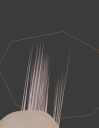
Hi all, I've started using 'Daz to Blender' Bridge and when the option comes up I select Subdiv0, those works fine (mostly), but I want my models to have more detail so I've trying to use Subdiv 1 or 2 when using the bridge. While most of the details are often brought in, for some reason every model I've tried that has been morphed either using daz morphs or zbrush has had an issue. It almost always occurs only in the face where needle like-projects jut either from the back or the front of the face as shown in the image. Only the base un-altered Gen8 models seems to come in without issue. Does anyone know why this may be occurring or any suggestions of what I can do to fix it?
Another issue I've had is green-tenting around the nails or between creases in the skin during any variation of Subdiv when using altered models. I'll post a pick of that one later. Thanks!

Daz 3D is part of 
Connect
DAZ Productions, Inc.
7533 S Center View Ct #4664
West Jordan, UT 84084
Licensing Agreement | Terms of Service | Privacy Policy | EULA
© 2026 Daz Productions Inc. All Rights Reserved.
Comments
The green tinting is an artifact from using Random Walk subsurface scattering. It's a known issue and I don't think there is a fix for it. You will see it anytime there is some intersection between the mesh, such as where the fingernails intersect the skin on the fingers. If anyone knows a fix other than post processing, I'd love to hear it.
Not sure what the fix is for exporting in HD, but you really only need to do that if you are trying to export HD Morphs from DAZ to blender. If you are not exporting HD morphs, you can export at base resolution and add a multi-res or subdivision surface modifer to make the normals/bumps show. If you do want to export HD Morphs, you can either use the Xin add-on and bake displacement maps or, even better, bake the displacement maps in ZBrush.