• Daz 3D
  • Shop
  • 3D Software
    • Daz Studio Premier
    • Daz Studio
    • Install Manager
    • Partnerships
    • AI Training data
    • Exporters
    • Daz to Roblox
    • Daz to Maya
    • Daz to Blender
    • Daz to Unreal
    • Daz to Unity
    • Daz to 3ds Max
    • Daz to Cinema 4D
  • 3D Models
    • Genesis 9
    • Genesis 8.1
    • Free 3D Models
  • Community
    • Gallery
    • Forums
    • Blog
    • Press
    • Help
  • Memberships
    • Daz Premier
    • Daz Plus
    • Daz Base
    • Compare
  • Download Studio
ADVANCED SEARCH
  • Menu
  • Daz 3D
ADVANCED SEARCH
Add image
  • Shop
  • 3d Software
    • Daz Studio Premier
    • Daz Studio
    • Install Manager
    • Partnerships
    • AI Training data
    • Exporters
    • Daz to Roblox
    • Daz to Maya
    • Daz to Blender
    • Daz to Unreal
    • Daz to Unity
    • Daz to 3ds Max
    • Daz to Cinema 4D
  • 3D Models
    • Genesis 9
    • Genesis 8.1
    • Free 3D Models
  • Community
    • Our Community
    • Gallery
    • Forums
    • Blog
    • Press
    • Help
  • Memberships
    • Daz Premier
    • Daz Plus
    • Daz Base
    • Compare

Notifications

You currently have no notifications.

Loading...
    • Categories
    • Recent Discussions
Daz 3D Forums > 3rd Party Software > Blender Discussion

Mesh of characters face get warped (Found FIX)

fox5050fox5050 Posts: 53
June 2021 edited June 2021 in Blender Discussion

So I just tried daz to Blender and my mesh verities on face gets pulled. Can any one guide me on what im doing wrong. Im trying to get my Daz3d character into Unreal Engine for a movie we are making. we need high quality. I tried Daz to Unreal bridges but we dont get high quality so someone suggested I need to bake my mesh. I am tring to learn that now but I noticed when I use daz to blender I get a high quality mesh in Blender with all the veins and muscle definition. So I though maybe I can go from daz to blender to unreal. Here is a photo of my issue. 
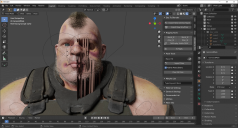
Snap 2021-06-06 at 20.37.04.png
1920 x 1032 - 2M
Post edited by fox5050 on June 2021

Comments

  • TheKDTheKD Posts: 2,711
    June 2021

    For the sake of anyone who might be searching for a solution to the problem in the future, what was the issue and fix for it?

  • fox5050fox5050 Posts: 53
    June 2021

    I figured out the fix. I think it might be with character that are scaled up more then 100%. My guy was at 117.5% so I scaled him down to 100% and everything went great. 

Sign In or Register to comment.
Adding to Cart…

Daz 3D is part of Tafi

Connect

DAZ Productions, Inc.
7533 S Center View Ct #4664
West Jordan, UT 84084

HELP

Contact Us

Tutorials

Help Center

Sell Your 3D Content

Affiliate Program

Documentation Center

Open Source

Consent Preferences

JOIN DAZ

Memberships

Blog

About Us

Press

Careers

Bridges

Community

In the Studio

Gallery

Forum

DAZ STORE

Shop

Freebies

Published Artists

Licensing Agreement | Terms of Service | Privacy Policy | EULA

© 2025 Daz Productions Inc. All Rights Reserved.

