• Daz 3D
  • Shop
  • 3D Software
    • Daz Studio Premier
    • Daz Studio
    • Install Manager
    • Partnerships
    • AI Training data
    • Exporters
    • Daz to Roblox
    • Daz to Maya
    • Daz to Blender
    • Daz to Unreal
    • Daz to Unity
    • Daz to 3ds Max
    • Daz to Cinema 4D
  • 3D Models
    • Genesis 9
    • Genesis 8.1
    • Free 3D Models
  • Community
    • Gallery
    • Forums
    • Blog
    • Press
    • Help
  • Memberships
    • Daz Premier
    • Daz Plus
    • Daz Base
    • Compare
  • Download Studio
ADVANCED SEARCH
  • Menu
  • Daz 3D
ADVANCED SEARCH
Add image
  • Shop
  • 3d Software
    • Daz Studio Premier
    • Daz Studio
    • Install Manager
    • Partnerships
    • AI Training data
    • Exporters
    • Daz to Roblox
    • Daz to Maya
    • Daz to Blender
    • Daz to Unreal
    • Daz to Unity
    • Daz to 3ds Max
    • Daz to Cinema 4D
  • 3D Models
    • Genesis 9
    • Genesis 8.1
    • Free 3D Models
  • Community
    • Our Community
    • Gallery
    • Forums
    • Blog
    • Press
    • Help
  • Memberships
    • Daz Premier
    • Daz Plus
    • Daz Base
    • Compare

Notifications

You currently have no notifications.

Loading...
    • Categories
    • Recent Discussions
Daz 3D Forums > 3rd Party Software > Blender Discussion

Diffeo not working with Daz hair presets.

vindictivepapivindictivepapi Posts: 9
April 2021 in Blender Discussion

Using "Easy Import DAZ" v1.60 button, the hair still imports with the bangs when I've used Matilda's hair preset with bangs OFF. Tips?
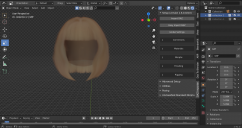
screenshot 1.png
2554 x 1350 - 2M
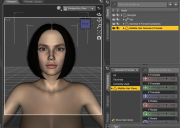
screenshot 2.png
1652 x 1174 - 516K

Comments

  • PadonePadone Posts: 3,986
    April 2021

    Did you export the dbz AFTER bangs off ? Because diffeo reads the geometry on that.

  • vindictivepapivindictivepapi Posts: 9
    April 2021

    Padone said:

    Did you export the dbz AFTER bangs off ? Because diffeo reads the geometry on that.

    Yes I always complete everything first before saving the scene and using "Export To Blender" (dbz). This is very weird. It works completely normal when exported as OBJ but I cannot find a great node setup in blender to have identical iray results. 

  • PadonePadone Posts: 3,986
    April 2021 edited April 2021

    Then it shouldn't happen usually dbz exports exactly what's visible in the viewport. Unless bangs off is using a very "weird" trick to hide the geometry. But luckily we're in blender and you can do anything you want there. You should be able to select the bangs in blender and delete them.

    Just go to edit mode, select the bangs by material and delete.

    material.jpg
    302 x 151 - 10K
    Post edited by Padone on April 2021
Sign In or Register to comment.
Adding to Cart…

Daz 3D is part of Tafi

Connect

DAZ Productions, Inc.
7533 S Center View Ct #4664
West Jordan, UT 84084

HELP

Contact Us

Tutorials

Help Center

Sell Your 3D Content

Affiliate Program

Documentation Center

Open Source

Consent Preferences

JOIN DAZ

Memberships

Blog

About Us

Press

Careers

Bridges

Community

In the Studio

Gallery

Forum

DAZ STORE

Shop

Freebies

Published Artists

Licensing Agreement | Terms of Service | Privacy Policy | EULA

© 2025 Daz Productions Inc. All Rights Reserved.
