• Daz 3D
  • Shop
  • 3D Software
    • Daz Studio Premier
    • Daz Studio
    • Install Manager
    • Partnerships
    • AI Training data
    • Exporters
    • Daz to Roblox
    • Daz to Maya
    • Daz to Blender
    • Daz to Unreal
    • Daz to Unity
    • Daz to 3ds Max
    • Daz to Cinema 4D
  • 3D Models
    • Genesis 9
    • Genesis 8.1
    • Free 3D Models
  • Community
    • Gallery
    • Forums
    • Blog
    • Press
    • Help
  • Memberships
    • Daz Premier
    • Daz Plus
    • Daz Base
    • Compare
  • Download Studio
ADVANCED SEARCH
  • Menu
  • Daz 3D
ADVANCED SEARCH
Add image
  • Shop
  • 3d Software
    • Daz Studio Premier
    • Daz Studio
    • Install Manager
    • Partnerships
    • AI Training data
    • Exporters
    • Daz to Roblox
    • Daz to Maya
    • Daz to Blender
    • Daz to Unreal
    • Daz to Unity
    • Daz to 3ds Max
    • Daz to Cinema 4D
  • 3D Models
    • Genesis 9
    • Genesis 8.1
    • Free 3D Models
  • Community
    • Our Community
    • Gallery
    • Forums
    • Blog
    • Press
    • Help
  • Memberships
    • Daz Premier
    • Daz Plus
    • Daz Base
    • Compare

Notifications

You currently have no notifications.

Loading...
    • Categories
    • Recent Discussions
Daz 3D Forums > 3rd Party Software > Blender Discussion

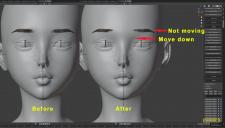
(Diffeomorphic) Eyebrows don't move along the morph.

acdum1857acdum1857 Posts: 105
April 2021 in Blender Discussion

https://diffeomorphic.blogspot.com/p/morphs-section-version-15.html

I imported the facial morphs through'Import Units' referring to the above document and they worked fine.
But the problem is that the eyebrows don't move along the morph.
(The same goes for eyelashes.)
How can I fix this?


I have read the documentation below, but I don't have'Easy Import DAZ'.
The version in the document is 1.6, but the current version is 1.51c.
http://diffeomorphic.blogspot.com/2021/03/easy-import.html

6277.jpg
2527 x 1440 - 1M

Comments

  • PadonePadone Posts: 3,999
    April 2021 edited April 2021

    As for 1.6 you have to get the development version, it's stable enough now to be used. As for the issue you have to merge rigs and trasfer morphs.

    https://diffeomorphic.blogspot.com/p/morphs-section-version-15.html


    Post edited by Padone on April 2021
  • acdum1857acdum1857 Posts: 105
    April 2021 edited April 2021

    Padone said:

    As for 1.6 you have to get the development version, it's stable enough now to be used. As for the issue you have to merge rigs and trasfer morphs.

    https://diffeomorphic.blogspot.com/p/morphs-section-version-15.html


    The problem is solved! You know really well about diffeo.
    Padone Your advice is always of great help.
    Thank you again. :D

    One question.
    Can I get v1.6? Should I wait for the release?
    It doesn't seem to be in bitbucket.

    Post edited by acdum1857 on April 2021
  • PadonePadone Posts: 3,999
    April 2021 edited April 2021

    1.6 is the development version you can get it from bitbucket or the diffeo page. I can't tell when a stable 1.6 will be released, but I definitely advise to use 1.6 since it gets so much better features, from easy import to HD expressions to automatic bump to a better mhx rig. Then now it seems Thomas is working on simulation to import dforce outfits, but this may take a while.

    https://bitbucket.org/Diffeomorphic/import_daz/downloads/?tab=branches

    https://bitbucket.org/Diffeomorphic/import_daz/issues/396/easy-mode

    https://bitbucket.org/Diffeomorphic/import_daz/issues/406/mixing-hd-normal-maps

    https://bitbucket.org/Diffeomorphic/import_daz/issues/433/lets-bump-it-right

    https://bitbucket.org/Diffeomorphic/import_daz/issues/421/the-mhx-ik-chains-for-the-legs-seem

    https://bitbucket.org/Diffeomorphic/import_daz/issues/410/better-dforce

    Post edited by Padone on April 2021
  • acdum1857acdum1857 Posts: 105
    April 2021

    Oh, it was right above the version I used.
    v1.6 works fine. Convenient.
    Thanks for your kind answer :D
    Have a nice day Padone!

  • vlalalavlalala Posts: 0
    August 2022

    Padone said:

    As for 1.6 you have to get the development version, it's stable enough now to be used. As for the issue you have to merge rigs and trasfer morphs.

    https://diffeomorphic.blogspot.com/p/morphs-section-version-15.html


    Hi Padone,


    Sorry for the stupid question. But I could not figure out how to merge rigs for brows and lashes. I just clicked merge rigs button after importing the character and thought that would do it? Then when I pose the character, the cloth followed, but not brows and lashes. Can you explain a little more about this process? Thank you very much!

  • vlalalavlalala Posts: 0
    August 2022

    Padone said:

    As for 1.6 you have to get the development version, it's stable enough now to be used. As for the issue you have to merge rigs and trasfer morphs.

    https://diffeomorphic.blogspot.com/p/morphs-section-version-15.html


    Hi Padone,

    Sorry for the stupid question. But after reading your comments I still can not get it done.

    I clicked the merge rigs button after importing the character. Then the cloth seemed to follow my posing, but the eyelashes and brows never moved.

    Also how to transfer morphs? I only found a transfer keyshape button, but some morph like eyes close are not in there.

    Thank you very much!


Sign In or Register to comment.
Adding to Cart…

Daz 3D is part of Tafi

Connect

DAZ Productions, Inc.
7533 S Center View Ct #4664
West Jordan, UT 84084

HELP

Contact Us

Tutorials

Help Center

Sell Your 3D Content

Affiliate Program

Documentation Center

Open Source

Consent Preferences

JOIN DAZ

Memberships

Blog

About Us

Press

Careers

Bridges

Community

In the Studio

Gallery

Forum

DAZ STORE

Shop

Freebies

Published Artists

Licensing Agreement | Terms of Service | Privacy Policy | EULA

© 2025 Daz Productions Inc. All Rights Reserved.

