• Daz 3D
  • Shop
  • 3D Software
    • Daz Studio Premier
    • Daz Studio
    • Install Manager
    • Partnerships
    • AI Training data
    • Exporters
    • Daz to Roblox
    • Daz to Maya
    • Daz to Blender
    • Daz to Unreal
    • Daz to Unity
    • Daz to 3ds Max
    • Daz to Cinema 4D
  • 3D Models
    • Genesis 9
    • Genesis 8.1
    • Free 3D Models
  • Community
    • Gallery
    • Forums
    • Blog
    • Press
    • Help
  • Memberships
    • Daz Premier
    • Daz Plus
    • Daz Base
    • Compare
  • Download Studio
ADVANCED SEARCH
  • Menu
  • Daz 3D
ADVANCED SEARCH
Add image
  • Shop
  • 3d Software
    • Daz Studio Premier
    • Daz Studio
    • Install Manager
    • Partnerships
    • AI Training data
    • Exporters
    • Daz to Roblox
    • Daz to Maya
    • Daz to Blender
    • Daz to Unreal
    • Daz to Unity
    • Daz to 3ds Max
    • Daz to Cinema 4D
  • 3D Models
    • Genesis 9
    • Genesis 8.1
    • Free 3D Models
  • Community
    • Our Community
    • Gallery
    • Forums
    • Blog
    • Press
    • Help
  • Memberships
    • Daz Premier
    • Daz Plus
    • Daz Base
    • Compare

Notifications

You currently have no notifications.

Loading...
    • Categories
    • Recent Discussions
Daz 3D Forums > 3rd Party Software > Blender Discussion

Daz to Blender- Surface settings

wjpblathwaytwjpblathwayt Posts: 45
March 2021 edited March 2021 in Blender Discussion

Hello

thank you for taking the time to read my post.

I'm stuck, and I don't know what i'm doing (Double threat!)

So, I've changed Amy_aimei's great ST uniforms to be TOS, however, I'm stuck at one spot.  The uniform is glossy.  In DAZ, I've removed all gloss settings, in Blender and this type of surface setting (below), I cant find 'gloss' or 'specular' settings in this set of options.

What can I do to make this more clothy?

Thank you

 

GLOSSY UNIFORM.png
549 x 553 - 311K
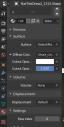
Capture settings.JPG
228 x 454 - 26K
Post edited by wjpblathwayt on March 2021

Comments

  • margravemargrave Posts: 1,822
    March 2021

    That looks like a custom shader. How did you import it, using the official Daz bridge?

    What does it look like in the Shader Editor?

  • Krys KryngleKrys Kryngle Posts: 311
    March 2021 edited March 2021

    Node setups for Cycles attached.  Don't know about Eevee. 

    There are some shading artifacts in the render but I was too lazy to figure out what the issue was.  SubD fixes the artifacts but messes up the black line on the uniform.

    Capture.JPG
    3839 x 1966 - 602K
    Post edited by Krys Kryngle on March 2021
  • margravemargrave Posts: 1,822
    March 2021
    With specularity down to 0.05 and roughness cranked all the way up to 0.95, there should be little if any gloss. You only posted the shader for the black part though, so I can't say about the yellow bit. As to the subsurf, that's a natural consequence of smoothing the vertices. Since the texture map is connected to the UV output, you might be able to fix it by finagling the UVs.
  • wjpblathwaytwjpblathwayt Posts: 45
    March 2021

    Good Morning!

    Thank you for getting back to me so quickly!

    I used the official Daz to Blender utility, and here are my shader settings... From Krampus' post, looks like I've got alot to learn!


    nodes.PNG
    639 x 317 - 46K
  • margravemargrave Posts: 1,822
    March 2021 edited March 2021

    The green node in the center is a node group. Select it and hit tab to go inside the group. Once there, look for "roughness" and turn to all the way up. And/or post a pic of what you see if you want more help.

    Post edited by margrave on March 2021
  • TheKDTheKD Posts: 2,711
    March 2021

    I would click on that default shader node and delete it. Then shift a and drop down a principaled bsdf and rehook up the texture maps to that. Then you will have the controls for roughness, specular etc to fine tune it to your liking.

  • margravemargrave Posts: 1,822
    March 2021

    TheKD said:

    I would click on that default shader node and delete it. Then shift a and drop down a principaled bsdf and rehook up the texture maps to that. Then you will have the controls for roughness, specular etc to fine tune it to your liking.

    From my experience, there is a Principled BSDF inside the node group already.

  • wjpblathwaytwjpblathwayt Posts: 45
    March 2021

    That did it!!  Using the TAB key was the perfect solution!


    Thank you very very much everyone, I've learned alot with this.

  • TheKDTheKD Posts: 2,711
    March 2021

    margrave said:

    TheKD said:

    I would click on that default shader node and delete it. Then shift a and drop down a principaled bsdf and rehook up the texture maps to that. Then you will have the controls for roughness, specular etc to fine tune it to your liking.

    From my experience, there is a Principled BSDF inside the node group already.

    Shoulda refreshed before posting, would have kept me from lookin like a dumbass lol.

  • margravemargrave Posts: 1,822
    March 2021

    TheKD said:

    Shoulda refreshed before posting, would have kept me from lookin like a dumbass lol.

    I would've deleted it too, honestly, but I figured I might as well keep it simple since the OP seemed like a new user. 

  • wjpblathwaytwjpblathwayt Posts: 45
    March 2021

    This is a WIP (fix the seams to TOS), i have more to do, but so far....

    Thank you

    Lt Kagiso.png
    1080 x 1920 - 3M
  • margravemargrave Posts: 1,822
    March 2021

    Here's something else to help you:

    https://docs.blender.org/manual/en/latest/modeling/modifiers/deform/corrective_smooth.html

  • wjpblathwaytwjpblathwayt Posts: 45
    March 2021

    Thanks margrave, something to read while i sit around the house.


Sign In or Register to comment.
Adding to Cart…

Daz 3D is part of Tafi

Connect

DAZ Productions, Inc.
7533 S Center View Ct #4664
West Jordan, UT 84084

HELP

Contact Us

Tutorials

Help Center

Sell Your 3D Content

Affiliate Program

Documentation Center

Open Source

Consent Preferences

JOIN DAZ

Memberships

Blog

About Us

Press

Careers

Bridges

Community

In the Studio

Gallery

Forum

DAZ STORE

Shop

Freebies

Published Artists

Licensing Agreement | Terms of Service | Privacy Policy | EULA

© 2025 Daz Productions Inc. All Rights Reserved.
