• Daz 3D
  • Shop
  • 3D Software
    • Daz Studio Premier
    • Daz Studio
    • Install Manager
    • Partnerships
    • AI Training data
    • Exporters
    • Daz to Roblox
    • Daz to Maya
    • Daz to Blender
    • Daz to Unreal
    • Daz to Unity
    • Daz to 3ds Max
    • Daz to Cinema 4D
  • 3D Models
    • Genesis 9
    • Genesis 8.1
    • Free 3D Models
  • Community
    • Gallery
    • Forums
    • Blog
    • Press
    • Help
  • Memberships
    • Daz Premier
    • Daz Plus
    • Daz Base
    • Compare
  • Download Studio
ADVANCED SEARCH
  • Menu
  • Daz 3D
ADVANCED SEARCH
Add image
  • Shop
  • 3d Software
    • Daz Studio Premier
    • Daz Studio
    • Install Manager
    • Partnerships
    • AI Training data
    • Exporters
    • Daz to Roblox
    • Daz to Maya
    • Daz to Blender
    • Daz to Unreal
    • Daz to Unity
    • Daz to 3ds Max
    • Daz to Cinema 4D
  • 3D Models
    • Genesis 9
    • Genesis 8.1
    • Free 3D Models
  • Community
    • Our Community
    • Gallery
    • Forums
    • Blog
    • Press
    • Help
  • Memberships
    • Daz Premier
    • Daz Plus
    • Daz Base
    • Compare

Notifications

You currently have no notifications.

Loading...
    • Categories
    • Recent Discussions
Daz 3D Forums > 3rd Party Software > Blender Discussion

daz to blender bridge fix eyelashes

100deathpg100deathpg Posts: 0
March 2021 in Blender Discussion

Hello. I use latest version daz to blender bridge. When using shape keys eye-related, eyelashes stay at the same point. Is there a way to solve this problem?
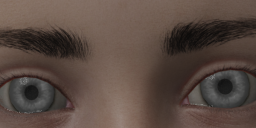
1.png
800 x 300 - 257K
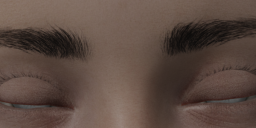
2.png
800 x 300 - 260K
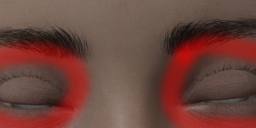
3.png
800 x 300 - 271K

Comments

  • brightwanderer_6642a87f54brightwanderer_6642a87f54 Posts: 0
    March 2021

    This should be fixed in the latest version of the bridge, but make sure you have installed the new version of the Blender Add-On as well as the new version of the Daz script. The script installs automatically into Daz when you use the Install Manager, but instead of updating the Blender add-on directly, it just puts a new version of the add-on into the Blender folder (and doesn't install it). This will mean it still doesn't work. You need to go to the Blender Add-Ons panel, remove the old version of the DTB bridge, and then find the new version in the list and install that instead.

    Now when you export a Genesis 8 figure, you should find that the eyelashes have their own set of shape keys (separate from the eyelids). From there, you can mix those two shape keys to create combined keys for eyelids/eyes. You do this by setting the keys you want to mix to 1, then clicking the "Shape Key Specials" button (arrow on dark square) and "New Shape from Mix". This creates a new shape key at the bottom of the list (called "Key (somenumber)") which will control both eyelids and eyelashes. You can do the same thing for the right and left eye keys. Just make sure you only have the two keys that you want to mix!

  • 100deathpg100deathpg Posts: 0
    March 2021

    brightwanderer_6642a87f54 said:

    This should be fixed in the latest version of the bridge, but make sure you have installed the new version of the Blender Add-On as well as the new version of the Daz script. The script installs automatically into Daz when you use the Install Manager, but instead of updating the Blender add-on directly, it just puts a new version of the add-on into the Blender folder (and doesn't install it). This will mean it still doesn't work. You need to go to the Blender Add-Ons panel, remove the old version of the DTB bridge, and then find the new version in the list and install that instead.

    Now when you export a Genesis 8 figure, you should find that the eyelashes have their own set of shape keys (separate from the eyelids). From there, you can mix those two shape keys to create combined keys for eyelids/eyes. You do this by setting the keys you want to mix to 1, then clicking the "Shape Key Specials" button (arrow on dark square) and "New Shape from Mix". This creates a new shape key at the bottom of the list (called "Key (somenumber)") which will control both eyelids and eyelashes. You can do the same thing for the right and left eye keys. Just make sure you only have the two keys that you want to mix!

    Updated addon in blender.  Many thanks!

Sign In or Register to comment.
Adding to Cart…

Daz 3D is part of Tafi

Connect

DAZ Productions, Inc.
7533 S Center View Ct #4664
West Jordan, UT 84084

HELP

Contact Us

Tutorials

Help Center

Sell Your 3D Content

Affiliate Program

Documentation Center

Open Source

Consent Preferences

JOIN DAZ

Memberships

Blog

About Us

Press

Careers

Bridges

Community

In the Studio

Gallery

Forum

DAZ STORE

Shop

Freebies

Published Artists

Licensing Agreement | Terms of Service | Privacy Policy | EULA

© 2025 Daz Productions Inc. All Rights Reserved.
