• Daz 3D
  • Shop
  • 3D Software
    • Daz Studio Premier
    • Daz Studio
    • Install Manager
    • Partnerships
    • AI Training data
    • Exporters
    • Daz to Roblox
    • Daz to Maya
    • Daz to Blender
    • Daz to Unreal
    • Daz to Unity
    • Daz to 3ds Max
    • Daz to Cinema 4D
  • 3D Models
    • Genesis 9
    • Genesis 8.1
    • Free 3D Models
  • Community
    • Gallery
    • Forums
    • Blog
    • Press
    • Help
  • Memberships
    • Daz Premier
    • Daz Plus
    • Daz Base
    • Compare
  • Download Studio
ADVANCED SEARCH
  • Menu
  • Daz 3D
ADVANCED SEARCH
Add image
  • Shop
  • 3d Software
    • Daz Studio Premier
    • Daz Studio
    • Install Manager
    • Partnerships
    • AI Training data
    • Exporters
    • Daz to Roblox
    • Daz to Maya
    • Daz to Blender
    • Daz to Unreal
    • Daz to Unity
    • Daz to 3ds Max
    • Daz to Cinema 4D
  • 3D Models
    • Genesis 9
    • Genesis 8.1
    • Free 3D Models
  • Community
    • Our Community
    • Gallery
    • Forums
    • Blog
    • Press
    • Help
  • Memberships
    • Daz Premier
    • Daz Plus
    • Daz Base
    • Compare

Notifications

You currently have no notifications.

Loading...
    • Categories
    • Recent Discussions
Daz 3D Forums > 3rd Party Software > Blender Discussion

UDIM, Genesis 8, and texture painting in Blender?

SpaciousSpacious Posts: 481
February 2021 edited February 2021 in Blender Discussion

Ok, so I figured out how to get UDIM set up and working in Blender.  I used this tutorial to get me started.  Just had to slow it down because this guy talks SO fast.
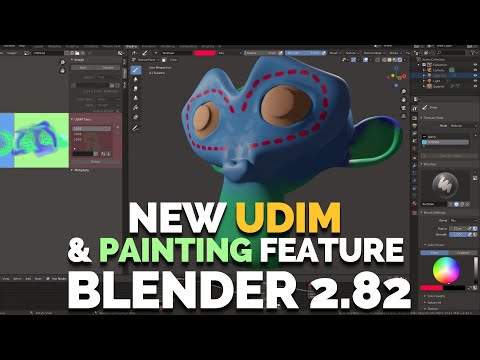
The trouble I'm having, is after painting on the figure and saving the image files I've just painted on, when I save those images and try to apply them to G8F in DAZ it seems that only the face textures import correctly.  The other textures come out kind of blocky and with artifacts.  (Screenshots below in both OpenGL and Iray preview)

I've been googling and trying different settings for bleed in Blender texture paint, and using different sizes for the texure images tro try to get pixel density to match better, painting directly on the UDIM tiles instead of fresh generated images...  Nothing seems to matter, when I put them on G8F back in DAZ it's the same result.

Anyone know what I'm doing wrong?

Edit : Maybe I'm being dumb, and that's all the pixels there are where the face meets the torso on the top of her head.
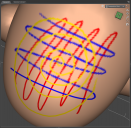
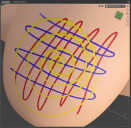
Screenshot 2021-02-18 162447.png
978 x 955 - 798K
Screenshot 2021-02-18 162551.png
976 x 954 - 2M
Post edited by Spacious on February 2021

Comments

  • PadonePadone Posts: 3,999
    February 2021

    udims may have a different resolution for every tile, may be you get a low res udim there

Sign In or Register to comment.
Adding to Cart…

Daz 3D is part of Tafi

Connect

DAZ Productions, Inc.
7533 S Center View Ct #4664
West Jordan, UT 84084

HELP

Contact Us

Tutorials

Help Center

Sell Your 3D Content

Affiliate Program

Documentation Center

Open Source

Consent Preferences

JOIN DAZ

Memberships

Blog

About Us

Press

Careers

Bridges

Community

In the Studio

Gallery

Forum

DAZ STORE

Shop

Freebies

Published Artists

Licensing Agreement | Terms of Service | Privacy Policy | EULA

© 2025 Daz Productions Inc. All Rights Reserved.

