• Daz 3D
  • Shop
  • 3D Software
    • Daz Studio Premier
    • Daz Studio
    • Install Manager
    • Partnerships
    • AI Training data
    • Exporters
    • Daz to Roblox
    • Daz to Maya
    • Daz to Blender
    • Daz to Unreal
    • Daz to Unity
    • Daz to 3ds Max
    • Daz to Cinema 4D
  • 3D Models
    • Genesis 9
    • Genesis 8.1
    • Free 3D Models
  • Community
    • Gallery
    • Forums
    • Blog
    • Press
    • Help
  • Memberships
    • Daz Premier
    • Daz Plus
    • Daz Base
    • Compare
  • Download Studio
ADVANCED SEARCH
  • Menu
  • Daz 3D
ADVANCED SEARCH
Add image
  • Shop
  • 3d Software
    • Daz Studio Premier
    • Daz Studio
    • Install Manager
    • Partnerships
    • AI Training data
    • Exporters
    • Daz to Roblox
    • Daz to Maya
    • Daz to Blender
    • Daz to Unreal
    • Daz to Unity
    • Daz to 3ds Max
    • Daz to Cinema 4D
  • 3D Models
    • Genesis 9
    • Genesis 8.1
    • Free 3D Models
  • Community
    • Our Community
    • Gallery
    • Forums
    • Blog
    • Press
    • Help
  • Memberships
    • Daz Premier
    • Daz Plus
    • Daz Base
    • Compare

Notifications

You currently have no notifications.

Loading...
    • Categories
    • Recent Discussions
Daz 3D Forums > 3rd Party Software > Blender Discussion

Daz To Blender Bridge 2.1.0 --- NOT Exporting selected Morphs!

nuno_senicanuno_senica Posts: 0
February 2021 in Blender Discussion

Hello DAZ Friends,

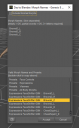
For some reason, the plugin is NOT exporting the morphs I selected in the morph dialog window in DAZ. When the character gets to Blender has no morps at all.

The only way I get some morphs exported is if I check the "Include Minimal Morphs" option but than I get the preset morphs, not my "custom" selected morphs!

I'm using  DAZ 4.15 and Blender 2.91  (64bits)

Is this happening on your end as well? Any suggestions on how to fix this?
 

Thank you!

PS - Is there a way to import CVS rules file with this plugin?
 

MorphExport.PNG
365 x 594 - 30K

Comments

  • ArtiniArtini Posts: 10,298
    February 2021

    No idea about that, but you should post your message in the dedicated forum for Blender:

    https://www.daz3d.com/forums/categories/blender-discussion


  • jestmartjestmart Posts: 4,449
    February 2021

    All those morphs look like they are the controller type that sets bone movements so not really morphs at all.

  • ChoholeChohole Posts: 33,604
    February 2021

    You can move the thread to the blender forum  your self, by selecting a new category in the edit screen (Blender Discussion)


  • nuno_senicanuno_senica Posts: 0
    February 2021

    You are right, just posted there. Thank you.
     

    Artini said:

    No idea about that, but you should post your message in the dedicated forum for Blender:

    https://www.daz3d.com/forums/categories/blender-discussion

  • mxomxo Posts: 32
    February 2021

    nuno_senica said:

    Hello DAZ Friends,

    For some reason, the plugin is NOT exporting the morphs I selected in the morph dialog window in DAZ. When the character gets to Blender has no morps at all.

    The only way I get some morphs exported is if I check the "Include Minimal Morphs" option but than I get the preset morphs, not my "custom" selected morphs!

    I'm using  DAZ 4.15 and Blender 2.91  (64bits)

    Is this happening on your end as well? Any suggestions on how to fix this?

    Same thing is happening for me as well.
    Opening the intermediary FBX file in other software than Blender shows that the morph(s) are there. If the same FBX file is imported manually into Blender the morphs are missing.
    So its likely something broken with Blender - not with Daz or Bridge. I am going to see what happens in older versions of Blender, will report back.

  • mxomxo Posts: 32
    February 2021

    I think maybe this answers it:
    https://docs.blender.org/manual/en/2.91/addons/import_export/scene_fbx.html#missing

    I hope I am wrong.

  • mrkhingmrkhing Posts: 0
    February 2021

    Same issue. Can't export any morphs except the "minimal morphs" which are correctly exported for some reason.

  • fxgovers_429568cb8efxgovers_429568cb8e Posts: 2
    April 2021

    Hi.  I found a working solution.  Use the "Daz Studio (1 unit = 1 cm) setting.  Click "show individual settings" .  Set the scale to 10000%  (yes, 10,000)

    Load your morph.

    Worked for me.

    Best of luck!

  • sllkd005sllkd005 Posts: 0
    November 2021

    fxgovers_429568cb8e said:

    Hi.  I found a working solution.  Use the "Daz Studio (1 unit = 1 cm) setting.  Click "show individual settings" .  Set the scale to 10000%  (yes, 10,000)

    Load your morph.

    Worked for me.

    Best of luck!

    Can you elaborate on what you mean? Where have you found this settings?

Sign In or Register to comment.
Adding to Cart…

Daz 3D is part of Tafi

Connect

DAZ Productions, Inc.
7533 S Center View Ct #4664
West Jordan, UT 84084

HELP

Contact Us

Tutorials

Help Center

Sell Your 3D Content

Affiliate Program

Documentation Center

Open Source

Consent Preferences

JOIN DAZ

Memberships

Blog

About Us

Press

Careers

Bridges

Community

In the Studio

Gallery

Forum

DAZ STORE

Shop

Freebies

Published Artists

Licensing Agreement | Terms of Service | Privacy Policy | EULA

© 2025 Daz Productions Inc. All Rights Reserved.

