• Daz 3D
  • Shop
  • 3D Software
    • Daz Studio Premier
    • Daz Studio
    • Install Manager
    • Partnerships
    • AI Training data
    • Exporters
    • Daz to Roblox
    • Daz to Maya
    • Daz to Blender
    • Daz to Unreal
    • Daz to Unity
    • Daz to 3ds Max
    • Daz to Cinema 4D
  • 3D Models
    • Genesis 9
    • Genesis 8.1
    • Free 3D Models
  • Community
    • Gallery
    • Forums
    • Blog
    • Press
    • Help
  • Memberships
    • Daz Premier
    • Daz Plus
    • Daz Base
    • Compare
  • Download Studio
ADVANCED SEARCH
  • Menu
  • Daz 3D
ADVANCED SEARCH
Add image
  • Shop
  • 3d Software
    • Daz Studio Premier
    • Daz Studio
    • Install Manager
    • Partnerships
    • AI Training data
    • Exporters
    • Daz to Roblox
    • Daz to Maya
    • Daz to Blender
    • Daz to Unreal
    • Daz to Unity
    • Daz to 3ds Max
    • Daz to Cinema 4D
  • 3D Models
    • Genesis 9
    • Genesis 8.1
    • Free 3D Models
  • Community
    • Our Community
    • Gallery
    • Forums
    • Blog
    • Press
    • Help
  • Memberships
    • Daz Premier
    • Daz Plus
    • Daz Base
    • Compare

Notifications

You currently have no notifications.

Loading...
    • Categories
    • Recent Discussions
Daz 3D Forums > 3rd Party Software > Blender Discussion

Some help needed...

jmreitzjmreitz Posts: 0
February 2021 in Blender Discussion

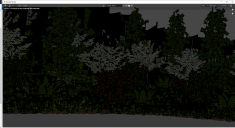
I'm trying to import an envioronment from DAZ to Blender and regardless of whether I import as .obj or using DTB bridge I get the result shown below.  I'm not sure what I'm doing wrong or how to correct it.  Any help would be appreciated.


Screenshot (2).png
1925 x 1003 - 3M
Screenshot (4).png
1924 x 1049 - 2M

Comments

  • felisfelis Posts: 5,734
    February 2021 edited February 2021

    Obj-files have limited texture information, so I don't think that really will give good results.

    But one issue, as I see it, is your alpha channel, which should be changed to alpha blend for your leaf materials.

    I would urge you to try diffeo bridge instead.

    Post edited by felis on February 2021
  • TheMysteryIsThePointTheMysteryIsThePoint Posts: 3,216
    February 2021

    Try Diffeomorphic. It's the best thing we have for materials, currently.

  • gregsgraphics_cafd0962a0gregsgraphics_cafd0962a0 Posts: 111
    February 2021

    First thing is that you don't seem to have any lights in the scene.  So it's hard to tell what's going on.  Second, we would need to see the nodes for some of the surfaces that look wrong.  You can't import OBJ files and expect the materials to be correct out of the box.  You're going to have to manually edit and add textures into the correct material nodes for many of the surfaces.  For example, it's rare you will get proper transparency/opacity settings for materials with alpha channels without manually adjusting them.

    Put some lights in the scene or adjust the position or intensity of the lights to get a better view of what's going on.  At the very least, go into the materials, go to the world settings, and increase the global environment light to get a better view of the scene.  Lights will not import with OBJ only, and if they transferred using the addon, you may need to adjust the intensity.

  • SDevSDev Posts: 158
    February 2021

    gregsgraphics_cafd0962a0 said:

    First thing is that you don't seem to have any lights in the scene.  So it's hard to tell what's going on.  Second, we would need to see the nodes for some of the surfaces that look wrong.  You can't import OBJ files and expect the materials to be correct out of the box.  You're going to have to manually edit and add textures into the correct material nodes for many of the surfaces.  For example, it's rare you will get proper transparency/opacity settings for materials with alpha channels without manually adjusting them.

    Put some lights in the scene or adjust the position or intensity of the lights to get a better view of what's going on.  At the very least, go into the materials, go to the world settings, and increase the global environment light to get a better view of the scene.  Lights will not import with OBJ only, and if they transferred using the addon, you may need to adjust the intensity.

    This! Without correct lightning/incorrect shader setup, anything looks flat, even with the best materials.

    A good resource to study plant materials/shaders in Blender is the free part of Graswald, which includes two different plant species (https://www.graswald3d.com/try)

  • benniewoodellbenniewoodell Posts: 1,999
    February 2021

    SDev said:

    gregsgraphics_cafd0962a0 said:

    First thing is that you don't seem to have any lights in the scene.  So it's hard to tell what's going on.  Second, we would need to see the nodes for some of the surfaces that look wrong.  You can't import OBJ files and expect the materials to be correct out of the box.  You're going to have to manually edit and add textures into the correct material nodes for many of the surfaces.  For example, it's rare you will get proper transparency/opacity settings for materials with alpha channels without manually adjusting them.

    Put some lights in the scene or adjust the position or intensity of the lights to get a better view of what's going on.  At the very least, go into the materials, go to the world settings, and increase the global environment light to get a better view of the scene.  Lights will not import with OBJ only, and if they transferred using the addon, you may need to adjust the intensity.

    This! Without correct lightning/incorrect shader setup, anything looks flat, even with the best materials.

    A good resource to study plant materials/shaders in Blender is the free part of Graswald, which includes two different plant species (https://www.graswald3d.com/try)

    I love Graswald! I won't do anything that needs grass without it, nor will I do trees without The Grove. Both are worth every single penny. 

Sign In or Register to comment.
Adding to Cart…

Daz 3D is part of Tafi

Connect

DAZ Productions, Inc.
7533 S Center View Ct #4664
West Jordan, UT 84084

HELP

Contact Us

Tutorials

Help Center

Sell Your 3D Content

Affiliate Program

Documentation Center

Open Source

Consent Preferences

JOIN DAZ

Memberships

Blog

About Us

Press

Careers

Bridges

Community

In the Studio

Gallery

Forum

DAZ STORE

Shop

Freebies

Published Artists

Licensing Agreement | Terms of Service | Privacy Policy | EULA

© 2025 Daz Productions Inc. All Rights Reserved.
