• Daz 3D
  • Shop
  • 3D Software
    • Daz Studio Premier
    • Daz Studio
    • Install Manager
    • Partnerships
    • AI Training data
    • Exporters
    • Daz to Roblox
    • Daz to Maya
    • Daz to Blender
    • Daz to Unreal
    • Daz to Unity
    • Daz to 3ds Max
    • Daz to Cinema 4D
  • 3D Models
    • Genesis 9
    • Genesis 8.1
    • Free 3D Models
  • Community
    • Gallery
    • Forums
    • Blog
    • Press
    • Help
  • Memberships
    • Daz Premier
    • Daz Plus
    • Daz Base
    • Compare
  • Download Studio
ADVANCED SEARCH
  • Menu
  • Daz 3D
ADVANCED SEARCH
Add image
  • Shop
  • 3d Software
    • Daz Studio Premier
    • Daz Studio
    • Install Manager
    • Partnerships
    • AI Training data
    • Exporters
    • Daz to Roblox
    • Daz to Maya
    • Daz to Blender
    • Daz to Unreal
    • Daz to Unity
    • Daz to 3ds Max
    • Daz to Cinema 4D
  • 3D Models
    • Genesis 9
    • Genesis 8.1
    • Free 3D Models
  • Community
    • Our Community
    • Gallery
    • Forums
    • Blog
    • Press
    • Help
  • Memberships
    • Daz Premier
    • Daz Plus
    • Daz Base
    • Compare

Notifications

You currently have no notifications.

Loading...
    • Categories
    • Recent Discussions
Daz 3D Forums > 3rd Party Software > Blender Discussion

Daz To Blender, IK Rigging Issues

gtsthrowaway7tgtsthrowaway7t Posts: 6
February 2021 edited February 2021 in Blender Discussion

After re-reading the manual I saw how to use IK bones that come in the DazToBridge setup, but parts of my model's hair glitches when using the largest IK Bone, and the model seems to disappear once I pose it off the ground, and how to I also have the arms move and not seem "pinned"?

Would appreciate any insight on this, trying to learn more about Blender animation using models I've made in Daz.

Thank you!
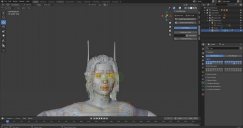
hairgltch.PNG
1920 x 1011 - 486K
model disappear.PNG
1918 x 1045 - 322K
Post edited by gtsthrowaway7t on February 2021

Comments

  • M0D1FYM0D1FY Posts: 2
    February 2021

    I'm running into an issue with the default Daz IK controllers in Blender 2.91. They don't seem to work in the latest version of Daz 4.15 and the Blender Bridge 2.1. If I switch the IK Solver from Standard to iTaSC, the feet work with IK, but still not the hands/arms. It's a shame because this was working in the previous version. Wish I hadn't updated now:( 

    I also noticed when importing into Blender 2.91, the default Daz controllers are hidden and I have to enable Shapes in the Viewport Display settings of the Pose palette. Not the end of the world. Still preferred the way it was before. 

    Maybe I'm missing something?

    2021-02-03 17_49_47-Blender.png
    1098 x 1274 - 708K
  • DAZ_samDAZ_sam Posts: 170
    February 2021

    M0D1FY said:

    I'm running into an issue with the default Daz IK controllers in Blender 2.91. They don't seem to work in the latest version of Daz 4.15 and the Blender Bridge 2.1. If I switch the IK Solver from Standard to iTaSC, the feet work with IK, but still not the hands/arms. It's a shame because this was working in the previous version. Wish I hadn't updated now:( 

    I also noticed when importing into Blender 2.91, the default Daz controllers are hidden and I have to enable Shapes in the Viewport Display settings of the Pose palette. Not the end of the world. Still preferred the way it was before. 

    Maybe I'm missing something?


    Sorry for the inconvenience this must of caused! We will look into this and see what we can do to fix this problem.  
     

  • DAZ_samDAZ_sam Posts: 170
    February 2021 edited February 2021

    gtsthrowaway7t said:

    After re-reading the manual I saw how to use IK bones that come in the DazToBridge setup, but parts of my model's hair glitches when using the largest IK Bone, and the model seems to disappear once I pose it off the ground, and how to I also have the arms move and not seem "pinned"?

    Would appreciate any insight on this, trying to learn more about Blender animation using models I've made in Daz.

    Thank you!

    We would need to look into more detail to solve your problem. If you could make a ticket we would try to help you however we can. 


    https://helpdaz.zendesk.com/hc/en-us/requests/new?ticket_form_id=23788


    Post edited by DAZ_sam on February 2021
  • mrsandem237mrsandem237 Posts: 10
    February 2021 edited February 2021

    DAZ_sam said:

    gtsthrowaway7t said:

    After re-reading the manual I saw how to use IK bones that come in the DazToBridge setup, but parts of my model's hair glitches when using the largest IK Bone, and the model seems to disappear once I pose it off the ground, and how to I also have the arms move and not seem "pinned"?

    Would appreciate any insight on this, trying to learn more about Blender animation using models I've made in Daz.

    Спасибо!

    Нам нужно было бы изучить более подробно, чтобы решить вашу проблему. Если бы вы могли сделать билет, мы постарались бы помочь вам, как только сможем.


    https://helpdaz.zendesk.com/hc/en-us/requests/new?ticket_form_id=23788

    I have the same problem that appeared after the last daz update, please fix it as soon as possible...)


    I have the same problem that appeared after the last daz update, please fix it as soon as possible...)

    Mod edit :-  to sort out the quoting

    Post edited by Chohole on February 2021
  • mrsandem237mrsandem237 Posts: 10
    February 2021

    Сказал M0D1FY:

    Я сталкиваюсь с проблемой с контроллерами IK Daz по умолчанию в Blender 2.91. Они, похоже, не работают в последней версии Daz 4.15 и Blender Bridge 2.1. если я переключаю Ik-решатель со стандарта на iTaSC, ноги работают с IK, но все еще не руки/руки. Это позор, потому что это работало в предыдущей версии. Жаль, что я не обновился сейчас:(

    Я также заметил, что при импорте в Blender 2.91 контроллеры Daz по умолчанию скрыты, и мне нужно включить фигуры в настройках отображения видового экрана палитры поз. Это не конец света. По-прежнему предпочитал, чтобы все было так, как было раньше.

    Может быть, я что - то упускаю?

    Please, if you have solved the problem, please let us know as soon as possible

  • mrsandem237mrsandem237 Posts: 10
    February 2021

    Сказал M0D1FY:

    Я столкнулся с проблемой с контроллерами Daz IK по умолчанию в Blender 2.91. Они, похоже, не работают в последней версии Daz 4.15 и Blender Bridge 2.1. если я переключу IK Solver со стандартного на iTaSC, ноги будут работать с IK, но все равно не руки/руки. Это позор, потому что это работало в предыдущей версии. Жаль, что я не обновился сейчас:(

    Я также заметил, что при импорте в Blender 2.91 контроллеры Daz по умолчанию скрыты, и мне нужно включить фигуры в настройках отображения видового экрана палитры поз. Но это не конец света. По-прежнему предпочитал, чтобы все было так, как раньше.

    Может быть, я что-то упускаю?

    You need to remove the bridge and install the old version 

Sign In or Register to comment.
Adding to Cart…

Daz 3D is part of Tafi

Connect

DAZ Productions, Inc.
7533 S Center View Ct #4664
West Jordan, UT 84084

HELP

Contact Us

Tutorials

Help Center

Sell Your 3D Content

Affiliate Program

Documentation Center

Open Source

Consent Preferences

JOIN DAZ

Memberships

Blog

About Us

Press

Careers

Bridges

Community

In the Studio

Gallery

Forum

DAZ STORE

Shop

Freebies

Published Artists

Licensing Agreement | Terms of Service | Privacy Policy | EULA

© 2025 Daz Productions Inc. All Rights Reserved.
