Sphere of Light & Dawn to Dusk Lighting 2 - Environment Lighting for DAZ Studio [Commercial]
 InaneGlory
Posts: 294
InaneGlory
Posts: 294
Introducing two new environment lighting sets from InaneGlory.
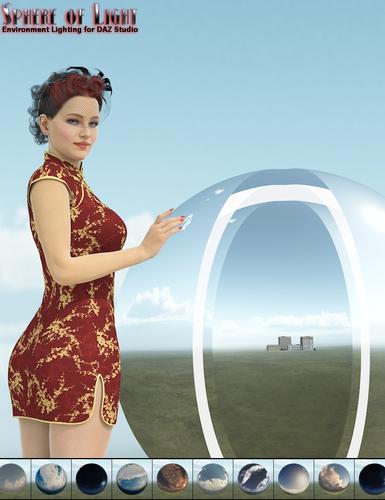
The Sphere of Light is a completely custom designed environment lighting solution that seamlessly blends together lighting and skydome imagery. The sphere is designed around a unique hybrid coupling of high dynamic range images and a massive custom area light.
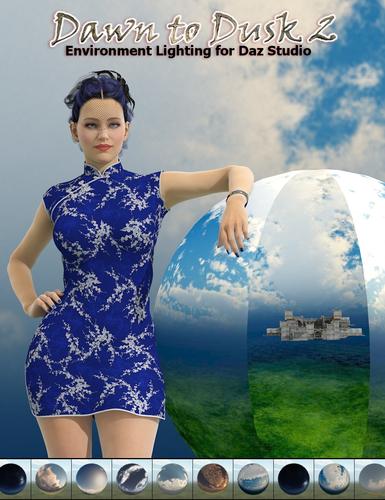
Dawn to Dusk Lighting 2 is a simple straightforward UberEnviroment2 based light set. It renders quickly and cleanly and includes matching sky textures that correctly match the light created by the UE2.
The heart of both sets is a series of 17 different skies that take you hour by hour, from dawn till dusk, through a fairly typical sunny summer day.

Daz 3D is part of 
Connect
DAZ Productions, Inc.
7533 S Center View Ct #4664
West Jordan, UT 84084
Licensing Agreement | Terms of Service | Privacy Policy | EULA
© 2026 Daz Productions Inc. All Rights Reserved.
Comments
I see that http://www.daz3d.com/new-releases/sphere-of-light-enviroment-lighting
is already out. Could you please post some other image of the scene with the water.
On the promo image (01-sphere-light-enviroment-lighting-daz3d.jpg) you included with the product,
the water looks very flat and not like the water, one see in the canal.
If you could also post some close up render of some character. I would like to see how the face looks a like.
When I post my images on the forum, I often got response, that the face is not enough lighten up.
Thanks in advance, if you will find the time, to post such images.
The water is the default material as Stonemason set it up. Here are a couple of closeups. Sorry to be so short buy I need to get to my other job. Will post more later today.
I grabbed this the nanosecond it hit the store last night. I'm looking forward to playing with it this weekend.
Theese are looking very well. Thanks for posting them.
Couple of quick renders using the Sphere; wonderful lighting set
One made with a beta version of the set...
(Character is 'Agnes' for V4)
Both of these sound really useful for a load and use standpoint? or are these for advanced users that can conjure perfect lights in there sleep?
Sphere of Light - Enviroment Lighting. complete custom light set of some kind (probably over my head). How difficult/complicated is it to operate and adjust the light levels? Like moving the scene to Mars or something, lol.
Dawn to Dusk Lighting 2. simple straightforward UberEnviroment2 based light set. Well my skills at Ubar lights is sub-par at best, I can barely operate a Uber light panel, the apply to other objects is still not my strong spot. Similar question as above I guess.
With the Sphere of Light all I've really done is load it in choose a sky select from the presets for intensity and shadow intensity and render.
A couple more renders using the Sphere.
Scorpio.. could you give an idea of render times as opposed to AoA lights? UE usually takes lots longer to render for me. Thanks :)
So exceptionally simple to operate, once the bits are located. coolness.
Render times can be quite subjective. sample rates, shadow bias, will drastically effect render times. Also the complexity of the surface being rendered plays a big part in render times as well... all other things being equal. I am curious as well.
Thanks for the beautiful renders Scorpio and Glaseye!
Dawn to Dusk 2 will be released soon. This isn't exactly how I would have chosen to do this but some things are beyond my control and we have to deal with the cards we've been dealt. It's ready and waiting to go and will be here when DAZ feels the time is right. I think we are looking at a couple of days wait at the most. (Hopefully)
The Sphere was designed to be as simple to use as walking outside and snapping a picture. No special understanding of the area light shader is required. I included lots of presets to adjust the light intensity of both the light from the sky and the light from the sun itself if the default settings aren't what your scene requires. There are also presets to adjust light quality and shadow softness. Plus preset that allow you to reset everything back to it's default settings. Beyond that all you really need to know is to change the direction of the light all you need to do is spin the Sphere using the Y rotate slider.
Dawn to Dusk 2 is also pretty straight forward and simple to use but it does require the user have a basic understanding of how to use an UberEnvironment to get the most from the set.
To be totally honest, I don't really know, I don't use anyone's lights but my own but if I had to hazard a guess I'd have to say the Sphere is slower, possibly a whole lot slower. In every way she was designed for quality, not for speed.
With Dawn to Dusk 2, I hadn't used an UE in a couple of years before I started designing this set and I found myself very surprised in how much improvements in the render engine have made the UE much faster than it used to be. Or at least what I remember it to be.
Compared to each other, Dawn is faster than the Sphere but the Sphere chugs along at a pretty constant rate while the UE slows down on heavily trans-mapped objects.
thank you for the answers, greatly appreciated. My only other curiosity has to do with using the light sphere in another scene, without removing the other scenes horizon, if that is even possible. For example the top of the world set, with the mountains going out to the horizon. I can only guess from my fumbling with that set, that the mountains are part of that environment-sphere-thing.
http://www.daz3d.com/easy-environments-top-of-the-world
or
http://www.daz3d.com/sea-scapes
A topic for me to look into this weekend possibly, when I have a chance to figure out how there lights can be separated from the sky-dome, if possible. I have so much to learn still.
The background sphere and the light source are integrated, so no, it is not really possible to use in that way.
As for the TOTW set; basically it is a skydome in cube form, with an additional scenery prop. So the hills in the background are on the background image. UE2 lights work best for use with TOTW (and the other sets).
Glad I managed to get the question out in a way some one could understand what I did not. Thanks, so I was not just not seeing light-settings there because of some shader-black-arts trickery, lol. Well Sphere of Light is still sounding very good.
What is the difference between Dawn to Dusk Lighting, and Dawn to Dusk Lighting 2, if I may ask?
The background sphere and the light source are integrated, so no, it is not really possible to use in that way.
As for the TOTW set; basically it is a skydome in cube form, with an additional scenery prop. So the hills in the background are on the background image. UE2 lights work best for use with TOTW (and the other sets).
Technically there is a way to do it as long as the skydome/prop you want to use is smaller than the sphere. The trick is to make the prop totally invisible to the light and yet still visible to the camera. How it might look will completely depend on the quality of the geometry and textures you start with so I can't promise the results will be good or useable.
I stand corrected ,,,, :red:
My own SkyDome (which is already setup in the way InaneGlory described) + sphere of light....
Technically, several years of advancements in HDRI technology and software and personal skills.
Stylistically, Dawn to Dusk 1 was all about those funky little moments around dawn or dusk when light gets all kinds of weird. DtD2 is a little more normal and traditional daylight with the addition of matching skydomes that weren't available in the 1st set.
To be totally honest, I don't really know, I don't use anyone's lights but my own but if I had to hazard a guess I'd have to say the Sphere is slower, possibly a whole lot slower. In every way she was designed for quality, not for speed.
With Dawn to Dusk 2, I hadn't used an UE in a couple of years before I started designing this set and I found myself very surprised in how much improvements in the render engine have made the UE much faster than it used to be. Or at least what I remember it to be.
Compared to each other, Dawn is faster than the Sphere but the Sphere chugs along at a pretty constant rate while the UE slows down on heavily trans-mapped objects.
Thanks IG. :)
I generally swap out UE lights for the AoA ones with DT's presets even using skyboxes. To my unsophisticated eye, when I've compared them, the renders look equal but in much less time. LOL
This set is all integrated, hence the question. :) It's all good, the set is in my cart anyway. :)
glaseye2, I like that glowing effect on the horizon. I may need to use that in the future. In fact I probably will, if I can ever get that haze thing in seascapes working, lol.
Refering to the non-"Sphere of Light" skydome. is there no way to adjust the light intensity coming from the sky-dome, or adjust the brightness of the sky diffuse mat (if there is such a thing?)? or is that ambient??? I really need to sit down and look at this, after the inspection today that I neglected cleaning for, lol.
SassyWench, I don't think it is as 'integrated' (monolithic), as it is a 'matching' set of stuff (modular). The sky can be changed for different clouds, separately from the time of day lighting. Or did I completely misunderstand the promo pics that badly?
(edit)
Better question I'll know the answer to once I install the thing, can the settings (samples, quality-whatever) be adjusted? Is that what you were referring to SassyWench?
(Edit 2)
Invisible to light, yet visible to the camera. Is that like the "Cast shadows" thing in the surface tab for other stuff (primitives), or like the Phantom switch in the Uber panel light stuff, or is there other ways?
"Integrated" as referring to "Sphere of Light" means that all of the skies have a sun or moon on the sky image, and a strong light source placed where the sun or moon is in relation to the sky image. They rotate or move together so that the visible light source and the actual light source are always in tandem. The entire sphere also emits ambient light as would be appropriate to the sky.
There are 10 skies with corresponding lights in the set. There are presets for the render quality from draft to final, shadow softness, and time of day.
Glaseye's picture is proof of concept that other domes with different sky maps can be placed inside the Sphere of Light. This makes it possible to get different cloud patterns while using the Sphere as a light source, but it takes some fiddling to get it to work correctly.
Hope that helps.
O.K. so the clouds are not separate from the sun/moon sphere, hmmm. Yes that helps immensely, as I know nothing, other then DIM is installing them now ("IDG Luminous Fae - Dual Layer Gel Lights for DS", and "Sphere of Light - Enviroment Lighting.").
http://www.daz3d.com/idg-luminous-fae-dual-layer-gel-lights-for-ds
http://www.daz3d.com/sphere-of-light-enviroment-lighting
In the past, I just loaded the sky-thing from the smart tab, and worked on other stuff in the scene. The promo for "Sphere of Light" shows three domes, I made assumptions I probably shouldn't have. sky mat, lights sphere, and not-clouds, lol.
(in separate news) I hope all is well, I've seen some horrible reports about flash floods. Tennessee, Arizona, etc.
The clouds/sun are together and the light is on the outside.
I hope you enjoy the gel lights too. We had fun making them.
We are in Minnesota so no worry about floods. Might snow any day now though, lol.
After thinking about it for a few hours, it makes scenes to combine the sky and clouds. Opacity maps would need to be used otherwise, and semi-transparent surfaces tend to bring render engines to a grinding halt. not that bad with small things, however a sky, yikes lol.
I have, I think 2 sky's with top of the world, and one with seascapes that I have found. The variety alone is worth it.
As for the IDG Luminous Fae, I took one glance at the included light-gels and was sold. I don't know where I'll use them yet, I just know I will, allot.
The other eases my mind as well, I was worried.
On a closely-related note, I am really liking the indirect camera that got thrown into the package. It seems noticeably faster and more efficient than the ones I've tried before.
Here is a image that I rendered with just "Sphere of Light" for lighting. Details of what else is used is in my Art Studio thread (link in signature). I rendered this at “5 Very Good” quality preset, and it took a long, long time to render, just over 3 hrs I think. I suspect quality 5 is overkill, but I wanted to try it.
There appears to still be noise in the sky, but at quality 5 I doubt that is render noise. I suspect that is the sky texture, some very light, high clouds.
Now that Dawn To Dusk is out, I'm going to try this scene out with it also.
Deleted - sorted it out.
The size of the skydome is the default UberEnvironment size, and yes it rather small. To enlarge it simply scale it up till it's the size you need (the skydome is parented under the UE light).
For reasons beyond me, when DAZ Studio (4.6.3.52) saves the UE scene subset it sets the skydome to visible in the preview but invisible in the render, even when it has been set to be visible in the render before saving. Completely freaked me out the first time I noticed it and I was at a loss with where my sky went and what I had done wrong in setting up the materials. Frustrating but easily fixed. After you load up the lights, select the skydome and on the parameters tab and turn Visible in Render ON. Now everything should render correctly. Wish it wasn't set up like this but somethings are beyond my ability to control.
Here is the same scene done with the Dawn to Dusk Lighting 2 set. I tried to get the sun in pretty much the same location.
A couple of observations when using DDL2:
- The light set loads in too small. First thing I did was change the scale to 500% to make it big enough. You could go larger depending on the size of your set.
- You have to change the environment sphere to be visible in render, otherwise the sky will not be visible in your render even though it shows in the preview.
- DDL2 is a UberEnvirornment2 based light set. You can use the quality presets from Light presets -> omnifreaker -> UberEnvironment2 on DDL2. The default settings that DDL2 loads in at are draft quality and will have blotchy shadows. This is rendered with "Set Quality 4XHi"
- The sun is a distant light aligned with the sun location on the sky dome. The default intensities are 50% for UE2 light and 50% for the Sun. This is probably a good ratio at gamma 1.0, but this is rendered at gamma 2.2 and the shadows were too washed out with those settings at gamma 2.2. I could barely see the girls shadow on the ground. This is rendered with sun at 70% and UE2 at 30%. That is close to the ratio I have used in the past at gamma 2.2.
Even at quality 4XHi the render time on this was about 20 minutes, compared to 3 hours with the Sphere of Light at highest quality. Those two quality settings may not be equivalent, but still it is clear DDL2 is a lot faster.