Daz to Unity Bridge - Rigging seems wrong / can't create proper ragdoll
 Ben_3727476
Posts: 6
Ben_3727476
Posts: 6
I think there is something wrong with the rigging. Unfortunately it is not possible for me to create a proper ragdoll.
The first thing you will have noticed is that the rig type of the FBX import has to be changed to 'Humanoid'.
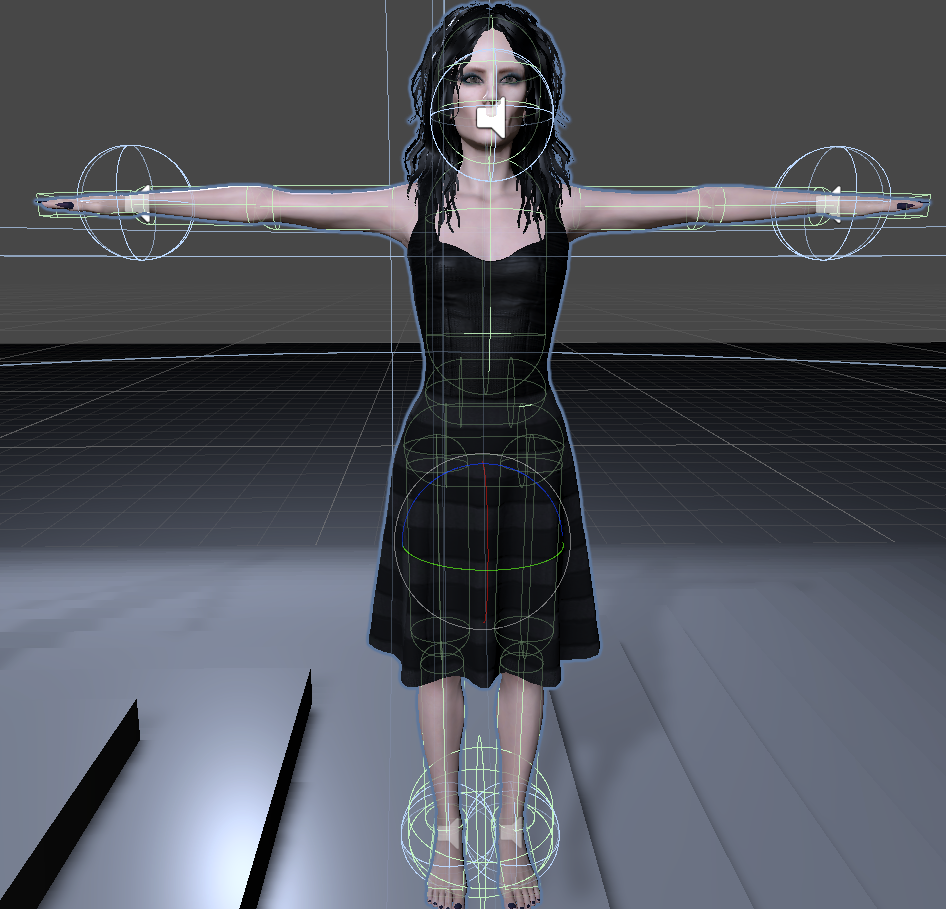
However, if you then look at the rigging itself, it looks very wrong - see the following picture:
Image removed
For comparison, here is a correct rig from Character Creator 3:
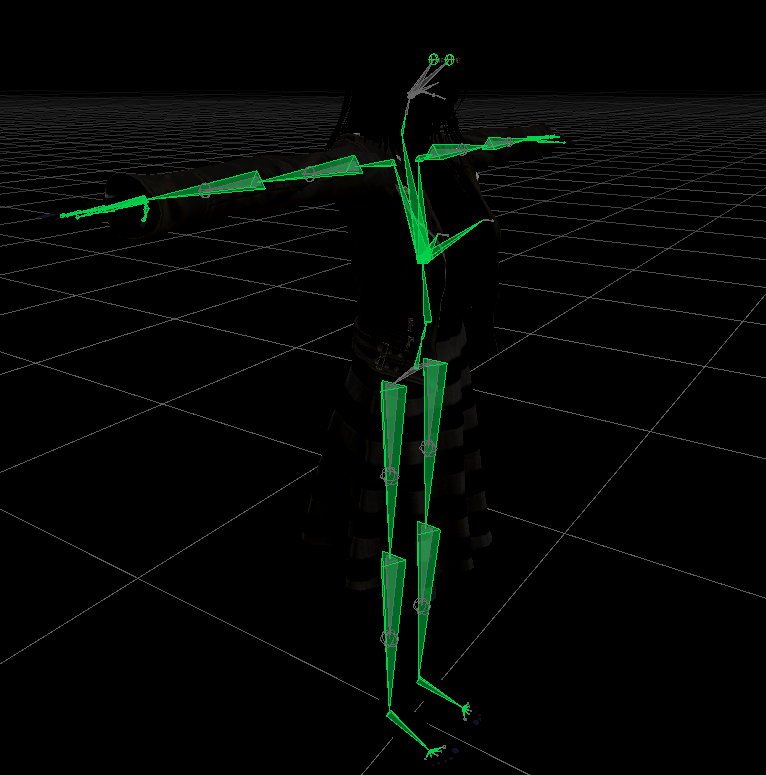
The first thought here is, of course, that the DAZ model is not in T-pose. Unfortunately, I have not found a function in DAZ for something like this (I just switched from CC to DAZ). Manual TPose editing of the characters in DAZ with subsequent export to Unity only makes the following problem worse.
Also, in the DAZ tutorial video for the Unity bridge, the character is not in T-Pose either (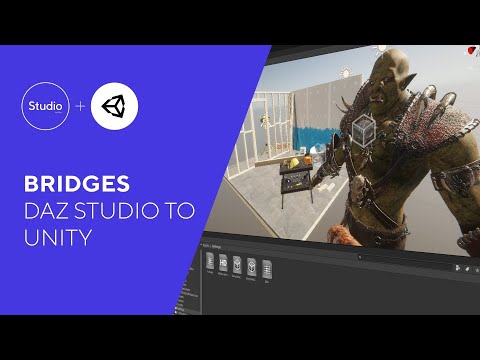 )
)
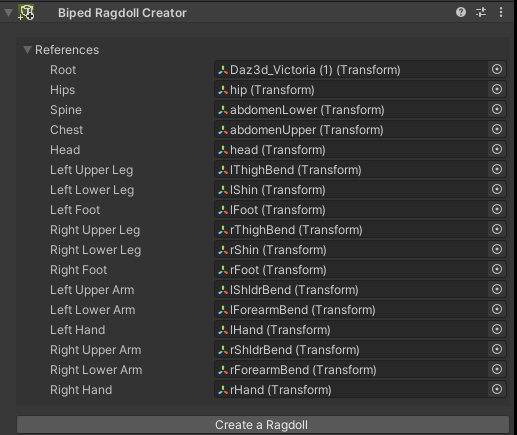
The real problem now is that I can't get a decent ragdoll with the rigging using FinalIK/Puppetmaster's 'Biped Ragdoll Creator'.
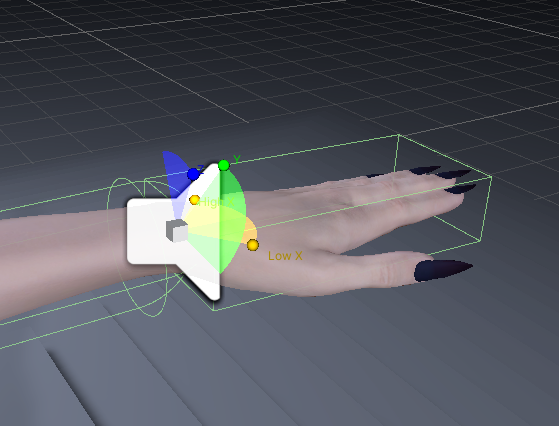
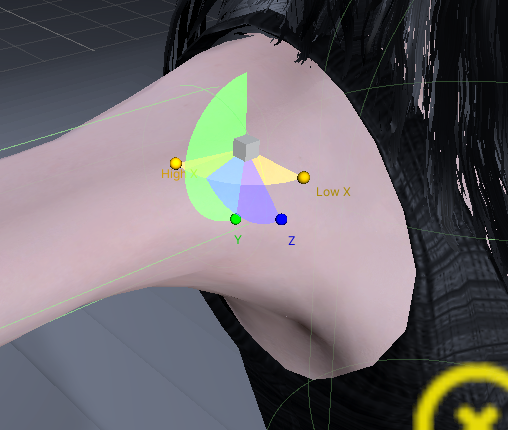
The rotation of the colliders is totally off and cannot be changed - only position and scaling, the actual alignment, i.e. the rotation, is determined by the joints.
Image removed
The joint alignments and limitations are also totally wrong by default:
Image removed

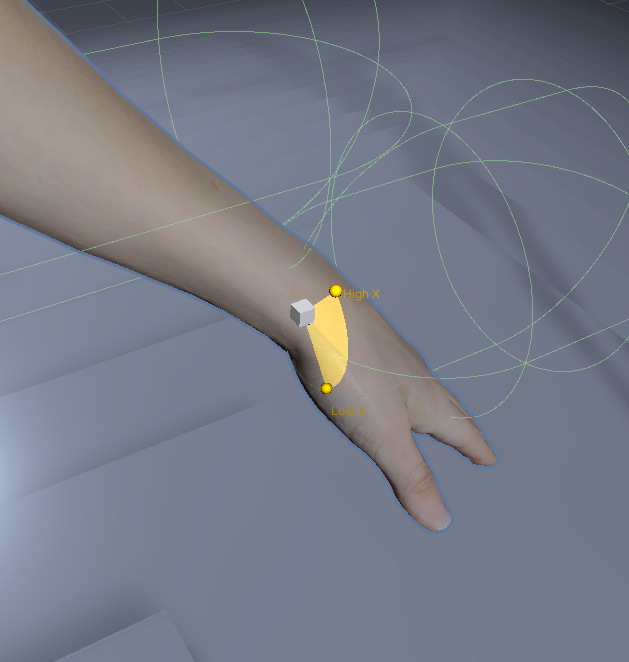
For comparison, here is a rigging of mine with a CC3 character with correct alignment of the joints and colliders.
Is this a known problem? If so, is it a bug or can I manually change something in the rigging to achieve the desired result? Is there a fix on it's way? I want to know because I want to spend some money on your
I would also like to use DAZ Pipline in the future - it looks very promising so far. However, it would be a breaker for me if I can't create a decent ragdoll.
best regards

Daz 3D is part of 
Connect
DAZ Productions, Inc.
7533 S Center View Ct #4664
West Jordan, UT 84084
Licensing Agreement | Terms of Service | Privacy Policy | EULA
© 2026 Daz Productions Inc. All Rights Reserved.
Comments
Please put the Viewport in a non-textured mode if you are going to show a nude figure.
Have tyou tried using Bake Rotations, from the Joint Editor tool's right-click menu with the figure posed in a T?
Thanks for your reply.
Ok, i try to repost the image - see below. The rotation is clearly off - never had any issues with other models that way.
Which editor do you mean with 'Joint Editor tool's right-click menu with the figure posed in a T'? While exporting to Unity?
Image removed
I have only heard of the issue with rotation, but was not affected of it in Unity, yet.
As far as I know Joint Editor is a part of Daz Studio.
Will be interesting to see, how you solve the problem.
Have used climbing controller in Unity and ragdoll was created without a problem, though.
Hi Artini, thanks for your reply.
It seems that the bridge is not done yet, rig seems totally wrong.
It is clearly visible at the chest bones. Here is the joint view in Daz:
Here in Unity, breast bones are reversed, pointing backwards:
See also my post regarding the twist bones. That seems to be the main issue here. Hopefully it will be fixed.
Here are the feet generated by the DAZ to unity bridge, wrong:
Here are the feet generated by CC3, correct:
The twist bones seem to be the problem.
Here again the whole correct rig generated by CC3 import scripts, the marked ones are the correct aligned twist bones:
Here the DAZ ones, all wrong:
Here the whole DAZ rig, all marked twist bones are wrong:
I've seen this posted many times in many places about the Daz Rig. I recently purchased Puppetmaster in the sale and emailed the creator.
"Hi,
There is not much I can do about it, I'm afraid, those bones are just oriented wrong. It is not possible to rotate colliders in Unity to fix it. There is a workaround though, but it requires some manual work.
1. After you have PuppetMaster set up, add a new empty gameobject to each of the misaligned ragdoll rigidbodies.
2. Copy-paste the collider from the ragdoll body part to that child gameobject, destroy the original collider.
3. Move/rotate the child object to fix the alignment.
The collider on the child object will act as a compound collider for it's parent Rigidbody as long as the child doesn't have a Rigidbody of it's own.
Best,
Pärtel"
Thanks for the solution to that problem - will test it myself, after I figure out, how to use Puppetmaster.
I doubt, if it will be ever fixed, because of the complexity of the rig itself.
What will happen to all items, like clothes, if the rig will be fixed?
Do they need to be fixed, as well?
Many thanks, Dortybassa - that should solve the problem.
Contacting Pärtel Lang would have been my next step as well. But I always hesitate to bother him at work, as I usually find a solution to the problems somewhere else. I also sometimes wonder why he's not sitting on some island sipping cocktails my now ;). He must really love his work, which is really fantastic.
The setup of the collider for Puppetmaster is always the most annoying thing when setting up a character, because unfortunately there is always some manual adjustment needed.
I wonder if it would not be possible to automate this step as well. I come as I said from RL CC3 and a new character took me at the beginning always so 2-3 hours of additional rigging for about 10 additional subsystems. After some imports of new models I had then written an automation script for that, which reduces the 2-3 hours to 2-3 minutes. However, I was not able to do this for the Ragdoll setup for Puppetmaster/FinalIK.
However, the child gameobjects solution should now serve as a good template to transfer them to new characters. As long as the size of the model matches the original setup, you should then only have to make minor manual adjustments.
@Artini and Dortybassa, I have been working with Unity and FinalIK in conjunction with Puppetmaster for about 4-5 years now. I can say that in my opinion FinalIK/PM are still the most valuable assets in the unity asset store. It takes some time to get familiar with these systems, but the payoff is really huge. Pärtel is really a genius and I have learned a lot from his code in all that time.
With reference to whether the DAZ bone problem will be solved, so I must now say that they should/must. Because if Pärtel already says that the bone structure is wrong, then it is.
I guess that the twist-bones are needed for the alignment of the colliders. And since I've never had such problems with all my other models, and I've imported a lot of other models besides CC3, I assume that DAZ will adjust the bone structure to Unity's standard humanoid rig. After all, the breast bones are misaligned as well. And the current structure, even if it is Mechanim-ready in terms of animation, the rig is not bug-free. I'm using some professional motion capturing packages that are not 100% fluid with the current rig - the legs, especially in terms of FootIK, shake from time to time.
I would be happy if DAZ would comment on this. A short message that the problem is known and will be fixed would be enough for me, because I would then wait for the change instead of now possibly having to invest several hours for a circumnavigation of the problem again.
In terms of clothing, I can't say for sure, but I don't think those would be affected. In the worst case, you would have to repeat the final rigging after the fix.
As for clothing in terms of modularity, I'm still not sure what the best approach is. The same goes for hair.
Do any of you have a good approach on this and can point to a resource or such?
best regards
As you say about your script "which reduces the 2-3 hours to 2-3 minutes", I value the most Unity assets,
that are easy to use and easy to understand. I have some favorites and use them all the time.
Horse Animset Pro and recently Climbing System. It is amazing, how much time they save for me.
I also have not solved, the problem with modularity in Unity, yet.
Long time ago, before Daz to Unity bridge has appeared, I have used sold here at Daz shop
https://www.daz3d.com/mcs-mega-bundle
It is incredible value for me: 182 Unity packages and all of them with interactive licence included in the price.
MCS packages were also sold before in Unity Asset store, as well.
What I like the most in it, that the MCS system allows, to easily change clothes and hairs in Unity.
MCS is an open source and you could look at it on https://github.com/mcs-sdk/mcs
If you are good at coding, maybe you could adapt it to the transferred Daz to Unity bridge characters.
That will be awesome.
Just tested MCS Male in Unity 2019.4.16 and it has some problem finding skin shader for the figure.
You can see on the right, how the contents packs (clothes, hair and props) work in MCS, though.
Just discovered, that the updated shaders, scripts and MCS Female and MCS Male was released at https://github.com/mcs-sdk/mcs/releases/tag/v1.7.0
You can even test them for free and 2 sets of clothes are there, as well.
With such update, I like https://www.daz3d.com/mcs-mega-bundle even better.
Below is the screenshot from Unity, after the ragdoll was created, together with controller and camera system.
Using Climbing System took only a couple of clicks to create a ragdoll and I do not need to edit colliders or so.
Of course, MCS is based on Genesis 2, so be aware of that.
Thank you, Artini, for the detailed description of this possibility.
I need to put a lot more research into this, especially regarding the adaptability of the clothing to the skinned mesh of the actual character. I'm not familiar with that yet, kept procrastinating on that. Right now I'm still using CC3+ characters, which really look extremely good, especially with subsurface scattering, makeup, etc.... To give the characters even more life I use Magica Cloth, this asset I can also highly recommend. You have to use the IL2CPP framework for it, but then you can benefit from Unity DOTs for cloth simulation.
I have already put quite a bit of money into RL CC3+, e.g. all the additional packages like SkinGen, hair, clothing, etc.. The result is really impressive. However, the lack of export options for the body morphs in CC3 is a huge limitation.
That's why I took advantage of DAZ's sales offers and really stocked up. For NPCs, the DAZ characters are certainly suitable, provided that the bone rig problem can be circumvented. But the Pärtel approach should work and should even be automated - in the end, the solution is probably even better than the standard approach with the 'biped ragdoll creator' alone.
I wish you and everyone a happy new year.
To be continued in the new year :)
best regards
Ben
Thanks and a Happy New Year, everyone.
Hello. I want to make a game in Unity where I can use customizable models. I want to be able to change clothes, hair and facial features and body type. Do you think genesis 8 is a good option? I have been looking at the MCS models but I don't know if they work well with the latest versions of Unity. I appreciate any opinion.
Have you seen Tafi products in Unity asset store.
They are also kind of Genesis 8 characters and clothes, but already comes with 700 morphs
and the licence for using them in games.
Check, for example Vidora, to see, what I mean.
Supports HDRP(2018.4) LTS, HDRP(2019.4) LTS, URP and Standard Render Pipelines.
As far as I understand, Tafi is a subdivision of Daz 3D, that sells assets in Unity asset store.
For anyone Wondering. If you use the DAZ to Unity Bridge, you can solve this skeleton issue by also exporting the actor as a FBX to your desktp, and open both models in Blender, and use the desktop skeleton instead of the unity skeleton. this fixes almost everything, very easy to do.