• Daz 3D
  • Shop
  • 3D Software
    • Daz Studio Premier
    • Daz Studio
    • Install Manager
    • Partnerships
    • AI Training data
    • Exporters
    • Daz to Roblox
    • Daz to Maya
    • Daz to Blender
    • Daz to Unreal
    • Daz to Unity
    • Daz to 3ds Max
    • Daz to Cinema 4D
  • 3D Models
    • Genesis 9
    • Genesis 8.1
    • Free 3D Models
  • Community
    • Gallery
    • Forums
    • Blog
    • Press
    • Help
  • Memberships
    • Daz Premier
    • Daz Plus
    • Daz Base
    • Compare
  • Download Studio
ADVANCED SEARCH
  • Menu
  • Daz 3D
ADVANCED SEARCH
Add image
  • Shop
  • 3d Software
    • Daz Studio Premier
    • Daz Studio
    • Install Manager
    • Partnerships
    • AI Training data
    • Exporters
    • Daz to Roblox
    • Daz to Maya
    • Daz to Blender
    • Daz to Unreal
    • Daz to Unity
    • Daz to 3ds Max
    • Daz to Cinema 4D
  • 3D Models
    • Genesis 9
    • Genesis 8.1
    • Free 3D Models
  • Community
    • Our Community
    • Gallery
    • Forums
    • Blog
    • Press
    • Help
  • Memberships
    • Daz Premier
    • Daz Plus
    • Daz Base
    • Compare

Notifications

You currently have no notifications.

Loading...
    • Categories
    • Recent Discussions
Daz 3D Forums > 3rd Party Software > Blender Discussion

Import basic genesis but, skin is not colored

V.002V.002 Posts: 4
November 2020 in Blender Discussion

Hi ! i explain my situation,i wanted to render my DAZ models but i have a amd graphic card wich cannot render on DAZ , so i installed blender and the AMD addon on it "Randeon pro render" for rendering with my graphic card instead of my cpu , in blender i go in the render engine tab change "Cycles" to "Randeon engine", wokds well, and then when i make a render,

everything is colored exept the skin color, im searching since a couples of hours for resolving the problem but can't find anything, 

How can i resolve this problem please ?

Thanks you for your time and take care !
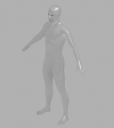
 

Renderfail.PNG
424 x 475 - 89K

Comments

  • TheMysteryIsThePointTheMysteryIsThePoint Posts: 3,216
    November 2020

    Do the skin materials render correctly in Cycles/OpenCL?

  • V.002V.002 Posts: 4
    November 2020

    Im i bit new to blender, but when i go to the shading tab and select the my face skin object (second screen) the color appear, why it does that and how to fix this ?

    Thanks for your helps again and take care

    Renderfail.PNG
    473 x 452 - 249K
    Renderfail2.PNG
    268 x 235 - 13K
  • V.002V.002 Posts: 4
    November 2020

    In Cycles yes its perfect :(

  • V.002V.002 Posts: 4
    November 2020

    (sorry for the second post) but i cant use my gpu with those settings 

  • PadonePadone Posts: 3,998
    November 2020 edited November 2020

    If you import with diffeo you can use the principled option for materials that should work fair enough with prorender since prorender is compatible with the principled shader. Anyway you don't need prorender since both cycles and eevee work fine with amd gpus, and diffeo is much better with cycles and eevee than prorender.

    Post edited by Padone on November 2020
Sign In or Register to comment.
Adding to Cart…

Daz 3D is part of Tafi

Connect

DAZ Productions, Inc.
7533 S Center View Ct #4664
West Jordan, UT 84084

HELP

Contact Us

Tutorials

Help Center

Sell Your 3D Content

Affiliate Program

Documentation Center

Open Source

Consent Preferences

JOIN DAZ

Memberships

Blog

About Us

Press

Careers

Bridges

Community

In the Studio

Gallery

Forum

DAZ STORE

Shop

Freebies

Published Artists

Licensing Agreement | Terms of Service | Privacy Policy | EULA

© 2025 Daz Productions Inc. All Rights Reserved.

