Daz to blender bridge error
 Theowolf98
Posts: 4
Theowolf98
Posts: 4
Hi everyone,
I am trying to bridge a genesis 8 character from Daz to Blender, however, I keep getting an error message which I have copied below. I have purchased a weapons pack and clothing which both support the Daz to Blender bridge. Has anyone else seen this happen before?
Traceback (most recent call last):
File "C:\Users\Theo\AppData\Roaming\Blender Foundation\Blender\2.90\scripts\addons\DTB\__init__.py", line 370, in execute
self.import_one(fbx_adr)
File "C:\Users\Theo\AppData\Roaming\Blender Foundation\Blender\2.90\scripts\addons\DTB\__init__.py", line 264, in import_one
drb.convert_file(filepath=fbx_adr)
File "C:\Users\Theo\AppData\Roaming\Blender Foundation\Blender\2.90\scripts\addons\DTB\DazRigBlend.py", line 39, in convert_file
secondary_bone_axis='X'
File "E:\3D Modeling\blender-2.90.0-windows64\blender-2.90.0-windows64\2.90\scripts\modules\bpy\ops.py", line 201, in __call__
ret = op_call(self.idname_py(), None, kw)
RuntimeError: Error: Traceback (most recent call last):
File "E:\3D Modeling\blender-2.90.0-windows64\blender-2.90.0-windows64\2.90\scripts\addons\io_scene_fbx\__init__.py", line 220, in execute
return import_fbx.load(self, context, filepath=self.filepath, **keywords)
File "E:\3D Modeling\blender-2.90.0-windows64\blender-2.90.0-windows64\2.90\scripts\addons\io_scene_fbx\import_fbx.py", line 2844, in load
_(); del _
File "E:\3D Modeling\blender-2.90.0-windows64\blender-2.90.0-windows64\2.90\scripts\addons\io_scene_fbx\import_fbx.py", line 2841, in _
root_helper.link_hierarchy(fbx_tmpl, settings, scene)
File "E:\3D Modeling\blender-2.90.0-windows64\blender-2.90.0-windows64\2.90\scripts\addons\io_scene_fbx\import_fbx.py", line 2336, in link_hierarchy
child.link_hierarchy(fbx_tmpl, settings, scene)
File "E:\3D Modeling\blender-2.90.0-windows64\blender-2.90.0-windows64\2.90\scripts\addons\io_scene_fbx\import_fbx.py", line 2292, in link_hierarchy
(mmat, amat) = mesh.armature_setup[self]
KeyError: Genesis8Female
location: E:\3D Modeling\blender-2.90.0-windows64\blender-2.90.0-windows64\2.90\scripts\modules\bpy\ops.py:201
location: <unknown location>:-1

Daz 3D is part of 
Connect
DAZ Productions, Inc.
7533 S Center View Ct #4664
West Jordan, UT 84084
Licensing Agreement | Terms of Service | Privacy Policy | EULA
© 2026 Daz Productions Inc. All Rights Reserved.
Comments
I get the exact same thing. Everything worked before the update, now I get the same as above
I have the same problem.
After you updated what? Which program or plugin are you talking about?
Blender? DazStudio? DazToBlender Plugin in Daz Studio? DazToBlenderPlugin in Blender?
Side note: The possibility to delete double posts is missing. Google helps to find that you can flag item and ask mods to remove it. that is not intuitive.
Just more amazing work from the staff and team at Daz3d.com I think you have to mail them cash for things to have progress.
Getting the same issue. New latest install of DazCentral/Daz Studio and Blender.
I'm having the same problem. New Blender User coming from max to try out this plugin. Fresh install of latest blender, latest Daz Studio and Daz to Blender. The latter installed through Daz install manager. The model is a basig Genesis 8.1 female.
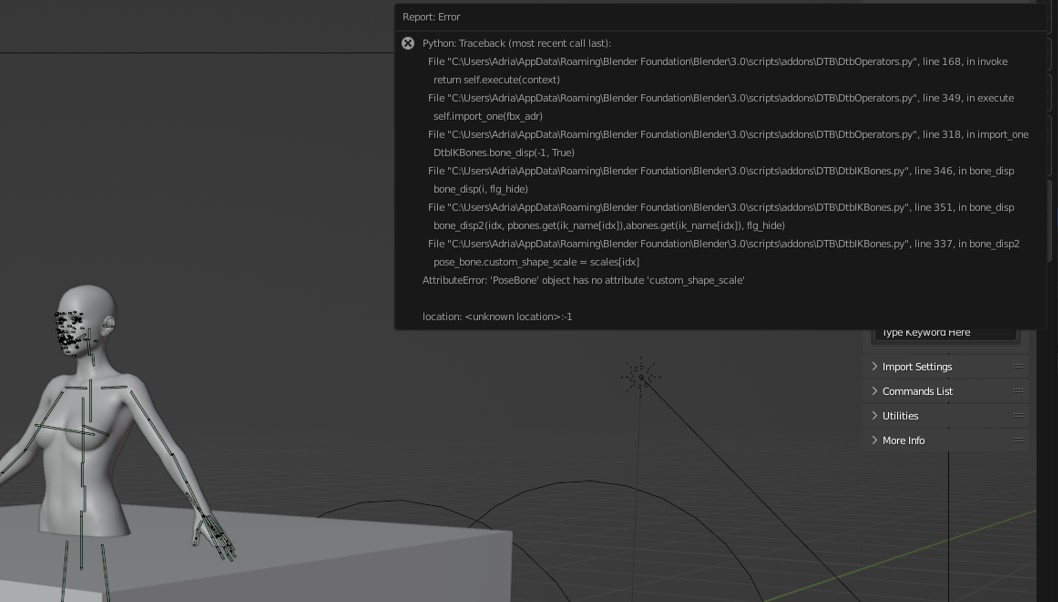
The model still loads but the rig that all the youtube video's show seems to be broken. You get telescoping rings trailing the character. Nothing at the pivot points or around the face for eye tracking. pic posted below.
Having the same error as well. At the same time, the pose and texture look different from daz when rendered.
In the meantime, I use Daz importer as well, everything works fine besides losing face rig.