hear ye hear ye true HD characters for diffeo
 Padone
Posts: 4,364
Padone
Posts: 4,364
Yes it is true. Thomas implemented true HD characters. This means you can import your HD characters then pose and render them in blender. The implementation uses a multires modifier so you can activate the HD mesh for rendering and pose with the base mesh for great performances. This is possible because of some new features in blender 2.9 so it doesn't work in 2.8. Also at this stage there are issues with geografts that are not supported.
The idea comes from @jcade so he gets credits too.
https://www.daz3d.com/forums/discussion/comment/5790646/#Comment_5790646
https://bitbucket.org/Diffeomorphic/import_daz/issues/53/use-the-multiresolution-modifier-for-hd
Below a little test I did with the Muta HD character for G8F she works great. Yes, again, that's posed and rendered in blender just out of the box with diffeo.
http://diffeomorphic.blogspot.com/p/daz-importer-version-15.html
https://www.daz3d.com/mutation-morphs-hd-for-genesis-8-female
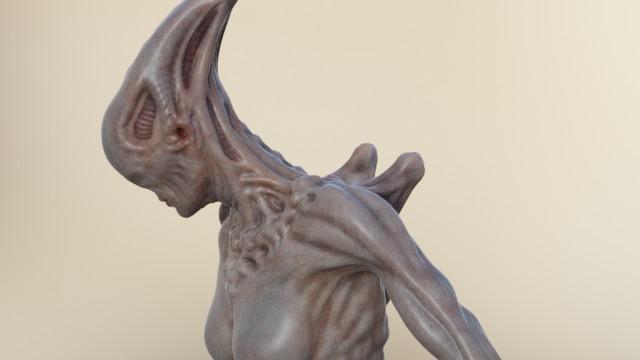
edit. As for geografts please see the comment by @Krampus this works just fine so we get geografts too !
https://www.daz3d.com/forums/discussion/comment/5999337/#Comment_5999337
edit. There's not a user docs update yet but we have two official posts in the blog explaining things. Also giving fair credits to @jcade and @Krampus.
http://diffeomorphic.blogspot.com/2020/09/high-resolution-meshes.html
http://diffeomorphic.blogspot.com/2020/09/hd-meshes-and-geografts.html


Daz 3D is part of 
Connect
DAZ Productions, Inc.
7533 S Center View Ct #4664
West Jordan, UT 84084
Licensing Agreement | Terms of Service | Privacy Policy | EULA
© 2026 Daz Productions Inc. All Rights Reserved.
Comments
Damn me.
Also there's some improvement for eevee skins. Now they tend to look decent for most characters. Stills a raw approximation of iray but this is expected since eevee has limitations over cycles in the volumetric section. If you want true iray skins please use cycles with bsdf materials.
Please see the whole discussion for details.
https://bitbucket.org/Diffeomorphic/import_daz/issues/179/i-believe-i-nailed-v8-act-2-aka-decent-s
Finally thanks to Engetudouiti at diffeomorphic, there are new improved bones that can import the daz locks and limits. And also improvements to the rigify conversion.
https://bitbucket.org/Diffeomorphic/import_daz/issues/174/about-new-rig-import-option-default
https://bitbucket.org/Diffeomorphic/import_daz/issues/166/daz-spine-bones-pose-for-rigi-fy-rig-not
Wow, looks cool. Not sure when I will have time to mess around again though. Maybe in that time the geographs be fixed into hd as will lol. Development is so fast.
This sounds awesome. Looking forward to play with it.
I do like the idea of better riging. Will definitely have to try it out.
Well the human shader materials are already wildly inconsistent in DAZ Studio so unless it's for DAZ Originals in Pro Bundles starting mid-2019 or so (and those are improved but not consistently or whole accurate) I wouldn't worry too much about it. The technical part though should be direct regardless of what the rendered results look like.
Is there a prospect of geografts working at some stage?
It is so encouraging that several projects DAZ Studio to Blender are progressing and wonderful that people are devoting their own time to making them happen.
@marble I believe HD geografts is the next step. Actually I have some ideas but will take some time to sort them out. Not seeing it coming soon unless someone else can help or Thomas finds the way out himself.
I completely agree on that. Does remind me of the early days of Reality when people kept making material conversion updates and Paolo had to add them. Good times.
Wish I could understand how to export rigging and animations better so I could contribute better feedback than "it don't work".
Wow. This is AWESOME! I was just thinking how much I did not want to bake new displacement maps for my project. Now I don't have to, which saves quite a bit of time that I can spend on other things. I can't even begin to express my appreciation and gratitude for this and all the work that has gone into Diffeomorphic and those who have contributed to its development.
Here are a few notes for anyone else trying this -
* Works with sub3, I did a lot of experiments and I don't think it works with sub4.
* You can export eyebrows and eyelashes, probably clothing, but cannot export with a geograft. Blender will throw an error if you try.
* But, you can add a geograft afterward. Export character in base res with the geograft / open in Blender and save / back in DAZ, export character in Sub3 with NO geografts / import sub3 in Blender / simply append the geograft from the previously saved blender file containing the geograft object / use Diffeomorphic to 'merge geograft' like you normally would. Worked for me.
That's good information - I even think I understand how you do that (usually I have several follow-up questions until it dawns on me). Thank you.
You may be ahead of me. I don't even know what a geograft is.
The penis and vagina addons are geographs. there are some horns and that tchulu face tentacles and others I don't know by name off the top of my head.
Generally add-ons that make the human more human and less Barbie & Ken doll-like. For those of us who don't always render fully clothed subjects. I guess there's a certain stigma attached to nudity - especially on this forum where it is not allowed - but I would guess that DAZ relies on the custom of people who render naked people which is why they provide geografts, even if they force you into buying a Pro bundle to go with them. Fortunately there are a number of 3rd. party alternatives available.
This seems to work fine here. I have issues merging the geograft armature though, the plugin doesn't seem to like the appended armature. Pointing Thomas to this to see if he can fix things. Thank you very much for this clever idea !
edit. Never mind, if I merge the armatures after merging the geograft it works just fine. This is so cool.
https://bitbucket.org/Diffeomorphic/import_daz/issues/53/use-the-multiresolution-modifier-for-hd
@ThomasLarsson @Padone @jcade you guys are machines! I'm still running the same dev build I mentioned weeks or months ago so I'mm updating now to give this a shot!
@the5amkebab Personally I did really nothing on HD if not pointing Thomas to the ideas by @jcade and @Krampus. I may have just some credits for materials.
@Padone that's still a huge job, realtime materials are a completely different thing to wrap your head around if you're used to working with path tracing instead, I think the new materials look incredible! I've tried using the HD export and I get 2 meshes in blender when I do, I assume the regular mesh and the other is the HD and I am supposed to merge them somehow through multires or baking normals? I really have no idea where to start, is there some documentation I'm missing to start reading? I also noticed that the HD mesh was the same number of faces as the regular mesh though, am I instead doing something wrong on export?
Thanks.
@the5amkebab
There's no user docs about HD yet since it's so new. Yes the importer gets both the base mesh and the HD version. You have to do nothing the HD version already gets a multires modifier. The HD resolution is taken from the DAZ Studio viewport so you have to set the viewport subd to the desired level before exporting.
You can delete the base mesh version if you don't need it. The original idea was to use the HD version to bake normal maps on the base mesh, but since we now have multires this may not be used.
I'm still learning Blender, so forgive my ignorance.
When I delete / hide the base mesh, the HD mesh seems to disappear as well?
And for some reason even if I hide the base mesh, I'm seeing swirly gray seams on the HD mesh, and what looks like poke-through of the base mesh.
Try putting the mesh (if it isn't) in a collection and unchecking the collection with it still being visible; everything will disappear, but the mesh might still be used. That still works for instance with objects when using them as particle objects, or at least it did.
This is amazing!!!! Thanks a lot for all the hard work!!!!
@Padone Ahh, I exported at subd level 1 so no wonder the HD mesh was the same tris as the normal mesh. Gave it another shot now, 800k tris, that's more like it lol! @ThomasLarsson do you ever dabble in Unreal engine or have any plans to do a Daz to unreal, or even a Blender to unreal for characters imported to Blender with the Diffeo? Awesome work and thanks again, this plug in really is so easy to use and has opened up huge possibilities for me and many others.
@Leonides02 You just have to delete the base mesh collection if you don't need it. I don't see how doing this would delete the HD collection too. This is not possible.
@the5amkebab As for ureal you may try to use the blender gltf exporter but there's some manual work to be done. And actually we get a much better support with eevee as for daz materials.
https://docs.blender.org/manual/en/2.80/addons/io_scene_gltf2.html
This is in the main page at diffeo but just in case you didn't notice it. Thomas just added strand based hair aka SBH support. This means you can import your SBH hair and figures in blender and also add simulations to do whatever you like with them. That is not possible in daz studio unless you're a PA.
http://diffeomorphic.blogspot.com/2020/09/strand-based-hair.html
These forums need a like/reaction button for posts.
+1
It's a really cool option to have. Never really messed around with SBH much in DS, just wrote it off completely when I learned that making it dynamic was for vendors only.
Damn, downloading the latest build now.