• Daz 3D
  • Shop
  • 3D Software
    • Daz Studio Premier
    • Daz Studio
    • Install Manager
    • Partnerships
    • AI Training data
    • Exporters
    • Daz to Roblox
    • Daz to Maya
    • Daz to Blender
    • Daz to Unreal
    • Daz to Unity
    • Daz to 3ds Max
    • Daz to Cinema 4D
  • 3D Models
    • Genesis 9
    • Genesis 8.1
    • Free 3D Models
  • Community
    • Gallery
    • Forums
    • Blog
    • Press
    • Help
  • Memberships
    • Daz Premier
    • Daz Plus
    • Daz Base
    • Compare
  • Download Studio
ADVANCED SEARCH
  • Menu
  • Daz 3D
ADVANCED SEARCH
Add image
  • Shop
  • 3d Software
    • Daz Studio Premier
    • Daz Studio
    • Install Manager
    • Partnerships
    • AI Training data
    • Exporters
    • Daz to Roblox
    • Daz to Maya
    • Daz to Blender
    • Daz to Unreal
    • Daz to Unity
    • Daz to 3ds Max
    • Daz to Cinema 4D
  • 3D Models
    • Genesis 9
    • Genesis 8.1
    • Free 3D Models
  • Community
    • Our Community
    • Gallery
    • Forums
    • Blog
    • Press
    • Help
  • Memberships
    • Daz Premier
    • Daz Plus
    • Daz Base
    • Compare

Notifications

You currently have no notifications.

Loading...
    • Categories
    • Recent Discussions
Daz 3D Forums > 3rd Party Software > Blender Discussion

Diffeomorphic 1.5 not pulling clothes and Camera

brainmuffinbrainmuffin Posts: 1,278
August 2020 in Blender Discussion

After upgrading my Mac to 1.5 of Diffeomorphic in both Studio and Blender, I'm trying to pull a scene with a G8 character (Shan) and a few sections of the Sci-Fi wall. The Wall (with my light modifications), Shan, and the plane primitive make it ok, but the camera, Nesena Hair, and Agate Noir: Psyche do not. There is no error message. Do I need to export these seperarely?

Comments

  • nicsttnicstt Posts: 11,715
    August 2020

    In Blender, just in case I'd toggle the System Console window to open just in case, to see what messages there are: Window > Toggle System Console.

    Trying them seperate might help track down the issue.

    I presume that all the libraries are available - although that should generate feedback error if not.

  • brainmuffinbrainmuffin Posts: 1,278
    August 2020
    nicstt said:

    In Blender, just in case I'd toggle the System Console window to open just in case, to see what messages there are: Window > Toggle System Console.

    Trying them seperate might help track down the issue.

    I presume that all the libraries are available - although that should generate feedback error if not.

    I don't have an option Window -> Toggle System Console.

  • nicsttnicstt Posts: 11,715
    August 2020

    You don't see that?

    window - toggle.jpg
    1028 x 599 - 77K
  • brainmuffinbrainmuffin Posts: 1,278
    August 2020

    This is what I see under Window

    Screen Shot 2020-08-28 at 10.21.09 AM.png
    743 x 413 - 137K
  • TheKDTheKD Posts: 2,711
    August 2020 edited August 2020

    Wow, that's strange. Here is what it looks like on mine
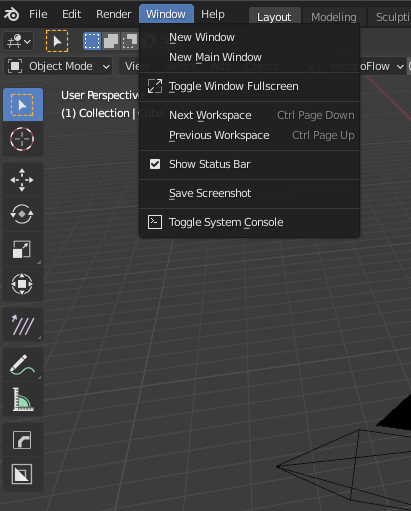
     

    Oh, I found something that might be useful.


    Right click on the Blender icon in the Applications folder and select "Show Package contents". Make an alias of Contents/MacOS/Blender by right clicking and selecting "Make Alias". Rename it and move it somewhere you like.

    This opens the console in the background, next to the Blender application.


    windowmenu.png
    411 x 511 - 53K
    Post edited by TheKD on August 2020
  • nicsttnicstt Posts: 11,715
    August 2020

    very odd

  • brainmuffinbrainmuffin Posts: 1,278
    August 2020 edited August 2020
    TheKD said:
     

    Oh, I found something that might be useful.


    Right click on the Blender icon in the Applications folder and select "Show Package contents". Make an alias of Contents/MacOS/Blender by right clicking and selecting "Make Alias". Rename it and move it somewhere you like.

    This opens the console in the background, next to the Blender application.


    Yep, that worked. The console window stays visible. Later I'll have to check if Linux acts similarly.


    Post edited by brainmuffin on August 2020
Sign In or Register to comment.
Adding to Cart…

Daz 3D is part of Tafi

Connect

DAZ Productions, Inc.
7533 S Center View Ct #4664
West Jordan, UT 84084

HELP

Contact Us

Tutorials

Help Center

Sell Your 3D Content

Affiliate Program

Documentation Center

Open Source

Consent Preferences

JOIN DAZ

Memberships

Blog

About Us

Press

Careers

Bridges

Community

In the Studio

Gallery

Forum

DAZ STORE

Shop

Freebies

Published Artists

Licensing Agreement | Terms of Service | Privacy Policy | EULA

© 2026 Daz Productions Inc. All Rights Reserved.
