• Daz 3D
  • Shop
  • 3D Software
    • Daz Studio Premier
    • Daz Studio
    • Install Manager
    • Partnerships
    • AI Training data
    • Exporters
    • Daz to Roblox
    • Daz to Maya
    • Daz to Blender
    • Daz to Unreal
    • Daz to Unity
    • Daz to 3ds Max
    • Daz to Cinema 4D
  • 3D Models
    • Genesis 9
    • Genesis 8.1
    • Free 3D Models
  • Community
    • Gallery
    • Forums
    • Blog
    • Press
    • Help
  • Memberships
    • Daz Premier
    • Daz Plus
    • Daz Base
    • Compare
  • Download Studio
ADVANCED SEARCH
  • Menu
  • Daz 3D
ADVANCED SEARCH
Add image
  • Shop
  • 3d Software
    • Daz Studio Premier
    • Daz Studio
    • Install Manager
    • Partnerships
    • AI Training data
    • Exporters
    • Daz to Roblox
    • Daz to Maya
    • Daz to Blender
    • Daz to Unreal
    • Daz to Unity
    • Daz to 3ds Max
    • Daz to Cinema 4D
  • 3D Models
    • Genesis 9
    • Genesis 8.1
    • Free 3D Models
  • Community
    • Our Community
    • Gallery
    • Forums
    • Blog
    • Press
    • Help
  • Memberships
    • Daz Premier
    • Daz Plus
    • Daz Base
    • Compare

Notifications

You currently have no notifications.

Loading...
    • Categories
    • Recent Discussions
Daz 3D Forums > 3rd Party Software > Blender Discussion

Exporting from DAZ to Blender FBX Model Problem

DryreLDryreL Posts: 30
August 2020 in Blender Discussion

Can someone help me? All my models look like this: (attached below)
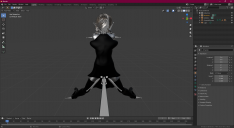
 

blenderscene1.png
1920 x 1050 - 317K
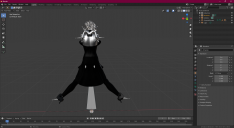
blenderscene2.png
1920 x 1049 - 318K

Comments

  • Richard HaseltineRichard Haseltine Posts: 108,056
    August 2020

    What options are you setting?

  • DryreLDryreL Posts: 30
    August 2020

    Default Blender settings. FBX model works nice when I import into Unity but it looks like this in Blender. I don't understand why. I am going to make an animation for my character in Blender so this is important for me.

  • Richard HaseltineRichard Haseltine Posts: 108,056
    August 2020

    What about the export settings from Daz Studio? Assuming that is what you are doing - you are not giving a lot of information.

  • TheMysteryIsThePointTheMysteryIsThePoint Posts: 3,227
    August 2020
    gokdenizcetintr said:

    Can someone help me? All my models look like this: (attached below)


    Try the Better FBX Imorter & Exporter at BlenderMarket. It has some settings added specifically for Daz.

  • DryreLDryreL Posts: 30
    August 2020
    Richard Haseltine said:

    What about the export settings from Daz Studio? Assuming that is what you are doing - you are not giving a lot of information.

    Here's my export settings. Do you have any idea about what happened in the Blender?

    FBXExportOptions.png
    1920 x 1049 - 349K
  • DryreLDryreL Posts: 30
    August 2020

    I found the solution. Import your fbx model into Blender and press Alt + G, Alt + R, Alt + S while in Pose Mode. Don't forget to select all bones. If you press a it will select all of them. And that's it!

  • brainmuffinbrainmuffin Posts: 1,268
    August 2020
    DryreL said:

    I found the solution. Import your fbx model into Blender and press Alt + G, Alt + R, Alt + S while in Pose Mode. Don't forget to select all bones. If you press a it will select all of them. And that's it!

    I tried this on a V4 model exported/imported vi FBX. It is now in the default pose. What's next?

  • benniewoodellbenniewoodell Posts: 1,999
    August 2020

    This happened to me with the Daz to Blender Bridge when I bought Tara and tried importing her with the Tara outfit and hair. I was surprised as it always happened with FBX imports but I was confused why the bridge did that. But I just clicked rest pose and it was fine and then I went on my merry way but it was definitely a head tilter. 

  • EnderEnder Posts: 23
    September 2022

    DryreL said:

    I found the solution. Import your fbx model into Blender and press Alt + G, Alt + R, Alt + S while in Pose Mode. Don't forget to select all bones. If you press a it will select all of them. And that's it!

    Great solution: it works for me!

  • foxrockerfellerfoxrockerfeller Posts: 0
    September 2023

    DryreL said:

    I found the solution. Import your fbx model into Blender and press Alt + G, Alt + R, Alt + S while in Pose Mode. Don't forget to select all bones. If you press a it will select all of them. And that's it!


    This solution worked for me as well (at least to get the rig back into resting pose in Blender). Also saved me from having to rig it myself!

Sign In or Register to comment.
Adding to Cart…

Daz 3D is part of Tafi

Connect

DAZ Productions, Inc.
7533 S Center View Ct #4664
West Jordan, UT 84084

HELP

Contact Us

Tutorials

Help Center

Sell Your 3D Content

Affiliate Program

Documentation Center

Open Source

Consent Preferences

JOIN DAZ

Memberships

Blog

About Us

Press

Careers

Bridges

Community

In the Studio

Gallery

Forum

DAZ STORE

Shop

Freebies

Published Artists

Licensing Agreement | Terms of Service | Privacy Policy | EULA

© 2025 Daz Productions Inc. All Rights Reserved.
