• Daz 3D
  • Shop
  • 3D Software
    • Daz Studio Premier
    • Daz Studio
    • Install Manager
    • Partnerships
    • AI Training data
    • Exporters
    • Daz to Roblox
    • Daz to Maya
    • Daz to Blender
    • Daz to Unreal
    • Daz to Unity
    • Daz to 3ds Max
    • Daz to Cinema 4D
  • 3D Models
    • Genesis 9
    • Genesis 8.1
    • Free 3D Models
  • Community
    • Gallery
    • Forums
    • Blog
    • Press
    • Help
  • Memberships
    • Daz Premier
    • Daz Plus
    • Daz Base
    • Compare
  • Download Studio
ADVANCED SEARCH
  • Menu
  • Daz 3D
ADVANCED SEARCH
Add image
  • Shop
  • 3d Software
    • Daz Studio Premier
    • Daz Studio
    • Install Manager
    • Partnerships
    • AI Training data
    • Exporters
    • Daz to Roblox
    • Daz to Maya
    • Daz to Blender
    • Daz to Unreal
    • Daz to Unity
    • Daz to 3ds Max
    • Daz to Cinema 4D
  • 3D Models
    • Genesis 9
    • Genesis 8.1
    • Free 3D Models
  • Community
    • Our Community
    • Gallery
    • Forums
    • Blog
    • Press
    • Help
  • Memberships
    • Daz Premier
    • Daz Plus
    • Daz Base
    • Compare

Notifications

You currently have no notifications.

Loading...
    • Categories
    • Recent Discussions
Daz 3D Forums > 3rd Party Software > Blender Discussion

Mirroring and splattering in Substance Painter

RexRedRexRed Posts: 1,493
July 2020 edited July 2020 in Blender Discussion

This is actually a Substance Painter question but Blender people know a lot of stuff so I thought would ask it here.

This has taken me a whole day to try and figure out to no avail. :(

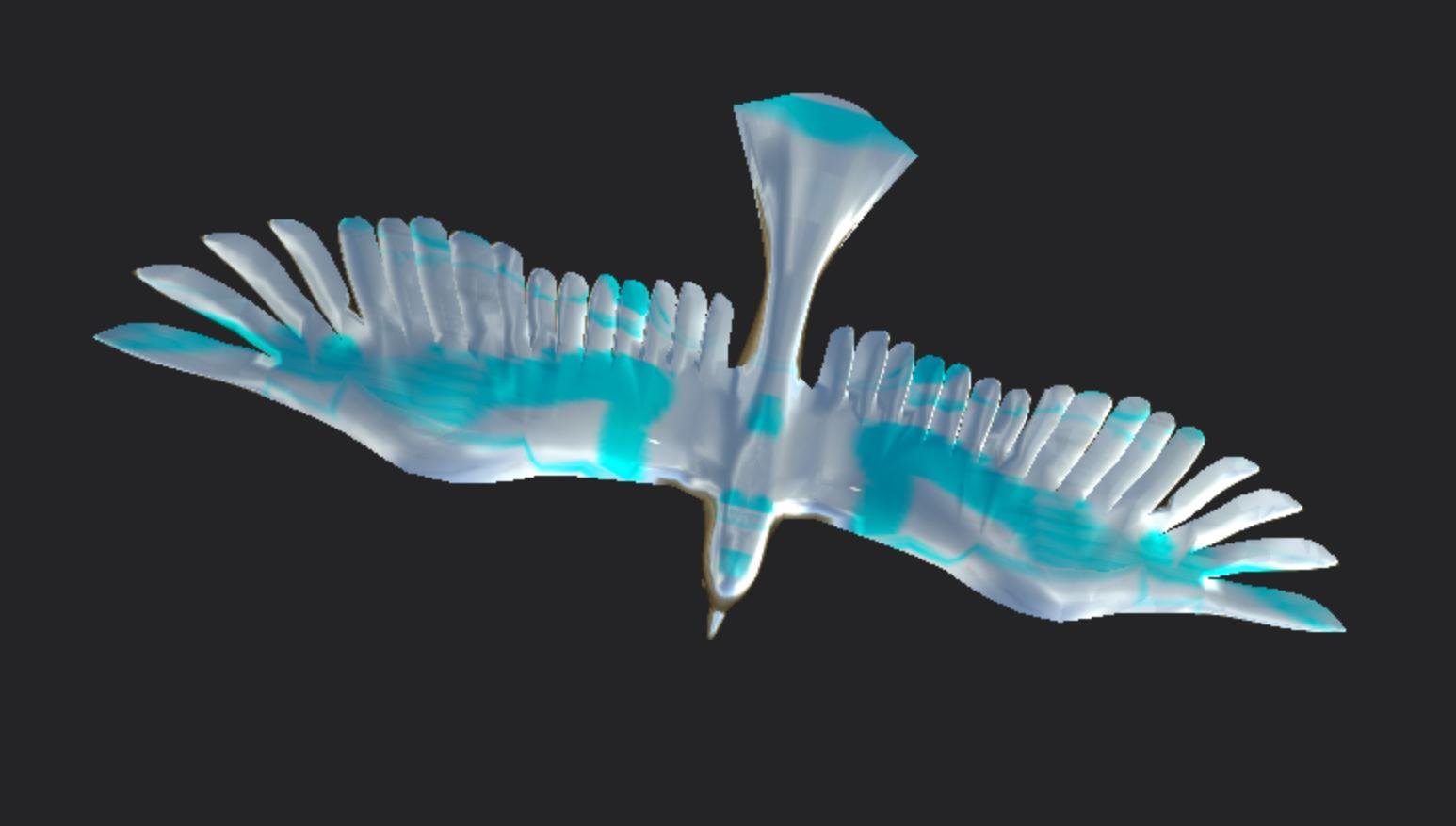
When I paint on the bird the paint splatters everywhere and it mirrors too.

I have symmetry turned off,

I just wanted to paint some eyes and a yellow beak.

Everything gets mirrored.

The wireframe of the bird looks like one half was made and they inverted it for the other side. The geometry on both sides are perfectly the same.

I tried bringing it into Daz and resetting the texture to Iray and then exporting it and importing it into Substance Painter and the paint is still splattering and mirroring, What I splatter on one side gets splattered on the other side. 

I think it has something to do with OpenGl and DirectX and UV mapping but I am not knowledgeable enough to figure it out.

Any help on this would be greatly appreciated.
Dove For Daz Forums.jpg
1546 x 877 - 188K
Post edited by RexRed on July 2020

Comments

  • lilweeplilweep Posts: 2,740
    July 2020

    Maybe show a pic of the UVs?

  • SilentLadyGTASilentLadyGTA Posts: 38
    July 2020 edited July 2020

    Hi,

    I always use OpenGL in Substance Painter. But yes we must see uv map.

    When I am texturing with Substance I use this excellent product: https://www.daz3d.com/environment-blend-shader

    Post edited by SilentLadyGTA on July 2020
  • RexRedRexRed Posts: 1,493
    July 2020

    I will get a picture of the UV, it is all scrunched together like an accordian. That product looks great SIlentLady! I got to study it more!!!! 

  • RexRedRexRed Posts: 1,493
    July 2020

    The UV is one crumpled mess..

    UV MAP OF DOVE.jpg
    3066 x 1453 - 391K
  • SilentLadyGTASilentLadyGTA Posts: 38
    July 2020 edited July 2020
    RexRed said:

    The UV is one crumpled mess..

    WOW ! my advice is to redo UV. You can get good result with this shit !

    Is it a crow from DAZ ? I can try it in Substance Painter

    Post edited by SilentLadyGTA on July 2020
  • RexRedRexRed Posts: 1,493
    July 2020

    It is a dove from free3d.com https://free3d.com/3d-model/dove-58343.html

    How do I create a new UV in Substance Painter?


  • lilweeplilweep Posts: 2,740
    July 2020 edited July 2020
    RexRed said:

    The UV is one crumpled mess..

    Yes. That is the problem.  I am assuming there is lots of overlap of the UV islands also, so when you paint on one section you end up painting another section.

    The UVs need to be re-made.  (No idea how to do this myself, but i think you can Unwrap UVs pretty easily in programs like Blender etc)

    Post edited by lilweep on July 2020
  • j cadej cade Posts: 2,310
    July 2020

    Provided you're using a relatively new version of substance (idk exactly when it was added early this year I think?), when you create a new project there are options to create uvs. in import settings toggle auto unwrap click on options and make sure its set to recompute


    obv using a full 3d program like blender will give you moar control but quick and automatic also certainly has its charm

  • SilentLadyGTASilentLadyGTA Posts: 38
    July 2020 edited July 2020


    RexRed said:

    It is a dove from free3d.com https://free3d.com/3d-model/dove-58343.html

    How do I create a new UV in Substance Painter?

    My try  to make better UV with Blender (obj + uv map)


    zip
    zip
    Dove_brid.zip
    148K
    Post edited by SilentLadyGTA on July 2020
  • RexRedRexRed Posts: 1,493
    July 2020

    Oh wow! You did it SilentLady! The paint glides on so smoothly in Substance Painter! The map is really nice! You are brilliant! I knew Blender people could solve this. I have got to learn Blender, it seems so hard but it does so much!!! 

    This is fantastic! A great ending to this frustrating dilemma. If you make a tutorial about how you did this I would love to learn how!!!

    Please link to it here. Thank you thank you thank you!!! :)

  • SilentLadyGTASilentLadyGTA Posts: 38
    July 2020
    RexRed said:

    Oh wow! You did it SilentLady! The paint glides on so smoothly in Substance Painter! The map is really nice! You are brilliant! I knew Blender people could solve this. I have got to learn Blender, it seems so hard but it does so much!!! 

    This is fantastic! A great ending to this frustrating dilemma. If you make a tutorial about how you did this I would love to learn how!!!

    Please link to it here. Thank you thank you thank you!!! :)

    Thank you !! Learning blender is very very easy ! So many tutorials on Youtube. In 15 days you will make great things !

  • SilentLadyGTASilentLadyGTA Posts: 38
    July 2020
    SilentLadyGTA said:
    RexRed said:

    Oh wow! You did it SilentLady! The paint glides on so smoothly in Substance Painter! The map is really nice! You are brilliant! I knew Blender people could solve this. I have got to learn Blender, it seems so hard but it does so much!!! 

    This is fantastic! A great ending to this frustrating dilemma. If you make a tutorial about how you did this I would love to learn how!!!

    Please link to it here. Thank you thank you thank you!!! :)


    RexRed said:

    Oh wow! You did it SilentLady! The paint glides on so smoothly in Substance Painter! The map is really nice! You are brilliant! I knew Blender people could solve this. I have got to learn Blender, it seems so hard but it does so much!!! 

    This is fantastic! A great ending to this frustrating dilemma. If you make a tutorial about how you did this I would love to learn how!!!

    Please link to it here. Thank you thank you thank you!!! :)


  • RexRedRexRed Posts: 1,493
    July 2020 edited July 2020

    J Cade your suggestion was very helpful too! I found the recompute part you suggested in the new import dialogue box and it works very well! It made one big gigantic UV.

    This has been a very long day but it ended up really fulfilling in finding the solutions to these issues.

    I didn't think the problems I was having were related. I thought I had some weird brush selected and did not know how to turn it off. 

    It was mirroring perfectly on both sides but I could not focus the sprayer it was splattering everywhere.

    What a hair puller this was. Now the brushes are quite focused in Substance Painter now that the UVs have been working right.

    I really learn a lot then I go searching for answers looking for a needle in a haystack... There is lots to learn along the way. 

    I saw that crumbled up UV map and it did not even occur to me that that was the problem. I was trying to delete it and make a new one but that was not working.

    When you all asked me for and image of the UV map that was an ah ha moment. 

    Thanks everyone for helping me find these solutions, now i can rest a while until the next big challenge comes along.

    I really wish i could learn Blender in a day but I really think it will take years instead. :).

    Post edited by RexRed on July 2020
  • RexRedRexRed Posts: 1,493
    July 2020 edited July 2020

    WOW, I just noticed the tutorial SIlent Lady, thank you!!!! I subscribed to your Youtube channel and clicked the bell! This is something really great to know how to do! Best to you all! heart

    Post edited by RexRed on July 2020
Sign In or Register to comment.
Adding to Cart…

Daz 3D is part of Tafi

Connect

DAZ Productions, Inc.
7533 S Center View Ct #4664
West Jordan, UT 84084

HELP

Contact Us

Tutorials

Help Center

Sell Your 3D Content

Affiliate Program

Documentation Center

Open Source

Consent Preferences

JOIN DAZ

Memberships

Blog

About Us

Press

Careers

Bridges

Community

In the Studio

Gallery

Forum

DAZ STORE

Shop

Freebies

Published Artists

Licensing Agreement | Terms of Service | Privacy Policy | EULA

© 2025 Daz Productions Inc. All Rights Reserved.