• Daz 3D
  • Shop
  • 3D Software
    • Daz Studio Premier
    • Daz Studio
    • Install Manager
    • Partnerships
    • AI Training data
    • Exporters
    • Daz to Roblox
    • Daz to Maya
    • Daz to Blender
    • Daz to Unreal
    • Daz to Unity
    • Daz to 3ds Max
    • Daz to Cinema 4D
  • 3D Models
    • Genesis 9
    • Genesis 8.1
    • Free 3D Models
  • Community
    • Gallery
    • Forums
    • Blog
    • Press
    • Help
  • Memberships
    • Daz Premier
    • Daz Plus
    • Daz Base
    • Compare
  • Download Studio
ADVANCED SEARCH
  • Menu
  • Daz 3D
ADVANCED SEARCH
Add image
  • Shop
  • 3d Software
    • Daz Studio Premier
    • Daz Studio
    • Install Manager
    • Partnerships
    • AI Training data
    • Exporters
    • Daz to Roblox
    • Daz to Maya
    • Daz to Blender
    • Daz to Unreal
    • Daz to Unity
    • Daz to 3ds Max
    • Daz to Cinema 4D
  • 3D Models
    • Genesis 9
    • Genesis 8.1
    • Free 3D Models
  • Community
    • Our Community
    • Gallery
    • Forums
    • Blog
    • Press
    • Help
  • Memberships
    • Daz Premier
    • Daz Plus
    • Daz Base
    • Compare

Notifications

You currently have no notifications.

Loading...
    • Categories
    • Recent Discussions
Daz 3D Forums > 3rd Party Software > Blender Discussion

blend files from daz - missing textures?

Lothar WeberLothar Weber Posts: 1,611
July 2020 edited July 2020 in Blender Discussion

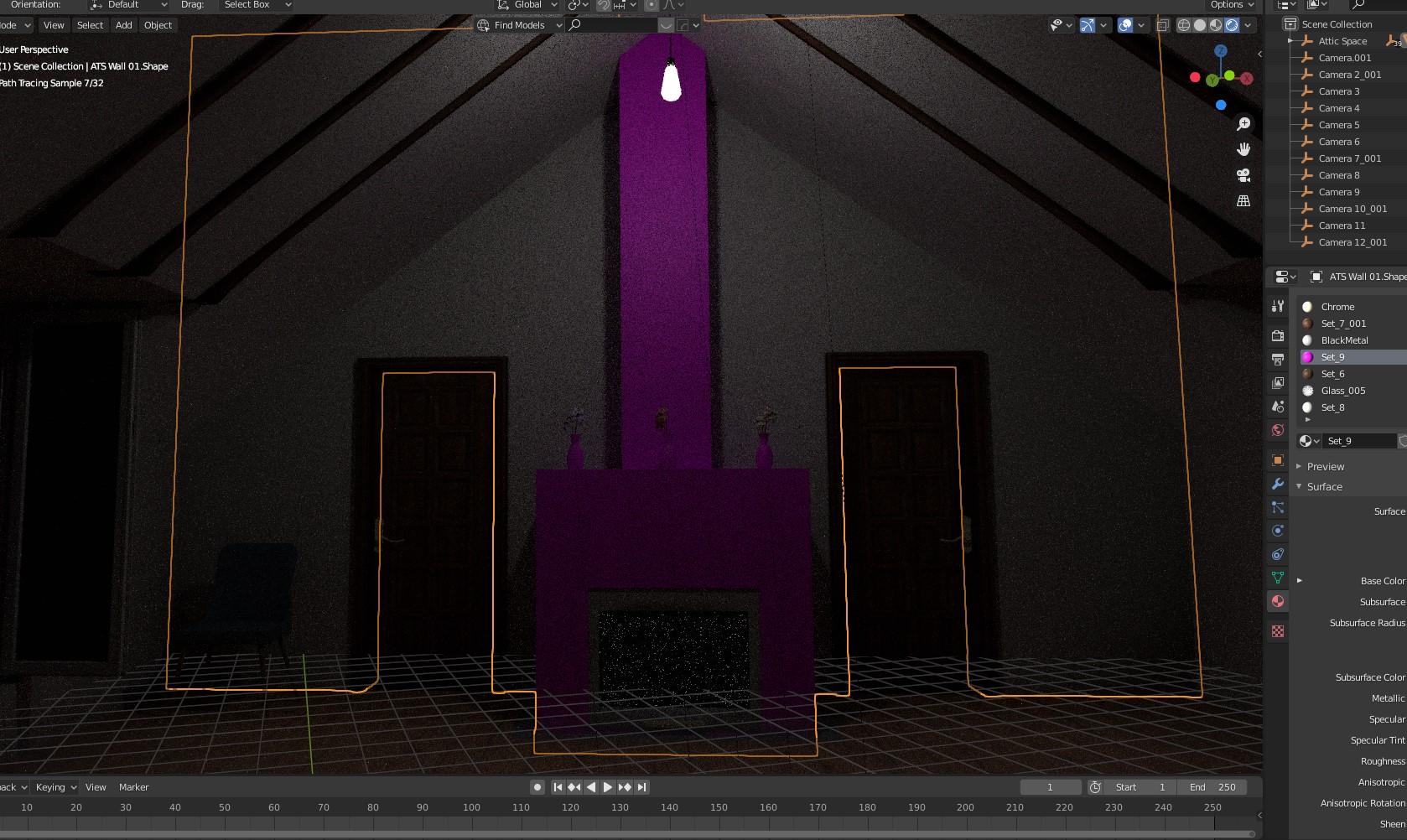
I downloaded the open attic .blend file from daz. Now in blender it's missing some textures. Any clues?
Anmerkung 2020-07-26 083149.jpg
1678 x 1002 - 447K
Post edited by Lothar Weber on July 2020

Comments

  • Lothar WeberLothar Weber Posts: 1,611
    July 2020 edited July 2020

    Another example of error in blender file of "Industrial Loft" - see image. Walls are missing and the floor is somewhere...

    Anmerkung 2020-07-26 094058.jpg
    1819 x 1010 - 306K
    Post edited by Lothar Weber on July 2020
  • TDBAGZTDBAGZ Posts: 165
    July 2020 edited July 2020

    Some Textures arent compatible between the two, IRAY / EVEE or Cycles.

    I dont know if its an MTL, MDL vs RSL, or Iray issue, but I have noticed that Blender always look more like 3DL, even G8Fs eyes (iris) dont display in Blender.

    I think Blender displays the one of the shader settings different Gloss, Reflection, SSS, or Specular (G8F Eye Moisture).  

    The UV map and surface "Material" zone assisments are correct when importing to Daz from Blender but dont I dont have enough or recent experience with transfering material presets between the two.

    You might try adjusting those presets on a set of spheres as a test and see if any display oddly.

    Might need to tweak, reset, or even redo shader settings with the principal shader or uberbase.

    Again I have very limited experience on material transfer and Blender rendering.

    I usually model, unwrap and map UV, as well as assisgn surfaces (Materials) in Blender. Then either transfer a painted color map or use the uberbase to color and shade for DS in DS.


    ADDENDUM: I have also had issues showing volumemetric shaders in blender, it needed a created Blender light to appear in addition to just the default viewport lighting.

    Post edited by TDBAGZ on July 2020
  • Lothar WeberLothar Weber Posts: 1,611
    July 2020
    TDBAGZ said:

    Some Textures arent compatible between the two, IRAY / EVEE or Cycles.

    I dont know if its an MTL, MDL vs RSL, or Iray issue, but I have noticed that Blender always look more like 3DL, even G8Fs eyes (iris) dont display in Blender.

    I think Blender displays the one of the shader settings different Gloss, Reflection, SSS, or Specular (G8F Eye Moisture).  

    The UV map and surface "Material" zone assisments are correct when importing to Daz from Blender but dont I dont have enough or recent experience with transfering material presets between the two.

    You might try adjusting those presets on a set of spheres as a test and see if any display oddly.

    Might need to tweak, reset, or even redo shader settings with the principal shader or uberbase.

    Again I have very limited experience on material transfer and Blender rendering.

    I usually model, unwrap and map UV, as well as assisgn surfaces (Materials) in Blender. Then either transfer a painted color map or use the uberbase to color and shade for DS in DS.


    ADDENDUM: I have also had issues showing volumemetric shaders in blender, it needed a created Blender light to appear in addition to just the default viewport lighting.

    Thank you for the answer. But they are official daz Blender (.blend) files. Downloaded from the product pages. They should work in blender without any additional work - in my opinion...

  • markusmaternmarkusmatern Posts: 597
    July 2020 edited July 2020

    Basically you have three options:

    1. Open a ticket and wait until it gets fixed
    2. Fix the problem in the shader
      1. The texture in the blend file, that is referenced is: granite_blackBitmap_granite_black_baked.png
      2. This is not supplied, instead there is one called granite_black.png
      3. This is also the one used when you load the set in DAZ. In DAZ it is also used with a tiling of 5.
      4. In Blender activate the Shading workspace
      5. Open the Outliner editor and open ATS Wall 01 -> ATS Wall 01.Shape -> Mesh -> Set_9
      6. Now you can change the texture and change the tiling in the Shader Editor.


    3. Fix the problem in the file system
      1. Locate the extracted textures subdirectory where you installed your Blender files
      2. Copy the file granite_black.png to granite_blackBitmap_granite_black_baked.png

    The same is with the vases, here the texture name is white_marbleBitmap_white_marble_baked.png (Copy from white_marble.png)

    These two need to be converted from their JPG versions:

    1. There are two boxes on the floor which use brownpaperBitmap_brownpaper_baked.png (Convert from brownpaper.jpg)
    2. And last but not least a picture on the wall: picture01Bitmap_picture01_baked.png (Convert from picture01.jpg)


    ShaderEditor.jpg
    1898 x 1028 - 310K
    Post edited by markusmatern on July 2020
  • Lothar WeberLothar Weber Posts: 1,611
    July 2020
    markusmatern said:

    Basically you have three options:

    1. Open a ticket and wait until it gets fixed
    2. Fix the problem in the shader
      1. The texture in the blend file, that is referenced is: granite_blackBitmap_granite_black_baked.png
      2. This is not supplied, instead there is one called granite_black.png
      3. This is also the one used when you load the set in DAZ. In DAZ it is also used with a tiling of 5.
      4. In Blender activate the Shading workspace
      5. Open the Outliner editor and open ATS Wall 01 -> ATS Wall 01.Shape -> Mesh -> Set_9
      6. Now you can change the texture and change the tiling in the Shader Editor.


    3. Fix the problem in the file system
      1. Locate the extracted textures subdirectory where you installed your Blender files
      2. Copy the file granite_black.png to granite_blackBitmap_granite_black_baked.png

    The same is with the vases, here the texture name is white_marbleBitmap_white_marble_baked.png (Copy from white_marble.png)

    These two need to be converted from their JPG versions:

    1. There are two boxes on the floor which use brownpaperBitmap_brownpaper_baked.png (Convert from brownpaper.jpg)
    2. And last but not least a picture on the wall: picture01Bitmap_picture01_baked.png (Convert from picture01.jpg)


    WOW thank you - that was fast. Seems we need to wait for the fixes a little longer, since it is so new.

Sign In or Register to comment.
Adding to Cart…

Daz 3D is part of Tafi

Connect

DAZ Productions, Inc.
7533 S Center View Ct #4664
West Jordan, UT 84084

HELP

Contact Us

Tutorials

Help Center

Sell Your 3D Content

Affiliate Program

Documentation Center

Open Source

Consent Preferences

JOIN DAZ

Memberships

Blog

About Us

Press

Careers

Bridges

Community

In the Studio

Gallery

Forum

DAZ STORE

Shop

Freebies

Published Artists

Licensing Agreement | Terms of Service | Privacy Policy | EULA

© 2025 Daz Productions Inc. All Rights Reserved.