daz to blender bugs
 Padone
Posts: 4,346
Padone
Posts: 4,346
It is not clear to me where to post bugs so this is the first I found, I guess we can add other bugs here for the developers to look at.
UNIT SCALE BUG
The plugin sets the blender unit scale to 0.01 so to fit the default daz studio unit that's centimeters. This is wrong since unit scale is a global factor and this way the figure doesn't fit other blender assets. For example when appending data from other blender files. The default blender unit is meters and the default unit scale is 1. So the plugin should scale the figure by 0.01 on import.
The purpose of the unit scale in blender is to fit precision for out of ordinary dimensions. Not to fit the units from meters to centimeters.
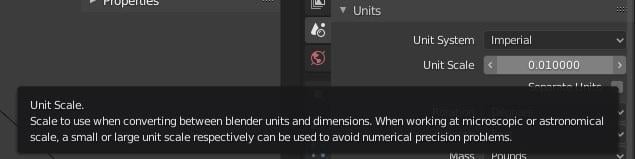
edit. Indeed this also gets issues with the camera and sun generated by the plugin itself, that are the wrong size from the start.

Daz 3D is part of 
Connect
DAZ Productions, Inc.
7533 S Center View Ct #4664
West Jordan, UT 84084
Licensing Agreement | Terms of Service | Privacy Policy | EULA
© 2026 Daz Productions Inc. All Rights Reserved.
Comments
This add on was originally designed to make morphs for daz, so the scaling is like that so you can easily send morphs back to daz with morph loader pro without any issues with the scale. At least that's my understanding.
Edited to fix malapropism
@Padone The developer included a command to change the Unit Scale. In the "Command" box of the plugin panel type "#real size" and then click the command button. That will scale the character and change the unit scale value to 1. I have not tested that on the Daz3D version, but it should work.
CORRECTIVE SMOOTH BUG
I'm not sure why you have to use a corrective smooth for the armpit area. There's already weightmaps and jcms for that and smooth is not necessary. Anyway if for some reason you do have to, then the modifier position in the stack is wrong. You have to place it after the armature modifier and before subdivision or the original vertex count will not match.
Thank you for the useful information. But here it says "already real size" and the scale doesn't change. Where do we get the documentation ?
edit. POSSIBLE #real size BUG
I managed to get the #real size command to work. It didn't work for me because I already saved and reloaded the figure. You have to use this command the first time you import the figure, before saving and reloading. Otherwise it doesn't work. Not sure if this is a bug or intended behaviour since the manual is rather quick on this.
Also the #real size command has a strange side effect since it has to be executed in object mode, but then it switches to pose mode and sets the viewport to camera perspective. Both unexpected actions if you ask me.
Hi @Padone! Someone posted this in the introducing the daz to blender bridge thread a little while ago and there is a lot of things that without this document, you wouldn't know. Here's the link:
https://drive.google.com/file/d/16helhf0K9RDGt_45rvoG1fy8rXG0JXNI/view?usp=sharing
Can you get to this link: https://drive.google.com/file/d/16helhf0K9RDGt_45rvoG1fy8rXG0JXNI/view?usp=sharing
It contains the documentation that Mitchy created for the Daz3D version. Why Daz is not sharing it is a bit of a Mystery to me.
Edit: Just noticed this was already shared in another thread. Sorry for the double post.
MATERIAL CONVERSION IS INEXISTENT
I just changed the reflectance tint to green for a she-hulk effect, but the plugin seems to have a default skin it applies to the figure, regardless of the daz material. Not a bug but somewhat sad. As reported in the uber shader documentation the reflectance tint has to be mutiplied with the diffuse color, so it's a quite simple implementation.
@benniewoodell @Cinus Thank you so much for the manual. I admit it's a bitty odd going blind on the plugin. I also guess that's very useful to everyone here. Going to read it.
Since this is now listed as a Daz Originals product, I think you would get the best response by submitting help tickets to the Daz service desk in the usual way. I don't think you can rely on the Daz devs combing the forums for bug reports.
@andya You're probably right. Let's say a bug discussion may be more useful to us poor users, then reporting to daz and wait for the fix takes its time as we know well enough.
@Padone Are you saying that the DazToBlender plugin created corrective smoothing modifiers for the armpits, or did you add those?
Thanks for this, very useful.
@Cinus That's the imported G8F, I didn't add anything. And I really can't figure out what the smoothing is needed for. I see that when you export the HD version it gest even worse since two smooth modifiers are generated. For the HD version it may make sense though since subdivision doesn't work fine with dense meshes.
@Padone Interesting. The "original" version does not create any smoothing modifiers. As you mentioned, it does seem somewhat redundant to add a smoothing modifier to the armpits.
I am curious, are you the padone that reported this blender bug many years ago: https://developer.blender.org/T39287
That issue is the cause of the really large file sizes and high memory consumption people are seeing when importing Daz characters into blender. Creating shapekeys for hair at base level is a bad idea. At higher levels of SubD, bad things will start happening to your computer :)
@Cinus Yep it's me. I was then replied by the developers that's not possible because it would be too slow to compute, something to do with fast memory access if I recall correctly. That I didn't agree of course. It seems this "feature" was never fixed.
A fast workaround is to separate the head with its morphs that works fine for dressed characters.
SKIN MATERIAL BUG
I see the plugin uses a mcy_skin custom group for the skin material that gets different outputs for eevee and cycles. Now this group uses random walk sss for eevee and gaussian sss for cycles. It should be the opposite since eevee doesn't support random walk that's intended for cycles only.
Also Just a related note for the manual. As for the #split eyelash command, the unnatural blue line reported in the manual is due to to the random walk sss that doesn't work fine with close disconnected meshes. Separating the disconnected meshes into multiple objects fixes this. I have no idea how the author gets this example since random walk can't work in the mcy_skin as explained above.
Padone :
You can cross the too big figure import off the bug list -- It is definitely a feature, and says so in the manual -- Mitchy stated it is for the use with Rigify which I have never used, so don't know the validity of this.
Blender Foundation's 2010 Sintel figure and rig is fine at the default 1-to-1 ratio of the default cube of 2 Meters or 2 Blender units at default Unit Scale = 1.00, which is what the BF states is the default figure size for Blender and subsequently what everything revolves around (personal Unit System/Scale used not withstanding).
This is the standard I have been importing/bridging my Daz Studio figures/props for several years for modeling, cloth simulation, and morph target work with 1-to-1 fidelity on round-trips.
Mitchy included a way to get the default World Unit Scale back to normal by using his Command box after figure import with the code #real size -- I'm going to create a toggle button added to the pre-import process, as well as not defaulting to Pose Mode -- I already did this for the GoB_DS bridge for morph targets addon.
@DaremoK3 It also says in the manual that this "feature" gets issues with simulations. In my opinion there's no reason to import out of scale, since the morph loader pro gets a scale option itself. Then yes there's the #real size command but it doesn't work completely fine as explained above. So let's say it's a "feature" with issues and a workaround. That sounds pretty close to a bug to me.
I do know my DAZ clothes and iClone CC2 FBX have to import that size too when I weightmap them for iClone6
Poser figures on the otherhand are tiny
@WendyLuvsCatz You can of course work out of scale in blender if that's only for export purposes. But if you need to work with your assets in blender then they need to be the proper size for camera perspective and lights and physics simulation to work properly.
Then I don't know iClone but usually importers do have a scale option, the morph loader pro does have it for example, so working out of scale in blender should be not necessary either way.
Even if I Did still use DS for Character animation, I would have zero use for this Daz bridge as it Apparently does not support animation Data transfer so those who Buy the $200 USD "Facemojo" Iphone plugin will have to use another method to render outside of Studio
However for my CC3 to Blender,animated figures, I simply use the principled SSS and plug in a custom Scatter mask to control distribution of the sss effect in EEVEE.
I get the same results wether I am using Random walk or Gausian ( I turned it up really high to show an example on this southern African Character)
so I am not sure why you are saying Random walk is not supported by EEVEE.
yeah I found this less useful than I thought
The Mystery is the Point's new Alembic exporter looks more useful to me as you get the full HD mesh with all the vertex animations
@wolf359 @wendy I agree this first version of the plugin is somewhat basic especially compared to diffeo. Nevertheless I am very excited from the new direction daz is taking providing content for other platforms including blender. So I'm dedicating some of my time to find bugs, that may also benefit everyone interested here.
As for eevee not supporting random walk that is specified in the eevee docs. You can select it of course but eevee will always do gaussian sss. That is indeed why you get the same result.
https://docs.blender.org/manual/en/latest/render/eevee/limitations.html
https://docs.blender.org/manual/en/latest/render/eevee/materials/nodes_support.html
I am not disparaging it, it's a good start indeed just not suited to my use, the .blend files are also a great idea
this thread was about bugs and not being able to import poses and animations is certainly something needing addressing.
Hi @WendyLuvsCats, I don't know if you saw the manual I posted above near the top of the thread, but there is a way to import poses (just type #get pose in the command box and a new box opens up). Now I will say after playing around with it this weekend, it really is hit or miss. A ton of poses from sets I tried to import, the character just sat there, but like you're good on using the base poses for sure, I got Mei Lin 8's poses to work, and some others, so this definitely is a bug that needs to be addressed. I know the manual says which files can or can't be read, but all the ones I tried to open matched what was said to be accessible. So I don't know what's going on. But it would be great to be able to transfer over animations as well.
I will need to read more
There's a manual? Oh for the love of...
Time to start over and see what I've been doing wrong, or doing the hard way.
Yeah, it really should have been advertised more than someone randomly finding it on google drive and posting it in one of these forums.
Load Poses and Exprssions
It tried to load poses with #get pose. It seems to work partly. It doesn't perfectly and not for all poses. And how can I load expressions? I did not find any expressions wich was loeaded with #get pose. Is it possible lod load expressions also?