• Daz 3D
  • Shop
  • 3D Software
    • Daz Studio Premier
    • Daz Studio
    • Install Manager
    • Partnerships
    • AI Training data
    • Exporters
    • Daz to Roblox
    • Daz to Maya
    • Daz to Blender
    • Daz to Unreal
    • Daz to Unity
    • Daz to 3ds Max
    • Daz to Cinema 4D
  • 3D Models
    • Genesis 9
    • Genesis 8.1
    • Free 3D Models
  • Community
    • Gallery
    • Forums
    • Blog
    • Press
    • Help
  • Memberships
    • Daz Premier
    • Daz Plus
    • Daz Base
    • Compare
  • Download Studio
ADVANCED SEARCH
  • Menu
  • Daz 3D
ADVANCED SEARCH
Add image
  • Shop
  • 3d Software
    • Daz Studio Premier
    • Daz Studio
    • Install Manager
    • Partnerships
    • AI Training data
    • Exporters
    • Daz to Roblox
    • Daz to Maya
    • Daz to Blender
    • Daz to Unreal
    • Daz to Unity
    • Daz to 3ds Max
    • Daz to Cinema 4D
  • 3D Models
    • Genesis 9
    • Genesis 8.1
    • Free 3D Models
  • Community
    • Our Community
    • Gallery
    • Forums
    • Blog
    • Press
    • Help
  • Memberships
    • Daz Premier
    • Daz Plus
    • Daz Base
    • Compare

Notifications

You currently have no notifications.

Loading...
    • Categories
    • Recent Discussions
Daz 3D Forums > 3rd Party Software > Blender Discussion

Daz to Blender Set up with Pics!

EboniteEbonite Posts: 24
July 2020 edited July 2020 in Blender Discussion

Morning Everyone.

I see some are still having trouble getting the Blender Bridge to work.  So I made a little step by step here.

I attached a Word Doc with images imbedded or you can bring up larger images if needed

1.  Open your Daz Install Manager and go to Installed.

2. Click on the little arrow to the far right and go down to 'Show Installed Files' and click on it.

*see image Daz-Blender 001*

3.  This opens a window listing everything that was installed by the DIM.

4. Click on the link /Blender Foundation/Blender...

*see image Daz-Blender 002*

5.  This opens another window showing where the Zip file was placed.  Don't close this Window!

6.  Here you can either expand the window to see the full file path. Or simply move the file to a folder that you may already have set up for Blender Addons.

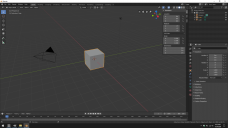
7.  Open Blender. Here you can see pressing 'N' in Blender pulled over the side bar, However no Daz to Blender is visible (side bar under Transform).

*see image Daz-Blender 003*

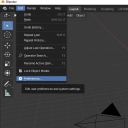
8. Go to Edit/Preferences and click on it.

*see image Daz-Blender 004*

9.  At the top of the Box that opens up click on Install from file.

10. Bring up your Window with the file address that I asked you not to close!

*see image Daz-Blender 005*

11.  Using that address, navigate to the location of the file, highlight it and click Install Add-on from file.

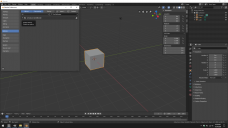
12.  Now click on the little empty box beside 'Armature: Daz to Blender and it should no also show in the Transform window side bar.

*see image Daz-Blender 006*

I hope that helps everyone, I believe I have hit all the major points.

Sorry if it is a little rudimentary.  

 

docx
docx
Daz to Blender.docx
2M
Daz-Blender 001.png
874 x 684 - 83K
Daz-Blender 002.png
991 x 608 - 47K
Daz-Blender 003.png
1920 x 1080 - 1M
Daz-Blender 004.png
484 x 484 - 140K
Daz-Blender 005.png
1920 x 1080 - 536K
Daz-Blender 006.png
1920 x 1080 - 863K
Post edited by Ebonite on July 2020

Comments

  • 3Diva3Diva Posts: 11,970
    August 2020

    This has been a HUGE help! Thank you, Ebonite ! :D

Sign In or Register to comment.
Adding to Cart…

Daz 3D is part of Tafi

Connect

DAZ Productions, Inc.
7533 S Center View Ct #4664
West Jordan, UT 84084

HELP

Contact Us

Tutorials

Help Center

Sell Your 3D Content

Affiliate Program

Documentation Center

Open Source

Consent Preferences

JOIN DAZ

Memberships

Blog

About Us

Press

Careers

Bridges

Community

In the Studio

Gallery

Forum

DAZ STORE

Shop

Freebies

Published Artists

Licensing Agreement | Terms of Service | Privacy Policy | EULA

© 2025 Daz Productions Inc. All Rights Reserved.