Depth of Field and Denoising at the same time
 nicstt
Posts: 11,715
nicstt
Posts: 11,715
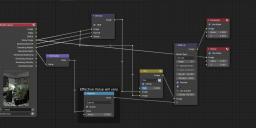
I've set up Blender to start up with the compositor set as it is, 3rd image.
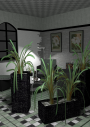
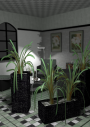
When I render it automatically processes the first image (unprocessed, which doesn't have much noise; not always the case) with depth of field (if set up for the camera) and denoise - again if set up.
If anyone is interested I can detail the steps.
The vignette is Mini Haven Interior Vignette, which I really like; the lamp has a cable and the leaves are modelled, which made it easy to add depth to them.
This is a manual transfer I did yesterday; it took some time to do as I was creating the materials from scratch, but looks good imo.
The render took 2m 30s.

Daz 3D is part of 
Connect
DAZ Productions, Inc.
7533 S Center View Ct #4664
West Jordan, UT 84084
Licensing Agreement | Terms of Service | Privacy Policy | EULA
© 2026 Daz Productions Inc. All Rights Reserved.
Comments
Looks good! I'm still learning to use the denoiser.
this is one of my absolute favorite things to use blender for! I even do my defocusing the mathy way. I use math the math node to create log10((z-n)^2/2+1)*2 where z is the z depth and n is the specific distance you want in focus (the equation stared out with the far simpler abs(z-n) but then I added in other stuff to smooth the transition) Its actually much less scary looking in blender
(the easy way to find the right value to subtract for what you want in focus: make sure your z or normalized z is plugged in to the viewer node > in the image editor tab select the viewer node > right click the point you want in focus > a bar will pop up in the bottom of the tab, giving you, amongst other things the exact z value at that location, which is the value you want to subtract so that location is completely in focus)
on the other hand I love normalizing depth + the ramp node as a mask for partially denoising images. if I decide I want to render something with real dof (sometimes it is called for) the out of focus areas take way longer clear up when rendering. But of couse being out of focus its not like you're worried about losing detail there so you just quickly isolate the in focus areas with the details you need preserved and then denoise the bajesus out of the rest of it
I love it being in the compositor; i don't render, I just change some settings.
And yeh, I use the mix node to combine noisy and and denoised. I rarely change it from .3