Character Converter Isn't Working
 Fauvist
Posts: 2,291
Fauvist
Posts: 2,291
https://www.daz3d.com/character-converter-from-genesis-3-female-to-genesis-8-female
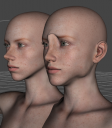
I've read the .pdf instructions. I've tried 3 times to convert the Genesis 3 character named Anhaem by Brahann to a Genesis 8 female figure. This is the result I get each time. The one on the right is obviously the converted version of the one on the left. And this isn't just some small inaccuracy. It's suppose to be extremely simple to use. Does anyone know what the problem is?

Daz 3D is part of 
Connect
DAZ Productions, Inc.
7533 S Center View Ct #4664
West Jordan, UT 84084
Licensing Agreement | Terms of Service | Privacy Policy | EULA
© 2026 Daz Productions Inc. All Rights Reserved.
Comments
I started a new scene and tried the 2nd method of converting a G3 character to a G8 figure, by having the G3 character loaded in the scene, and a blank G8Female figure loaded in the scene. Seemingly a completely different way of converting. But the result was the same. A mangled deformed G8 figure.
I spent 3 hours trying to get GenerationX2 to work, to no avail, and now I've spent 2 hours trying to get this converter to work. I'm getting pretty frustrated. It worked on this G3 character Britney or Brittney or whatever her name is, but unfortunately this isn't the character I want converted.
That is definitely a strange result. When you tried to convert the second time, had you deleted the morphs? The converted morphs are in data/DAZ 3D/Genesis 8/Female/Morphs under the FIRST directory for Daz Studio Formats specified in the Content Directory Manager (F2->"Content" tab->"Content Directory Manager..." button). If you don't delete them, you won't get a different result. After that, I would try pushing the tolerance way down (0.0005 or so).
BTW, I rarely check this forum. It is better if you post in the specific product's thread in the commercial forum. For this one, it is https://www.daz3d.com/forums/discussion/340346/released-character-converter-from-genesis-3-female-to-genesis-8-female-now-conv-jcms-commercial
I appreciate you trying to help. I didn't delete the first atttempt at conversion, so those files are still somewhere.
I attached a screenshot of the Content Directory Manager. I don't know what "first" directory means, or where it is. I almost never look at files or where they are, so I'm REALLY inexperienced at finding files.
Anyway, I started a new scene and loaded the character Anhaem for G3Female by Brahann again, and realized that it loads oddly, in that it loads with the Y Rotate set at 111.13, so that the figure is almost completely turned at a 90 degree angle, which isn't, because when you open the scene you get the Perspective View, which is slightly rotated. Which must be how Brahann saved the character and packaged it for distribution. I'll attach a a screenshot. That's probably why the conversion is all screwed up.
I see you have nested content folders, which will certainly screw things up. You should not have "My Daz 3D Library/Runtime" as a content folder. If your Poser format content folders are set that way also, you should change it there also. Anything you've installed to the 3rd folder needs to be fixed. If you use DIM, your best option is to uninstall them and reinstall them to the first destination; if you install manually, you'll need to move the nested folders up, except for the ones that are supposed to be there.
Normally DIM installs to "My Daz 3D Library", and sets that as the second content folder. The default for the first folder is "My Library". That way anything you create (or create with converters like this) won't overwrite or get overwritten by content from the Daz 3D store.
Are you saying the conversion problem with that one character is because I have an extra folder?
I have thousands of products in those folders, and a third of them are not from DAZ, so DIM isn't going to install them anywhere. I realize it is unconventional, and I realize some content isn't where it is supposed to be, but I know which wrong place that it is, so I don't have a problem with it. It's been like that for years. I've bought over a thousand pieces of content in just the last year. and I don't have the psychological energy to rearrange 5000 files.
As @Fixmypcmike states, you have an unusual organization I can understand not wanting to change. But for conversion, may I suggest adding a directory in front (above) of /Volumes/3D CONTENT 2TB 31 October 2014/My DAZ 3D Library? It *probably* won't make a difference but better safe than sorry.
That would definitely cause conversion problems! You need to resave it or use the custom scene conversion (after you delete the old ones)
I have some trouble with the convert thene character from G3F to G8F.....
some characters work, but for the most characters I get a strange displacement of the head.......
Any Idea what could help?
Thank you!