Help making hair parts invisible
 CMacks
Posts: 202
CMacks
Posts: 202
in The Commons
I'm trying to use a couple of different hair models together. I want to keep the bangs (fringe) visible from one, but hide all the other surfaces including the cap. When I use "cutout opacity" set to zero for the surfaces I want to hide, it looks ok in the preview, but not in Iray. See attached. Any ideas?
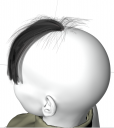
iray1.png
1358 x 1526 - 428K
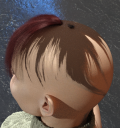
iray2.png
1340 x 1434 - 1M

Daz 3D is part of 
Connect
DAZ Productions, Inc.
7533 S Center View Ct #4664
West Jordan, UT 84084
Licensing Agreement | Terms of Service | Privacy Policy | EULA
© 2026 Daz Productions Inc. All Rights Reserved.
Comments
I would suggest using the geometry editor to either hide (which I'm not sure persists on scene reload) or delete the offending surfaces.
Cutout opacity as a way of hiding surfaces can cause visual bugs in Iray, so it's not a great way to hide things.
Thanks for the comment. Any instructions or tips on using the geometry editor would be appreciated as I've never tried it.
How to Create Multiple Surface Zones in Daz Studio
Thanks. I have gotten it to work. What format do I save the modified hair file as? I don't want to overwrite the original hair model.
Save a Wearable preset - but note that if you load the original hair into the scene you will get only ne version, as DS is internally modifying the base asset (and embedding that in the preset, or in a scene file). You can use File>Save As>Support Assets>Figure/Prop Asset but then you won't get the benefit of any updates or new morphs for the base item.
When I tried saving as a Figure/Prop Asset, I got a (rare) crash of DS.
Which version of DS (Help>About Daz Studio)? At which point does it crash?
DS 4.12 for Mac. It asks me to provide a name for the file, and when I type it in and hit enter DS crashes. I'm trying this with a scene that only has the hair model I'm modifying, but I got the same thing when there was g8f as well.
How about saving as a scene asset? Will that suffice?
So you don't get the options dialogue at all? If you are using Catalina it may be related to the file dialgue issue, you might try the DS Public Build (4.12.1.75) https://www.daz3d.com/daz-studio-beta
Not using Catalina, still Mojave. Even simpler: I open a new scene, create a primitive (sphere) select it, then save as Figure/Prop asset. I get the Mac finder popup so I can point to the folder and give a name, and when I hit enter DS crashes...
Have you tried using different folders?