Electric Guitar Collection Bundle for Genesis 8 and Genesis 3
 KeithH
Posts: 338
KeithH
Posts: 338
in The Commons
Does anyone have experience with the Electric Guitar Collection Bundle for Genesis 8 and Genesis 3?
Would love to have a tutorial on how to pose the cords. This part is killing me. In my attached photos, you can see the guitar cords are non-existant because I cannot pose them correctly.
https://www.daz3d.com/electric-guitar-collection-bundle-for-genesis-8-and-genesis-3
Thanks
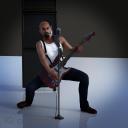
Char_G3M_Guitar_01_insta.jpg
1080 x 1080 - 386K
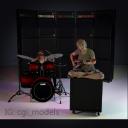
Char_Heidi_01_RealHuman_Fun_02_insta.jpg
1080 x 1080 - 446K

Daz 3D is part of 
Connect
DAZ Productions, Inc.
7533 S Center View Ct #4664
West Jordan, UT 84084
Licensing Agreement | Terms of Service | Privacy Policy | EULA
© 2026 Daz Productions Inc. All Rights Reserved.
Comments
The hand poses that come with Stellacaster might help. You may still need to do some wrist fiddling to get them to work with your other poses. Hands are pretty much the same between G3 and G8, so that shouldn't be an issue.
By "guitar cords" are you meaning "cables" or "chords" (finger positioning)?
I haven't found a decent way to do it, either. I usually just load it up and hide everything but the actual plugs then pretend it's bluetooth lol.
If you mean finger positioning, there are tons of photos of guitar players on the net. I usually use them as model to pose my character hands and fingers. It's easier than you might think.
If you mean cable, I build myself a guitar transmitter with a jack plug and a cube.
Hi there... I love him with the beard and the smoke!
For the tutorial there's a set of videos that cover the posing of the strap and some of the cords on each page. The cords are fully rigged, so you can select certain sections and tweak to infinity to get them exactly where you need to go, using the dials on the cords, or (my favorite) just doing it manually. If you need more, I can try to do a cord-specific video for you as it takes a bit to write this all out. For reference, in the videos on the product page the sections are at about 5 min and 40 min.
For now, the order of posing goes like this:
1. Load person & clothes, etc.
2. Choose a pose (our wearable poses load everything - guitar, pick, strap) or make your own. Position the person in your scene if needed.
IMPORTANT: If you are making your own pose or starting from the base load poses included (meaning the simple A & T poses in the main guitar folder) LOAD THE CORD BEFORE POSING (#3) so you don't have to worry about it following you. Once it's loaded, it will stay in parented place until you are ready to pose it.
If you forget, as long as your pose for the guitar is done with no translations on the bone, the cord will load correctly. Don't move the guitar itself using the bones by just clicking on it and going. I know it's tempting! Make sure you position using the main object. All translations/rotations on the bone should be 0, or the cord will not snap into place. Once loaded, if needed, you can turn the cord off in the scene table while you finish posing the person/guitar and turn it back on when you are ready to pose the cord so you can see it.
3. TO LOAD THE CORD: Click the guitar itself and load the cord specific to that guitar. There's one for each. These are the last 3 options at the BOTTOM of the main guitar folder. If you are using one of our wearable poses, you can do this at any point, as long as you have not changed anything on the guitar translations. You can move the whole person around the scene, turn them etc, just don't move the actual guitar in relation to the person. It loads parented, so this shouldn't happen anyway, The guitar will move with the person.
4. Pose Cord from there.
TO POSE THE CORD:
Find the cord in the scene tab. It will be parented to the guitar, which is parented usually to the abdomen lower or upper. Choose the cord, right click and expand from selected so you can see all the bits.
Select one or more bits to pose at one time. Cable Start & Cable End don't move as they are the metal parts. Start with Cable 1.
Cable 1 - Cable 3 probably has to move sort of sharply to drop down to the floor. Select that group together using your shift key, both in the scene tab and in the posing tab. If you forget the posing tab, it will only move the first thing you selected and it will be a very sharp kink looking bend, so make sure you get the corresponding ones in the posing tab. Bend/twist/side-side that section to get you going. You can use twist only on a single bit to turn the whole bottom of the cord whichever direction you need because it just spins things in place on the Y axis.
Once you decide how far you need to go to hit the ground, select a larger section down there, probably 5-7 bits at a time. Make sure to select in the posing tab as well. Now use bend to give it a gentle curve to hit the ground. If it's not quite on the ground, you can go back and select a few bits in between and extend on the Y axis to get the length exactly right to touch the ground.
Here you want to zoom in and make sure the part on the floor is perfectly straight and even with the floor. Tweak individual bits until you are happy.
Once you have it flat, use the same technique of selecting groups of cable to make some nice S curves or whatever you want, usually using side-side. To get the cord to turn upwards and plug into something, go through the same steps, using larger groups for gentle curves up and smaller groups for tighter curves (to bend the Cable End into position).
All of this can also be done using the dials in the parameter tab if you have both the main Guitar Cable selected in both the Scene Tab and the Paramater Tab, but it's actually fairly easy and faster doing it manually once you get the hang of it.
Hope that helps!
THANK YOU SO MUCH - If I understand you right, I can select many sections of the cord at a time and move the cords?
Many items like the microphone the cord drops through the floor by default.
Will the cables and straps function correctly if the guitars are scaled to their proper sizes? The Flying V and Explorer are not scaled to the same proportions as the Strat. The distance from the nut to the bridge should be the same on all 3 guitars, but the 2 Gibson designs are shrunk down so that the over-all sizes are roughly equal. I decided not to purchase this because of this inaccuracy of scale and the possible problems inherent in correcting it and the effects upon the cables and other peripherals.
Hi Keith...yes you can.
The main microphone loads with the cord going straight down in neutral position so you can start from a "straight" base if you like. However, there are 2 presets in the microphone folder that load the prop with a positioned cord for you already done.
One has the cord wrapped around the base and the other one lets it fall fairly straight to the floor and then bend out with a nice curled section on the floor. If you start with either of those, you should be able to adjust to your liking as you don't have to pose the top part, only the lower portion on the floor to place the end where you like (extending length if needed).
If one of those are not going the right direction to start, you can always select one of the bones at the top and use just "twist" to spin it in the direct you'd like first. I'd use the first one to do that, the one closest to the microphone head.
In addition, there's a preset which loads the speaker stack AND the microphone with the cord already attached. If you need longer length on that because you want the speaker stack farther away, just extend the length on some of the straight portions on the floor.
Also, you could use the Houndog pose to preload the microphone and possibly modify from there.
On adjusting guitar size, you should have no problem if loading the cord first, as I went over above and adjusting the size accordingly if you like. I would start by loading the set up of your choice (pose, wearable, etc) and just adjusting the hand poses slightly once you decide on a size. The strap can be adjusted accordingly, if you need. I would size the guitar only first, then adjust the strap from the top strap pin first, and the rest might be fairly minimal, working from an existing pose, to get what you feel is right for you. Saving a your own preset that way could be a good idea as well.
Thanks for the info!
You're welcome :)
I purchased the Guitar Set.
Great! Hope you enjoy it...love to see a render :)