Terradome 3 for 3delight render Iray to 3delight convert
 Galaxy
Posts: 562
Galaxy
Posts: 562
Terradome 1 and 2 I own but I can't load. Terradome 3 is Iray only and thus I avoided it till today morning.
The best part is it is working fine with 3delight.
Is there anyway I can directly optimize those default materials for 3delight?
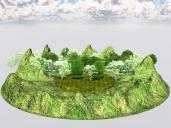
Terradome 3 and Forests Trees and Grass world building set 001.jpg
960 x 720 - 134K
Post edited by Galaxy on

Daz 3D is part of 
Connect
DAZ Productions, Inc.
7533 S Center View Ct #4664
West Jordan, UT 84084
Licensing Agreement | Terms of Service | Privacy Policy | EULA
© 2026 Daz Productions Inc. All Rights Reserved.
Comments
Terradome 1 and 2 are for Poser.
The default textures are only for 3dl and will not convert to Iray. you would need to build your own 3dl shaders, or be find some 3dl shader presets that give results you are happy with.
Thanks, I will use default materials for Iray rendering. But I am happy finally this product is working for. me.
This is a free shader I did for 3DL which allows a 'two layer' Normal based effects.
There's no direct conversion, so you'd have to painstakingly copy over maps and tweak them... but it's something. (And free)
https://sharecg.com/v/89313/gallery/7/Material-and-Shader/Willbear-3DL-Terrain-Shader
Using Willbear 3DL Terrain Shader. Viewport Zone A and Zone B color is red only.
Tree is from Jacksons field, Iray shader but rendering fine with 3delight.
You really wouldn't want to use IRay shaders for optimum performance in 3Delight. Jackson's Field comes with 3DL material presets, so simply a matter of doubleclicking;)
I usually select 3Delight shaders for 3Delight renders.
This time using Metal Abounds Iray Shaders https://www.daz3d.com/metal-abounds-iray-shaders . This Iray shaders looks like working fine with 3delight though probably 3delight shaders will give better performance . This type of shaders also supports viewport texture shading.
There is another kind of shaders those shaders are viewport unfriendly or blind shaders. What kind of shaders are they?