DAZ DIM Installs to Default instead of Directed Directory
 tomsfo1
Posts: 87
tomsfo1
Posts: 87
Installing DAZ 4.10 in a new computer. My C: is a solid state that I want to keep clean, using my D: for programs and content.
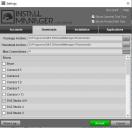
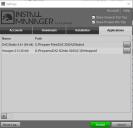
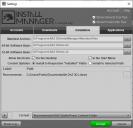
In DIM I changed configuration settings for Download, Installation and Applications. See attached screen clips.
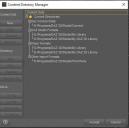
I also changed the location in Content Directory Manager. See screen clip.
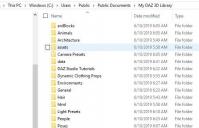
During content installation it installed to default C:\Users\Public\Documents\My DAZ 3D Library instead of my D: drive.
I believe DIM/Gear/Applications was blank when I started the content installation.
My question is: Can I simply move to files to D:?
Thanks for your time.
Tom

Daz 3D is part of 
Connect
DAZ Productions, Inc.
7533 S Center View Ct #4664
West Jordan, UT 84084
Licensing Agreement | Terms of Service | Privacy Policy | EULA
© 2026 Daz Productions Inc. All Rights Reserved.
Comments
Ypur content path is still the recommended C:/Users/Public/Documments/My Daz 3D Library/ - you need to add a new path (+ button) and set DIM to use that (Current, at the bottom of the Installation tab). Also, it looks as if you installed DS to C: before you chnaged the paths for software - uninstall and reinstall (with DS closed) if you want to change that.
Thanks for a prompt response. I'll give it a try a little later.
Hace a good day.
Thanks again Richard. Looks like I got it the way I want it now. I appreciate your time in responding.
Tom